You're probably staring at a planning doc that already feels too small for the event you're trying to run. The venue has questions. The A/V vendor wants final specs. Someone from marketing just promised a VIP experience that nobody has operationalized. Registration is open, but nobody has settled check-in logic, zone access, or who owns the dock schedule. That's where event logistics planning stops being a checklist and becomes the thing that decides whether the event feels calm or chaotic.
The hard truth is simple. Attendees don't experience your planning effort. They experience lines, signage, sound, timing, staff confidence, room turns, and whether the right people get into the right place at the right moment. Good logistics makes an event feel easy. Bad logistics leaks into everything, from budget overruns to speaker frustration to the first impression at the door.
What follows is the playbook I'd hand a junior planner before letting them run a serious conference, festival zone, graduation, or multi-session corporate event. It keeps the focus on execution, but it also addresses a gap most guides miss. You don't need to buy an expensive enterprise stack to build disciplined, scalable workflows. If your team already lives in Google Workspace, you can build a surprisingly strong operational system there, provided you design the process properly.
Table of Contents
- The Master Plan Building Your Logistics Timeline and Team
- Sourcing Your Stage Venue Vendor and Equipment Logistics
- Managing Flow Attendee Ticketing and Check-in Workflows
- Coordinating Movement Transport Load-In and Security
- Executing Day-Of On-Site Operations and Contingency Plans
- Closing the Loop Post-Event Wrap-Up and Performance Metrics
The Master Plan Building Your Logistics Timeline and Team
A real logistics timeline is the event's central nervous system. If it's vague, every department fills in the blanks differently. If it's detailed and shared, the team can make fast decisions without tripping over one another.
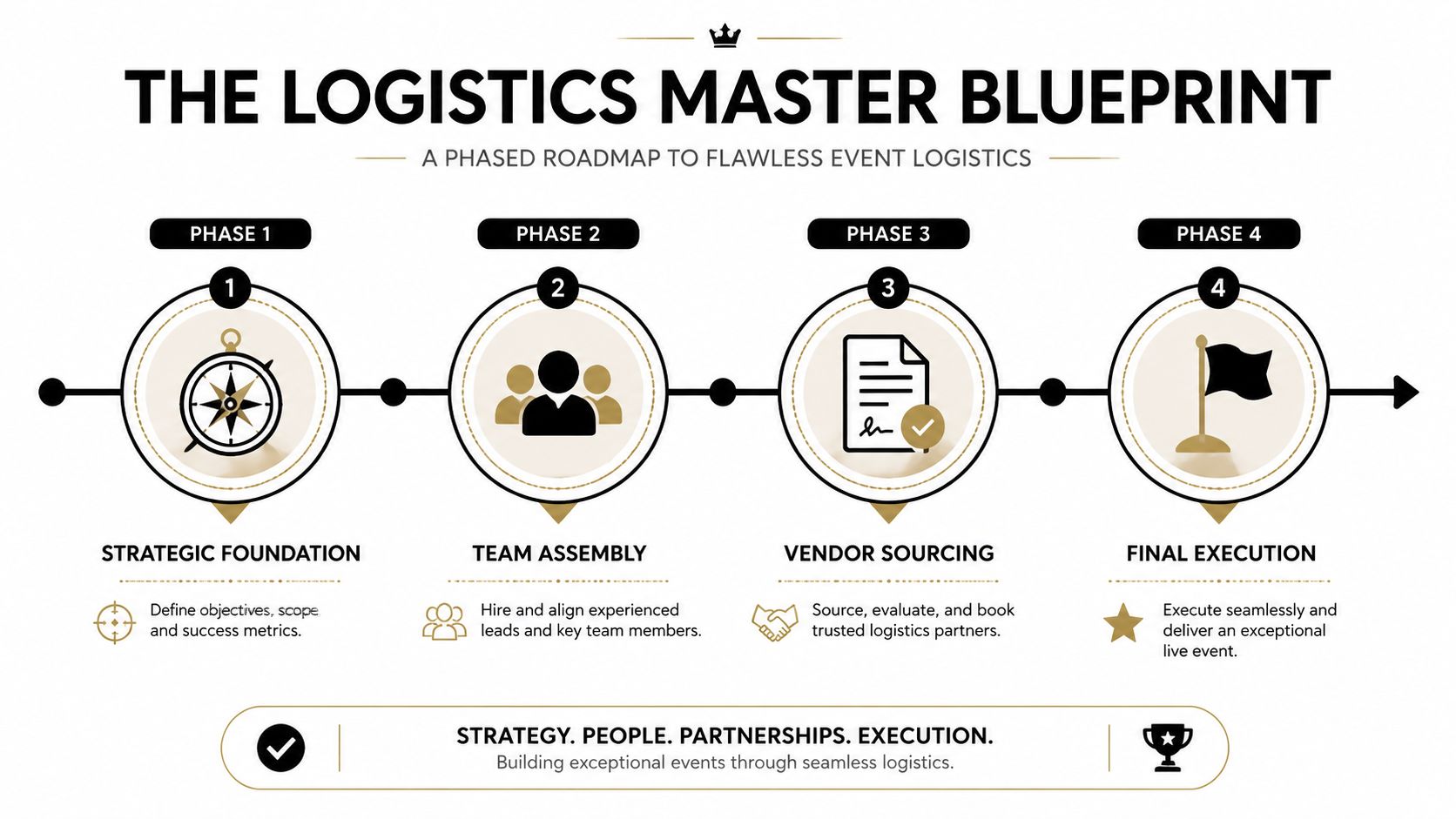
A phased approach works because logistics problems don't appear all at once. They surface in layers. Early planning governs vendor availability, venue suitability, and budget exposure. Mid-stage planning locks in dependencies. Final-stage planning protects execution. According to Naboo's event logistics planning benchmarks, success rates improve by up to 40% when planning begins 6 to 18 months in advance, and events with detailed timelines achieve 95% on-time execution versus 70% for ad-hoc plans.
Build the timeline backward from show day
Start at doors open, not at kickoff. Work backward through every dependency that must be true for guests to have a smooth experience. That means registration rules are finalized before ticket distribution. Signage files are approved before print deadlines. Rigging approvals are in before load-in windows. Catering counts are frozen before procurement.
In practice, I structure the master sheet around phases rather than departments. Departments matter, but phases reveal risk sooner.
- Foundation phase: Confirm event goals, working budget, venue shortlist, production scope, and who has approval authority.
- Commitment phase: Lock venue, major vendors, headline technical needs, insurance requirements, and transport assumptions.
- Build phase: Finalize floorplans, staffing plan, ticketing logic, attendee communications, room sets, access levels, and run-of-show drafts.
- Execution phase: Issue final schedules, conduct walk-throughs, verify deliveries, test tech, and confirm escalation contacts.
Practical rule: If a task has no date, owner, dependency, and approval path, it isn't planned. It's just discussed.
Google Sheets works well here because of its widespread familiarity. One tab can hold milestone dates. Another can track vendor contacts and contract status. Another can act as a simple RACI chart. You don't need a fancy interface if the sheet is structured cleanly and updated daily.
For outdoor builds, temporary structures, or weather-sensitive layouts, it also helps to review specialist guidance early. Teams handling marquee rental logistics for large festivals tend to think more rigorously about surface conditions, access routes, and build sequence than planners who only look at guest-facing aesthetics.
Assign ownership before tasks start moving
Weak ownership causes most preventable failures. Not because people are lazy, but because everyone assumes someone else has it covered. Avoid job-title thinking and assign functional ownership instead.
Here's the minimum ownership map I expect on any serious event:
| Function | Owner's real responsibility |
|---|---|
| Budget control | Approves spend changes and tracks exposure against scope |
| Vendor coordination | Handles communication, confirms deliverables, manages deadlines |
| Attendee experience | Owns registration, wayfinding, queues, seating, and front-of-house clarity |
| Technical delivery | Owns A/V, internet, power, testing, backups |
| Venue operations | Owns access windows, dock use, room turns, venue compliance |
| Safety and security | Owns credentials, access restrictions, incident escalation |
A simple RACI in a shared sheet keeps this honest. One person is responsible. A smaller set is accountable or consulted. Everyone else is informed. The point isn't bureaucracy. The point is preventing confusion when the timeline tightens.
Assign ownership before tasks start moving
One more rule matters. Keep your planning system close to where your team already works. If your planners live in Google Drive, Docs, Sheets, and Calendar, build around that. Adoption matters more than theoretical feature depth.
The best logistics system is the one your team updates without being chased.
That discipline is what turns a timeline from paperwork into control.
Sourcing Your Stage Venue Vendor and Equipment Logistics
A 500-person corporate conference can look straightforward on paper. General session, breakout rooms, coffee, branding, check-in, maybe a sponsor area. Then you walk the site and realize the loading dock is shared, storage is tiny, the ballroom power layout is awkward, and the venue's “available AV” package doesn't match the program.
That's why venue sourcing has to start with logistics, not mood board language.
Choose the venue like an operator
When I assess a venue, I'm asking operational questions first. Can trucks reach the dock without conflict? Is there enough marshalling space for staggered vendor arrivals? How far is the path from dock to ballroom? Are there rigging restrictions? Where will spare furniture live during room transitions? What happens if it rains during load-in?
For a conference of this size, a venue can lose on logistics even if it wins on appearance. Beautiful foyers don't help if registration backs into the main circulation path. A grand ballroom doesn't help if ceiling limitations block your stage design. Fast site visits matter, but slow note-taking matters more.
Use a vendor-facing venue checklist during the walk:
- Access reality: Ask for dock rules, delivery hours, freight elevator access, and whether the venue allows early equipment receipt.
- Power and connectivity: Confirm outlet locations, dedicated circuits, house internet policy, and who supports failures on event day.
- Storage and turnover: Identify holding areas for cases, collateral, signage, and room reset items.
- Attendee movement: Trace arrivals from curb to registration to session rooms to restrooms to catering points.
A venue should be easy to operate, not just easy to sell internally.
Treat vendors as part of the operating system
The fastest way to lose control is to manage vendors in separate email threads with no common document. Every event needs a central vendor register. Mine usually includes company name, lead contact, mobile number, contract status, insurance status, load-in window, load-out window, space needs, power needs, and dependencies.
Think about the conference example. The stage set vendor can't install until carpet protection is down and house tables are cleared. The A/V team needs final room layout before cable runs are fixed. Catering needs exact refresh points so they don't block sponsor visibility or emergency access. Printing needs final branded files after legal approval, not before.
Red flags show up early if you know where to look:
- Slow contract replies: Often a sign that execution will be loose too.
- Vague setup assumptions: “We'll sort it on site” usually means they haven't staffed properly.
- Incomplete technical requests: If the A/V partner can't specify power, staging, and cable path needs cleanly, expect day-of improvisation.
- No named lead on event day: Never accept a vendor team with no single decision-maker on site.
Contract details that save you later
A vendor agreement is a logistics tool, not just a legal document. It should protect timing, handoffs, and operational standards, not only payment terms.
Check this language before signing: cancellation terms, insurance requirements, setup and strike windows, responsibility for damaged goods, overtime rules, substitute equipment policy, venue compliance obligations, and named on-site lead contacts.
I also like to force one practical step before final confirmation. Put all critical vendors in the same communication rhythm. That can be a standing call, a shared Google Sheet, or both. What matters is that suppliers stop behaving like separate contractors and start acting like one delivery team.
Equipment logistics deserves the same discipline. Don't just list “projector,” “lectern,” and “radios.” Track where each item comes from, who signs for it, when it arrives, where it's stored, and whether it's mission critical. If a replacement would be difficult, flag it early and build a backup path.
A strong venue and vendor plan doesn't make the event glamorous. It makes it dependable. That's worth more.
Managing Flow Attendee Ticketing and Check-in Workflows
Guests judge your operation before they hear the first speaker. They judge it at arrival. If the line is confusing, if a VIP gets sent to the wrong desk, if staff can't verify a registration, the event starts in deficit.
That's why attendee flow has to be designed as one connected system. Registration data, ticket format, check-in method, access permissions, staffing, and signage all belong to the same workflow.

Start with the attendee record
Most check-in problems begin upstream. Teams collect too little data, too much irrelevant data, or data in a format no one can use on site. Keep the registration record practical. Capture what operations needs to make fast decisions at the door and inside the venue.
That usually means attendee name, organization, contact details, ticket type, day access, session permissions, dietary notes if relevant, badge name, and any special handling flags such as speaker, sponsor, VIP, media, or staff. If the event includes zones or multiple days, build those fields into the source data from the start instead of trying to patch them later.
A simple spreadsheet can handle this well if it's structured. One row per attendee. One field per operational decision. Clean naming rules. No free-form chaos. If you need a planning model, this event registration template for organizing attendee data is the kind of starting point that keeps front-of-house and reporting aligned.
Design arrival as a flow not a desk
Many planners still think in terms of a registration table. That's too narrow. Arrival is a movement pattern. Guests need directional certainty, fast validation, problem resolution, and a clear next step.
Map the arrival journey in order:
- Approach: Parking, drop-off, exterior signage, and queue split.
- Pre-check: “Have your QR code ready” signage and staff triage before the scanner line.
- Validation: Scan, confirm, admit, or reroute.
- Exception handling: Separate desk for spelling issues, unpaid registrations, guest substitutions, or badge reprints.
- Orientation: Move guests toward the next action, not back into uncertainty.
Modern ticketing proves essential. According to Eventcombo's hybrid and multi-zone event logistics guidance, 65% of corporate and educational events now face hybrid or complex permission challenges that many event logistics guides barely address. The same source notes that low-code native tools like Google Workspace integrations can cut costs by 70% and reduce setup from days to hours. That matters because access control isn't a luxury feature anymore. It's basic operational hygiene.
If your check-in process can't tell the difference between main event access, breakout access, and VIP lounge access, it isn't finished.
Handle zones sessions and hybrid access cleanly
Multi-zone events break weak systems fast. A general admission attendee enters a sponsor lunch. A day-two guest turns up on day one. A student has access to the ceremony but not the reception. A speaker's assistant needs backstage without having all-access credentials. These aren't edge cases. They're normal operations.
The old workaround was wristbands, manual lists, and a lot of radio traffic. That still works in small, simple setups. It falls apart when attendance is larger, sessions overlap, or teams need live updates.
A better approach is to tie permissions directly to the attendee record and validate against that record wherever access matters. Google Workspace is useful here because planners can maintain the source of truth in a familiar place, while staff work from controlled outputs such as QR tickets, filtered lists, and mobile scanners. The key is consistency. One ruleset. One attendee record. One version of access logic.
Here's what works well in practice:
- Single source data: Keep attendee status and permissions in one maintained sheet.
- Separate exception lane: Don't let check-in staff solve billing or registration disputes in the main queue.
- Offline resilience: If venue Wi-Fi drops, your process still needs to admit the right people.
- Zone clarity: Staff at each access point should know exactly what valid entry looks like.
A smooth arrival doesn't just save time. It tells attendees they're in competent hands. That confidence carries into every room they enter after that.
Coordinating Movement Transport Load-In and Security
Transport rarely gets praise when it works. It gets blamed immediately when it doesn't. A late truck, a blocked dock, a shuttle bottleneck, or a badly placed ride-share point can throw stress across the entire day.
This isn't a side task. In the event logistics market, North America held a 38.1% revenue share in 2023, and Grand View Research's event logistics market report notes that transport represents 34.2% of the service share there. That tells you how much budget and risk sits inside movement planning.
Control transport before transport controls you
Start by separating three flows that inexperienced teams often lump together: freight, staff, and attendees. They move differently, arrive at different times, and create different consequences when delayed.
For freight, build a shipment manifest and confirm delivery windows against venue rules. For staff, define arrival times by function so your check-in crew isn't competing with staging labor at the same access point. For attendees, make arrival choices explicit. Parking, shuttle boarding, drop-off, and accessible entry need to be mapped and communicated clearly.
A few planning habits reduce pain fast:
- Freight first: Confirm where equipment can wait if it arrives before your access window.
- Attendee communication: Send transport instructions that match real on-site conditions, not a generic map pin.
- Driver coordination: Give vendors named contacts, dock rules, and unloading sequence before event week.
- Asset visibility: If you're moving multiple item types between storage, dock, and rooms, use a system for tracking event inventory and assets with QR codes so cases, kits, and rentals don't disappear into the building.
Build a dock schedule that vendors can actually follow
The best load-in schedules are specific enough to run and simple enough to read on a phone. Don't write a heroic spreadsheet that no crew chief can use under pressure.
I like a dock schedule with these fields:
| Time window | Vendor | Vehicle or shipment | Dock or entry point | Contact | Next dependency |
|---|---|---|---|---|---|
| Early window | Staging | Set pieces and truss | Main dock | On-site lead | Floor protection complete |
| Next window | A/V | Audio and video racks | Freight entrance | Tech lead | Stage footprint marked |
| Mid window | Furniture | Lounge and registration | Side dock | Floor manager | Sponsor area cleared |
| Final window | Catering | Service ware and back-of-house | Kitchen access | Catering lead | Prep room unlocked |
Leave buffer between arrivals. If every supplier is booked for the same hour, the schedule isn't a schedule. It's a wish.
Dock congestion is usually a planning failure, not a venue failure.
Security is a flow problem as much as a safety problem
Security teams often get pulled in too late, after planners have already designed guest flow. That's backward. Access control affects lines, routes, staffing, and guest sentiment.
Give security a map that shows credential types, restricted areas, public circulation, emergency routes, and sensitive storage. Define radio channels and who can escalate what. Staff should know where to send a confused guest, where to hold a delivery, and how to challenge someone politely when their credential doesn't match the zone.
For events with backstage, VIP, speaker, media, or student-only areas, security needs the same operational clarity your registration team has. The smoother that handoff is, the less front-of-house friction you create.
Executing Day-Of On-Site Operations and Contingency Plans
A lot of teams still carry an unspoken belief that if the prep was solid, the day will somehow take care of itself. It won't. Event day rewards teams that rehearse, communicate clearly, and react from pre-agreed playbooks instead of improvising under pressure.
According to Engineerica's guidance on event logistics execution, effective on-site logistics can cut operational delays by 50%. The same source says 55% of day-of hitches are caused by a lack of rehearsals, 37% of events experience tech fails, and recommends a staff-to-attendee ratio of 1:50 plus full walk-throughs.
Run a command center not a group chat
Day-of control starts with one operating model. Someone needs final authority. Someone needs to own the run-of-show. Someone needs to monitor guest flow. Someone needs to handle vendor movement. If all of that sits in one busy messaging thread, you'll miss decisions and duplicate effort.
Your command center can be a production office, a back room, or a clearly defined desk in staff-only space. What matters is that it has the latest schedule, radio list, venue map, supplier contacts, escalation paths, and issue log.
A useful run-of-show includes:
- Time cue: What happens and when.
- Owner: Who calls it.
- Location: Where it affects operations.
- Dependency: What must already be complete.
- Failure response: What happens if the cue slips.
Keep the language plain. “Speaker escort to holding room” is better than “talent transition.” Write for tired humans under time pressure.
Rehearse what can fail
Teams often rehearse the happy path and ignore the ugly one. That's backwards. The happy path rarely needs rehearsal. The problem scenarios do.
Walk the venue with A/V, catering, security, registration, and venue operations together. Check scanner positions, queue routes, green room access, mic handoff timing, room flip sequence, and overflow logic. If your event includes cameras or temporary surveillance, make sure the responsible staff can access and verify those systems. For teams using Dahua hardware, a technical reference like Dahua camera model passwords and setup can save time during pre-event verification, especially when temporary monitoring points are part of the plan.
For access-sensitive events, define the line between guest validation and security enforcement. If you're using QR code ticketing with event access control rules, the operational win comes from making those permissions clear before doors open, not arguing about them after a scanner rejects someone.
Here's a simple rehearsal checklist:
- Arrival test: Run several real check-ins, including invalid or duplicate entries.
- Tech failure drill: Simulate internet loss, audio dropout, and projector failure.
- Speaker movement: Rehearse how talent gets from arrival to stage without confusion.
- Emergency lane: Confirm who clears paths and who communicates with attendees.
Rehearsal isn't a luxury for polished teams. It's how polished teams are made.
A useful field example sits below. Watch how the strongest event operations leaders move from broad oversight to small interventions without losing the full picture.
Mini playbooks for common day-of failures
When the keynote is late, don't start debating options in public. Trigger the holding plan. Extend walk-in music, delay room dark by a few minutes, have the MC reset expectations, and prepare alternate opening remarks if needed.
When power drops in a key room, freeze nonessential movement. Get technical lead, venue engineer, and room manager on the same channel. Keep staff at doors so attendees don't flood in while systems are unstable. Communicate only what you know.
When registration goes offline, switch to your backup admission method immediately. That can be offline scanning, printed lists, or a pre-exported lookup file. The mistake is waiting too long because someone thinks Wi-Fi will return any second.
When crowding builds unexpectedly at one entrance, reassign staff fast. Open a secondary lane if your credential rules allow it. Send one person to the back of the line to give instructions before frustration turns into noise.
The teams that look calm on site aren't lucky. They've decided in advance what calm looks like.
Closing the Loop Post-Event Wrap-Up and Performance Metrics
The event isn't over when the last guest leaves. It isn't over when the keynote video is posted either. It's over when the site is cleared, the data is reviewed, the invoices are reconciled, and leadership gets a report that explains what happened and what should change next time.
That final phase is where event logistics planning proves its value. If you skip it, you lose lessons, miss budget leakage, and go into the next event with opinions instead of evidence.
The event ends after the report not after the applause
Start with controlled load-out. Vendors need timed departures just as much as they needed timed arrivals. Check assets back in, confirm rentals, walk the site with the venue, and document any damage or missing items before memories get fuzzy.
Then close the financial side while operational details are still fresh. Match invoices against contracted scope and on-site changes. Weak approval discipline often becomes evident at this point. Extra labor, overtime, last-minute print work, and transport extensions tend to hide in the margins unless someone reviews them against the original plan.
Your post-event report should answer two questions. What happened operationally, and what should we change before the next event is approved?
Measure what matters to operations and budget
Operational metrics don't need to be flashy. They need to be useful. Review peak arrival windows, no-show patterns, zone traffic, session demand, exception handling volume, and where queues formed. If you used digital check-in data well, this analysis becomes much easier and far more credible.
Sustainability now belongs in that report too, not as a soft add-on but as a performance line. According to Agenda USA's event logistics perspective, 78% of attendees prefer green events. The same source states that digital check-in can slash paper use by 90% and support shuttle optimization that yields 20% to 30% cost savings. Those are the kinds of outcomes that finance teams and sponsors can understand.
A useful wrap-up packet usually includes:
- Operational summary: What worked, where delays occurred, and what caused them.
- Attendance findings: Arrival trends, access patterns, and session-level demand.
- Vendor review: Which partners were proactive, which required chasing, and which created risk.
- Sustainability outcomes: Paper saved, transport efficiencies, and practical next steps.
- Decision log for next time: Changes to venue, staffing, ticketing, access rules, and load-in planning.
If you do this well, the next event starts stronger. The team isn't rebuilding from memory. It's improving from proof.
If you want a practical way to keep event logistics planning inside tools your team already knows, Darkaa is worth a look. It turns Google Sheets and Google Forms into a QR ticketing, check-in, and access-control workflow with offline validation, real-time sync, and support for multi-day, multi-zone events, without forcing your staff onto a new dashboard.