You're probably staring at some version of the same mess most nonprofit teams know too well. One spreadsheet has sponsors. Another has ticket sales. A volunteer is texting last-minute guest changes. Someone printed an outdated check-in list. Finance wants to know whether the event is worth doing again. Leadership wants the room full, the mission visible, and the revenue strong.
That's normal. It's also fixable.
Good nonprofit event management isn't about becoming a full-time event company. It's about building a repeatable operating system that helps your team run galas, auctions, breakfast briefings, school fundraisers, church events, and community gatherings without rebuilding the process from scratch every time. The strongest teams don't just pull off one good night. They create a system that keeps supporter data organized, roles clear, budgets grounded, and follow-up fast.
That matters because events are no longer judged only by what came in at the end of the evening. The field has shifted toward mission-centered, relationship-driven engagement, with teams tracking outcomes like funds raised, new donor count, repeat attendance, and post-event actions as part of the event itself, not as an afterthought, according to TickPick's nonprofit event management guidance.
Table of Contents
- Rethinking Nonprofit Events in 2026
- Defining Your Event Purpose and Objectives
- Building Your Master Plan Timeline and Budget
- Choosing Your Event Technology and Ticketing System
- Managing Volunteers Vendors and Outreach
- Executing a Flawless Day-Of Operation
- Measuring Success and Building a Reusable Playbook
Rethinking Nonprofit Events in 2026
A lot of nonprofit events still run on adrenaline. The team works late, patches holes with volunteer goodwill, and calls it a win if the room felt busy and the auction closed. Then everyone exhales, downloads a few receipts, and moves on until the next event forces the same scramble all over again.
That approach gets expensive fast. It burns out staff, hides weak margins, and makes donor stewardship inconsistent. It also misses what events are good at now. Event industry research projects the global events market will reach $2.5 trillion by 2035, reports that 59% of respondents favor in-person events, and says two-thirds of attendees feel more positively about a brand after interacting with it at an event, according to Eventgroove's event industry statistics. For nonprofits, that points to something bigger than ticket revenue. Events can build trust, belonging, and long-term support.
Nonprofit events work best when the guest experience and the mission experience feel like the same thing.
That changes how you plan. A gala is not just a fundraising night. It may also be a donor cultivation tool. A community fair may be a volunteer pipeline. A school fundraiser may strengthen parent relationships as much as it raises money. Even practical choices like venue layout, registration flow, and entertainment should support the kind of relationship you want people to have with your organization after they leave.
For faith-based organizations and congregational events, operational details matter just as much. If you're coordinating a fellowship night, fundraiser, or holiday program and need production support, church event rentals can be a useful planning reference when you're weighing sound, lighting, and on-site setup expectations.
The shift for 2026 is simple. Stop treating each event as a standalone production. Build a system that turns every event into a cleaner, more mission-aligned next event.
Defining Your Event Purpose and Objectives
The fastest way to waste time in nonprofit event management is to start with logistics. Teams book a venue, brainstorm themes, and debate catering before they've answered the hard question: Why are we doing this event at all?
That question sounds obvious. It usually isn't.
Pick one primary job for the event
Most events produce more than one benefit, but they still need one primary job. If you don't choose it, your team will make conflicting decisions all the way through planning.
A practical way to define purpose is to choose the primary outcome first:
- Fundraising: The event's main role is to generate net revenue for a specific need.
- Cultivation: The room is designed to deepen relationships with donors, prospects, or sponsors.
- Community building: Success looks like strong attendance, participation, and belonging.
- Advocacy or awareness: The event is meant to educate, mobilize, or make the mission visible.
- Volunteer appreciation: The goal is retention, gratitude, and stronger internal culture.
Once the primary job is clear, the rest gets easier. Ticket price, program length, sponsorship structure, speaker choices, and follow-up all change based on that decision.
Practical rule: If your team can't finish the sentence “This event exists to…” in one line, the plan is still muddy.
Use goals that change behavior
SMART goals are useful only when they shape real decisions. In practice, that means attaching each goal to an owner, a deadline, and a data point your team can track.
Here's a simple framework:
| Event purpose | Strong objective | What to measure |
|---|---|---|
| Fundraising | Raise net income for a defined program need | Funds raised, expense control, post-event giving |
| Cultivation | Move guests toward deeper support | New donor count, sponsor meetings, follow-up actions |
| Community building | Bring the right people together | Attendance quality, repeat attendance, volunteer interest |
| Advocacy | Increase mission awareness and action | Post-event actions, signups, meeting requests |
| Appreciation | Retain and thank core supporters | Repeat attendance, volunteer return, donor retention cues |
A weak goal says, “Have a successful gala.” A useful goal says, “Bring current donors and high-potential guests into a room that clearly shows program impact and creates obvious next steps for engagement.”
Revenue matters, but overreliance is risky
This is the part many teams avoid. Some organizations run events because they've always run events, not because the numbers and mission still support them.
One expert argues special events should make up “probably no more than 33%” of a nonprofit's income, warning that heavy dependence can make an organization fragile if attendance drops, as discussed in Joan Garry's piece on the special events mistake. That doesn't mean events are bad. It means a revenue-first mindset can push organizations into exhausting, high-effort cycles that look productive but leave little resilience.
You can test your own event strategy with a few blunt questions:
- Would we still run this event if ticket revenue fell sharply?
- Does this event create stronger donor relationships, or just short-term transactions?
- Are our top supporters giving because of the event, or in spite of it?
- Does this event reflect the mission clearly enough that guests understand why we exist?
If the answers are shaky, the fix may not be better centerpieces or a bigger auction catalog. The fix may be changing the event's role in your development strategy.
Decide what not to optimize
Every event has trade-offs. A low ticket price may support access but limit margin. A long formal program may increase storytelling space but weaken the guest experience. A packed sponsorship menu may raise more money but clutter the mission.
Experienced teams make these trade-offs on purpose. They don't chase every possible dollar. They protect the few outcomes that matter most for the organization's long game.
That's what strong nonprofit event management looks like at the strategy level. Clarity first. Everything else after.
Building Your Master Plan Timeline and Budget
Six weeks before a gala, the warning signs usually show up all at once. The caterer needs a headcount guarantee. The sponsor invoice is still unpaid. The auction team wants another table. The executive director asks whether ticket sales are strong enough to add a video. None of those problems start six weeks out. They start months earlier, when the event lives in email threads, verbal approvals, and a budget built from assumptions instead of current decisions.
A master plan fixes that. It gives the team one operating system for the event, not a pile of disconnected tasks. If you want events to become a repeatable program instead of a yearly scramble, this section matters more than centerpieces, swag, or even the run of show.
Build the timeline around decision points
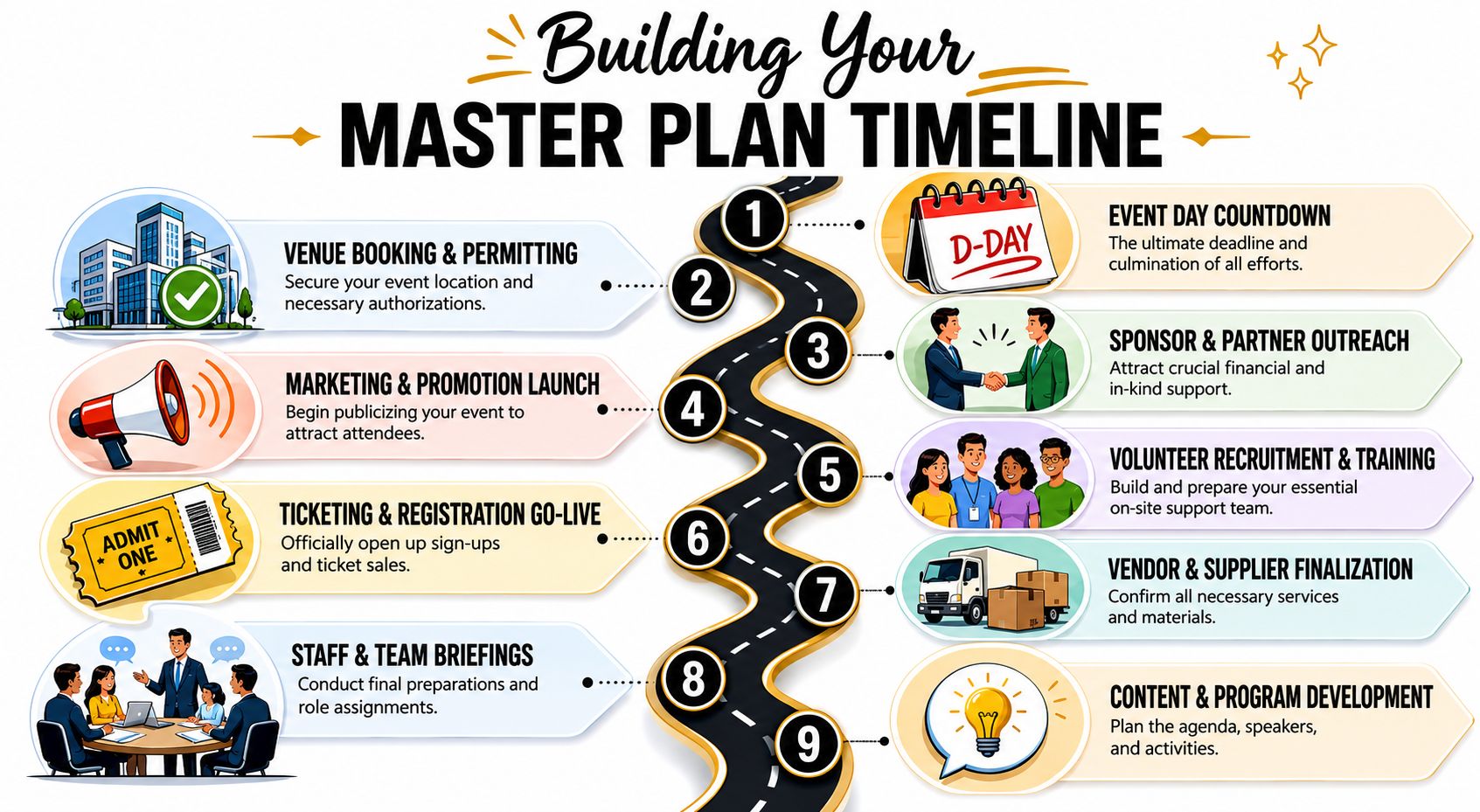
The event date is only the deadline. The plan is every approval, handoff, contract, and communication that must happen before guests walk in.
I build timelines backward from the event date, but I do not start with a long task dump. I start with decisions that change other decisions. Venue selection affects capacity, food minimums, sponsor packages, staffing, signage, accessibility, and guest flow. A late venue decision ripples through everything else.
A workable master timeline usually includes these milestones:
Venue and format approved
- Confirm location, capacity, accessibility, insurance requirements, and permit needs.
- Decide whether the event is seated, reception-style, community-facing, hybrid, ticketed, or invitation-only.
Financial model approved
- Set the revenue mix. Tickets, sponsorships, paddle raise, auction, peer-to-peer, or simple donor cultivation.
- Assign one owner to each revenue stream so projected income has accountability behind it.
Program structure set
- Map the guest experience from invitation through follow-up.
- Protect the mission moments early so they do not get squeezed out by logistics later.
Operational leads assigned
- Name leads for registration, sponsor service, volunteer coordination, finance, vendor management, and on-site authority.
- Add backup owners now, not the week of the event.
Public launch ready
- Open registration only after the internal workflow is tested.
- Confirm that the public promise matches the actual event experience.
Final production locked
- Approve scripts, signage, seating logic, check-in process, vendor load-in, and escalation paths.
- Confirm who can approve last-minute changes on site.
Shorter events do not need fewer decisions. They need tighter timing.
For small teams, Google Workspace handles this well if you set it up with discipline. Keep one planning Sheet with milestone dates, owners, status, and blockers. Store contracts, creative files, floorplans, and scripts in one shared Drive folder. Use Calendar for approval deadlines, not just the event date. If you want a stronger model for running events from shared cloud tools, this guide to cloud event management systems is a useful reference.
Give every deadline an owner
A timeline without names is optimism in spreadsheet form.
Each line should answer four questions: what must happen, who owns it, when it is due, and what depends on it. That last part is where many nonprofit teams get caught. “Send invitations” sounds simple until nobody has approved the mailing list, sponsorship logos are missing, and the event description still does not explain why the program matters.
I also recommend a weekly status rule with only three labels: on track, at risk, blocked. That keeps staff and board event committees from hiding behind vague updates.
Build the budget from current quotes and hard choices
Budget trouble usually starts with copy-paste habits. Last year's numbers feel safe, so the team adjusts them slightly and calls it a plan. Vendor pricing changes. Minimums change. Attendance patterns change. Your staffing needs change too.
Use current quotes wherever possible, and separate confirmed costs from estimated ones. A practical guardrail is to keep event expenses low enough that the event still serves the mission after staff time, risk, and follow-up are considered. In many organizations, once expenses start consuming too much of projected revenue, the event looks successful in the room but weak on paper.
That trade-off matters. Some events should maximize net revenue. Others should prioritize donor cultivation, community visibility, or stewardship. The budget should reflect that choice clearly.
I use two budget views:
| Budget view | What it's for |
|---|---|
| Commitment budget | Tracks approved spending based on signed quotes, contracts, and internal approvals |
| Cash-flow view | Tracks when deposits, final payments, sponsorship income, and ticket revenue actually hit |
Teams need both views. A gala can be profitable overall and still create cash stress if deposits are due before sponsorship money arrives.
For teams that need a stronger foundation, this complete guide to nonprofit budgets is useful because it places event spending inside the organization's wider financial picture instead of treating the event as a stand-alone project.
Watch the numbers that still give you options
Do not review every line item with the same intensity. Focus on the lines that can still change your decisions.
Pay close attention to:
- Venue and production costs, because these usually lock early
- Food and beverage exposure, because small shifts in headcount can move the total fast
- Registration pace, because weak sales often point to positioning or pricing problems
- Sponsor status, because verbal interest does not cover invoices
- Printing, decor, and add-ons, because late-stage extras erode margin quickly
One simple habit keeps the budget honest. Track three figures for every line: budgeted, committed, and actual.
That format helps teams see the difference between a placeholder number and a signed obligation. It also makes decision rules easier to enforce. If registration is soft, cut optional decor before guest experience basics. If sponsor revenue is lagging, postpone upgrades that do not change donor outcomes. If venue costs rise beyond plan, reconsider format or scope before pushing ticket prices higher and hurting attendance.
A good event budget does more than control spending. It shows what the organization is willing to protect, what it is willing to cut, and whether the event still deserves to happen in its current form. That is how one-off events turn into a repeatable, mission-aligned program.
Choosing Your Event Technology and Ticketing System
Most nonprofit event headaches aren't caused by bad intentions. They're caused by fragmented systems. One team member owns RSVPs in a form. Another keeps sponsor seats in a spreadsheet. Someone else manually edits a check-in list. Then the event adds VIP access, volunteer badges, dietary notes, or multiple sessions, and the whole thing starts to wobble.
That's why your event technology choice matters more than many teams think.
What a single source of truth actually looks like
Operational reliability improves when the team uses one central record for registration and attendee status, because fragmented spreadsheets increase coordination errors as complexity rises, according to BiddingOwl's event management tips for nonprofits.
In practice, a single source of truth means:
- one attendee list
- one current status for each guest
- one place to store role-based information
- one shared view of who has checked in, canceled, transferred, or no-showed
It doesn't necessarily mean buying a giant new platform. For many nonprofit teams, the more realistic answer is keeping operations inside tools staff and volunteers already know.
A practical Google Workspace setup
Google Workspace works well for nonprofits because it reduces training friction. Most staff and volunteers already understand Sheets, Forms, Drive, and Gmail. That matters when you're onboarding temporary helpers or handing off event operations between departments.
A simple setup can look like this:
| Tool | Best use |
|---|---|
| Google Sheets | Master attendee list, sponsor table assignments, volunteer assignments, zone access |
| Google Forms | Simple RSVPs, volunteer signups, post-event feedback |
| Google Drive | Contracts, floorplans, scripts, signage files, sponsor logos |
| Google Docs | Run-of-show, vendor briefs, check-in scripts |
| Google Calendar | Timeline milestones, rehearsals, delivery windows |
Once that backbone exists, add-ons can turn those tools into a working ticketing system. For example, QR code tickets for Google Sheets let teams generate one ticket per row in the attendee sheet, which is useful for guest lists with custom fields like table number, supporter type, meal choice, access zone, or sponsor package. For RSVP-driven events, QR code attendance for Google Forms can be enough when responses feed directly into a structured attendance workflow.
If you want a broader view of why centralized operations matter, this guide to cloud event management is a solid reference point.
One option in this category is Darkaa, which turns Google Sheets and Forms into a QR ticketing and check-in workflow with branded ticket creation, bulk delivery, and scanner-based attendance syncing back into Sheets. That kind of setup is useful when a nonprofit wants to stay inside Google Workspace rather than move the team into another dashboard.
What works and what breaks on event day
The systems that work well tend to share a few traits:
- They reduce duplicate entry. Staff shouldn't retype the same guest data across tools.
- They support custom fields. Nonprofit events rarely stop at first name, last name, and email.
- They handle changes cleanly. Transfers, plus-ones, comp tickets, and sponsor substitutions happen.
- They give live visibility. Staff need to see attendance status without hunting through messages.
- They allow multiple check-in devices. One scanner at the door is a bottleneck waiting to happen.
What usually breaks:
- manual guest list merges the day before the event
- separate lists for sponsors, tickets, and arrivals
- printed check-in sheets that go stale after the first update
- volunteer-led check-in with no clear rules for duplicates or exceptions
A ticketing system doesn't need to be fancy. It needs to be accurate, shared, and easy to use under pressure.
For nonprofit event management, the right technology is the one your team can run well. Familiar tools, clear ownership, and one clean data flow beat a complicated stack every time.
Managing Volunteers Vendors and Outreach
Even a well-designed event plan can collapse if the human side is loose. Nonprofit events depend on three groups doing their part at the right time: volunteers, vendors, and attendees. Each group needs different communication, different expectations, and different management.
Volunteers need structure not just enthusiasm
Volunteers often hear “just help where needed.” That sounds flexible. On event day, it creates confusion.
Give volunteers defined roles, a named supervisor, a reporting time, and one-page instructions. They should know what success looks like in their role without needing to chase someone down for answers.
A practical volunteer structure includes:
- Welcome and registration team: greets guests, resolves check-in issues, directs traffic
- Room support team: handles seating questions, transitions, and guest guidance
- Mission support team: manages program materials, speaker readiness, or story assets
- Auction or fundraising support: assists with bid logistics, donation stations, or paddle raise flow
- Floaters: cover breaks and solve small operational problems
Training should be brief but specific. Walk volunteers through the guest journey, not just their isolated task. When they understand how the night fits together, they handle surprises better.
If your organization regularly depends on ministry or congregational volunteers, these insights for managing church teams are helpful because they address a key challenge many nonprofits face: people are willing, but systems are often thin.
Vendor discipline protects the budget
A good vendor relationship is collaborative. It still needs boundaries.
Get every key detail in writing. That includes timing, setup needs, staffing assumptions, what's included, what counts as an add-on, and who is the day-of point person. Verbal understanding is not enough when the catering truck is late or the AV team says extra labor was assumed.
Use a simple vendor brief for each partner:
| Vendor | Must confirm before event day |
|---|---|
| Caterer | arrival window, final count rules, dietary handling |
| AV team | equipment list, internet needs, mic plan, backup plan |
| Venue | access times, loading path, cleanup expectations |
| Rentals | delivery window, pickup rules, damage responsibility |
| Entertainment | set time, technical needs, contact person |
Good nonprofit teams also resist a common mistake. They don't let the cheapest quote drive the whole decision. Reliability, communication speed, and clarity matter because vendor problems usually surface at the worst moment.
Outreach should match the event's real purpose
A lot of event promotion fails because it sells the format instead of the reason. “Join us for our annual gala” is not a strong invitation by itself. People need to understand why this event matters and why now.
Match outreach to your event type:
- Cultivation event: lead with access, mission insight, and relationship.
- Community event: lead with participation, connection, and local relevance.
- Fundraising event: lead with impact, urgency, and what support makes possible.
- Volunteer event: lead with gratitude and belonging.
Use channels your audience already responds to. For many nonprofits that means email, partner cross-promotion, community groups, social posts, and direct board outreach. Keep the registration step simple, and don't overcomplicate the ask.
One thing that consistently works is giving your board, committee, or sponsor partners short copy they can send. They will promote an event if you make it easy. They won't write the invitation from scratch.
Executing a Flawless Day-Of Operation
The day of the event is not the time to make creative decisions. It's the time to run the plan, stay calm, and solve only the problems that couldn't be prevented earlier.
A clean event day has rhythm. People know where to be. Devices work. Vendors know who to ask. Guests feel welcomed instead of processed.
Run the site in zones
Don't manage the event as one giant blob. Divide it into zones with clear owners.
Typical zones include check-in, sponsor reception, main room, backstage or speaker hold, auction area, donor services, and vendor loading. Each zone needs one lead who can answer questions and escalate issues.
Your run-of-show should include more than program timing. It should also show:
- opening and closing times for each zone
- who owns guest issues
- who approves seating exceptions
- where supplies are stored
- who has final say on technical changes
This operational map is what keeps small problems from traveling across the whole event.
Check-in sets the tone
Guests decide quickly whether the event feels organized. Check-in is often the first proof.
Day-of execution quality is closely tied to technical readiness. Guidance for nonprofit events emphasizes pre-testing internet-connected devices, maintaining real-time logistics visibility, and preparing fallback plans for AV or technology failures because check-in and the guest experience are the first bottlenecks attendees notice, according to OneCause's nonprofit event management guidance.
That means no unopened tablets at the registration desk. No volunteers using a scanner for the first time with a line forming. No guessing whether the Wi-Fi will reach the lobby.
For teams using a Google Workspace workflow, QR code ticket check-in for Sheets is practical because staff can scan arrivals on multiple devices while attendance updates stay visible in the shared record. For nonprofit-specific setup examples, this guide to QR code fundraiser check-in shows the kind of flow that helps at the door.
A short walkthrough can help teams visualize the process before event day:
Prepare for the problems you hope never happen
The teams that look unflappable usually aren't lucky. They rehearsed the likely failures.
Bring backup power, backup internet access if possible, a paper fallback for critical contacts, and a clear escalation path for guest disputes.
Common event-day contingencies include:
- Scanner or device failure: have spare charged devices and login access ready
- Duplicate ticket or guest mismatch: define who can approve entry exceptions
- AV interruption: identify a fallback mic plan and manual script continuation
- Vendor delay: know which elements can shift without affecting the guest experience
- Unexpected guest flow: keep one flexible staffer near check-in to redirect traffic
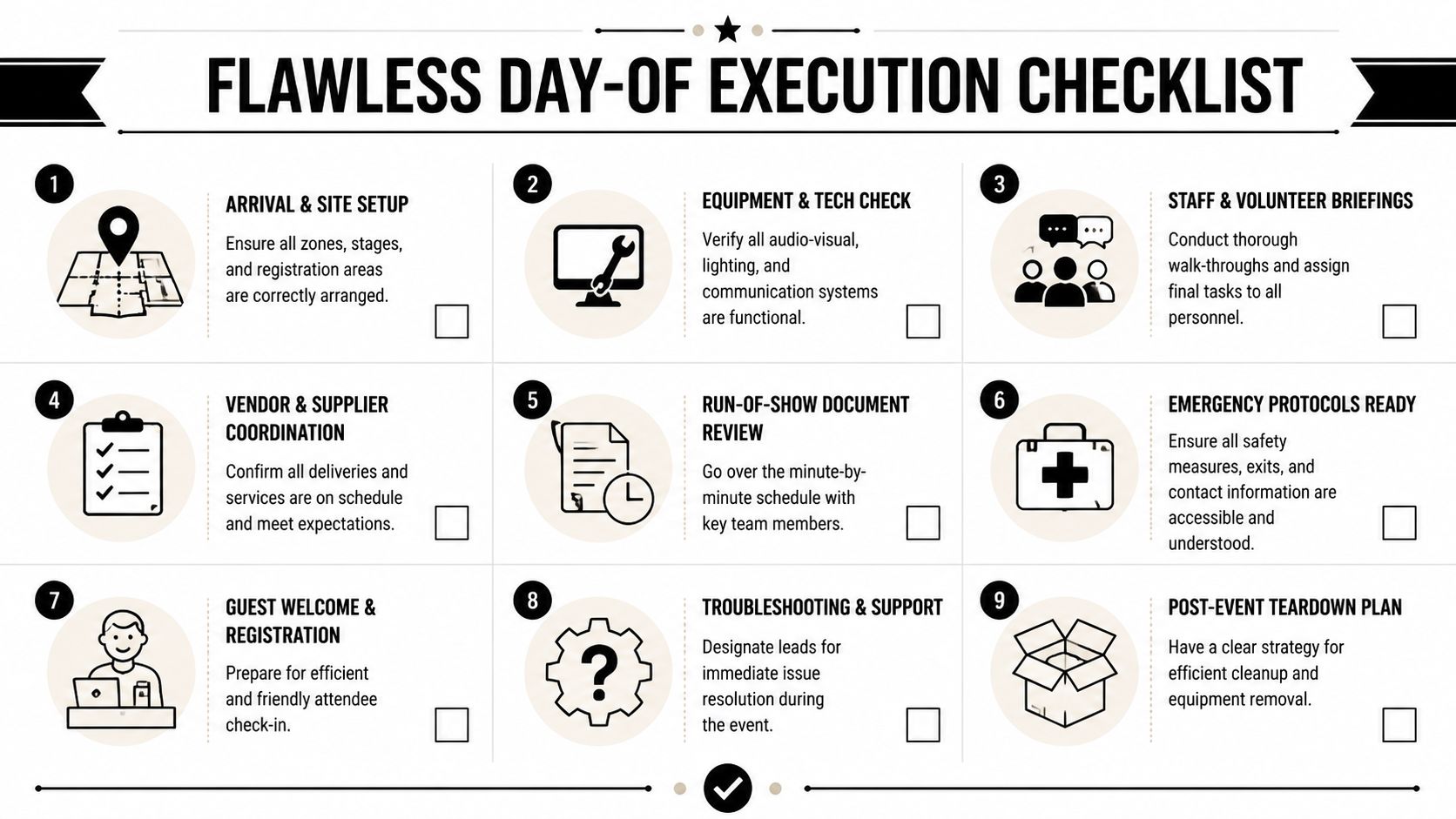
A solid pre-opening routine helps. Walk the room. Test the sound. Scan sample tickets. Confirm signage placement. Re-brief volunteers after setup changes. Review emergency contacts one last time.
Flawless doesn't mean nothing goes wrong. It means the guest rarely feels the strain when something does.
Measuring Success and Building a Reusable Playbook
The room is empty. The last rental pickup is done. Someone has a folder of photos, someone else has the paddle raise total, and three volunteers texted notes about check-in problems that never made it into a shared file. If the team stops there, the next event starts from memory instead of a system.
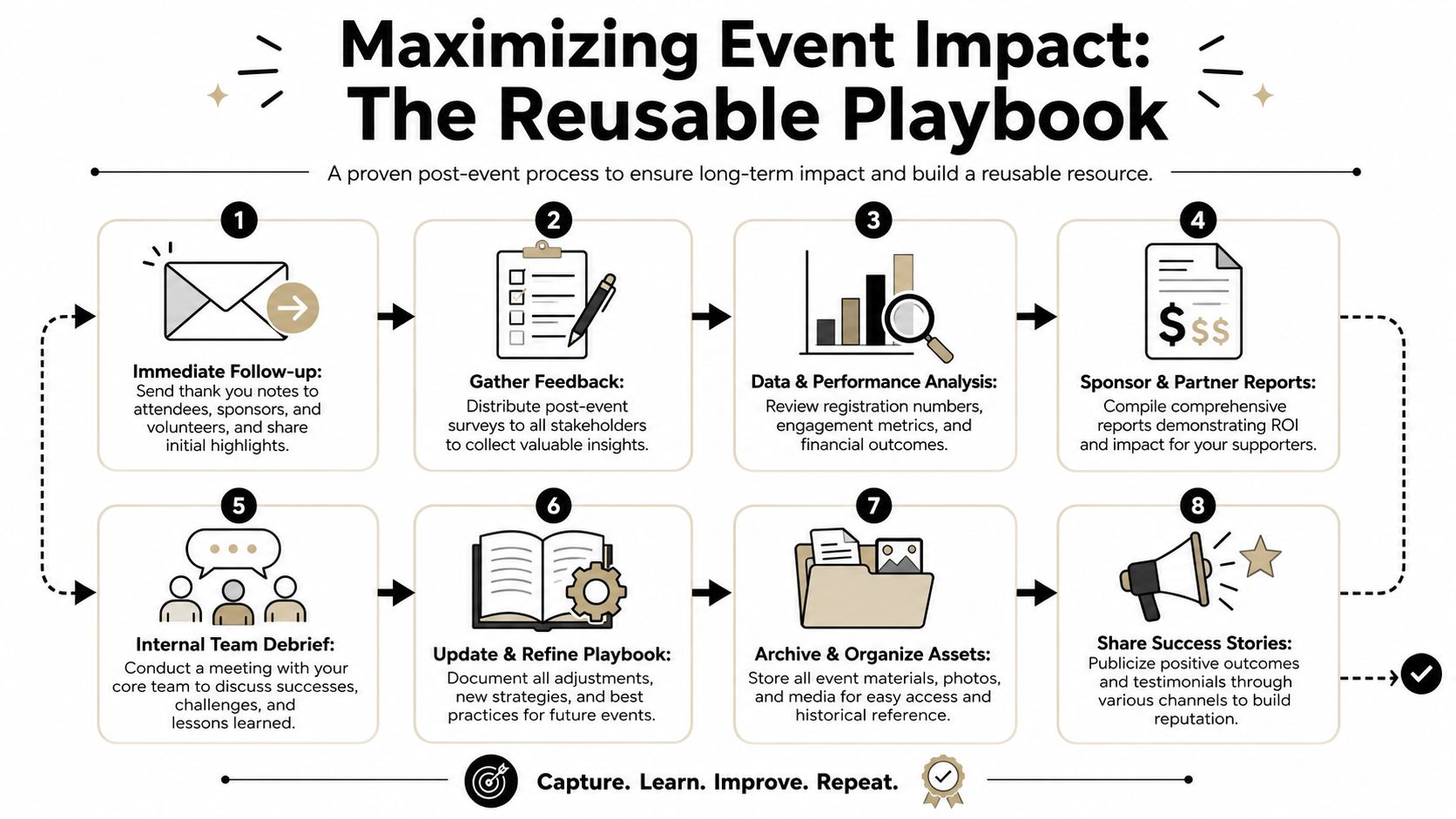
Strong event programs treat post-event work as operations, not cleanup. The goal is bigger than thanking people and closing the budget. The goal is to turn one event into a repeatable process your team can run again with less stress, better data, and tighter alignment to the mission.
Follow-up is part of the event
Teams that wait until everyone feels rested usually send weaker follow-up. The message gets generic, sponsor details get missed, and warm conversations with donors go cold.
Set the follow-up sequence before event day and assign owners in advance. A practical rhythm looks like this:
| Timing | Action |
|---|---|
| Within 48 hours | personalized thank-you messages to attendees, sponsors, and volunteers |
| Within two weeks | major-donor calls and tailored outreach to high-value guests |
| Within one to three weeks | recap message with outcomes, photos, and next-step opportunities |
That timing protects momentum. Guests gave money, time, attention, and reputation to support your organization. They should hear back while the event is still fresh.
Keep the outreach segmented. Sponsors need value and visibility recaps. Volunteers need appreciation plus a clear next ask. First-time attendees often need a softer path into deeper involvement. Major donors usually need a direct conversation about impact, not another mass email.
Capture the data future teams will actually use
“Take notes on what worked” does not help much six months later, especially if the event chair changed or a key staff member left. Good debriefs capture decisions, friction points, and performance in enough detail that another team can pick them up and act.
I have found that the most useful reviews combine numbers with context. Revenue totals matter. So does the note that check-in slowed down because sponsor guests arrived under a company name that did not match individual registrations. That kind of detail is what improves the next event.
Capture at least these categories after every event:
- Attendance data: registered, checked in, no-show, walk-in, sponsor comps, VIPs
- Revenue by stream: tickets, sponsorships, donations, auction, appeal, other
- Operational friction points: registration errors, delayed vendors, bottlenecks, missing supplies
- Program effectiveness: where attention dropped, where guests engaged, where timing slipped
- Stewardship signals: new donor potential, sponsor follow-up needs, volunteer standouts
- Asset storage: final scripts, signage files, floorplans, budgets, vendor contacts, photos
If your team wants a clearer view of what attendance patterns can reveal, this guide to event attendance statistics and trends is a useful starting point.
Turn notes into a real operating playbook
A reusable playbook should live where your team already works. For many nonprofits, that means Google Workspace. That choice matters. A playbook no one opens is just archived effort.
Build a simple system encompassing the next event from kickoff through follow-up:
A master event template Sheet
- tabs for budget, timeline, registration fields, seating, and day-of staffing
A standard debrief Doc
- what worked, what broke, what changed, what to repeat, what to stop
A vendor directory
- contact, scope, reliability notes, payment terms, event fit
A volunteer role library
- role descriptions, scripts, checklists, training notes
A follow-up calendar
- who sends what, to whom, and by when
Include decision records, not just files. If your team chose a lower-cost caterer and accepted a longer setup window, write that down. If a mission moment performed better than a live auction item, note why. If an event raised money but exhausted staff, pulled donors away from your core programs, or brought in guests who were unlikely to stay engaged, record that too. Revenue is one measure. A mission-aligned event program looks at retention, relationship quality, staff load, and whether the event still deserves a place on the calendar next year.
That is how one-off events become a sustainable program.
The strongest event program is the one your team can repeat without depending on one heroic person.
That's the payoff. You keep institutional memory inside the organization. Planning gets faster. Handoffs get cleaner. New staff and volunteers can step in without rebuilding the wheel. Each event leaves behind a better system, not just a set of final numbers.
If you want to keep your nonprofit event management process inside Google Workspace instead of adding another platform, Darkaa is worth a look. It lets teams use Google Sheets and Google Forms to create QR code tickets, track attendance, and run check-in with shared live data, which is useful when you need a repeatable system that staff and volunteers can learn quickly.