You're probably in the part of planning where the guest list has escaped its lane. Names are sitting in text messages, your parents have their own version, your partner has a notes app list, and somebody has already asked if they can bring a plus-one you never approved. This is normal. It's also the point where small mistakes start turning into expensive ones.
Good wedding guest list management isn't just about deciding who gets invited. It controls your budget, your room layout, your catering count, your seating chart, and how calm you feel in the final weeks. The couples who stay sane usually do one thing early: they stop treating the guest list like a loose collection of names and build one system that handles everything from first draft to day-of check-in.
Table of Contents
The Foundation of Your Wedding Day
A guest list isn't paperwork. It's the framework for the whole event.
I've seen couples choose a venue first, then realize the room fits fewer people than the family expected. I've also seen the opposite. They keep adding names casually, then discover the catering bill climbed because every “maybe” turned into a paid seat. Neither problem starts with flowers or food. It starts with a list that wasn't treated as a live planning tool.
The calmer approach is simple. Put every guest decision in one central document from day one, then make that document the only place where updates happen. No side lists. No “I thought you added them.” No handwritten notes that never make it into the final count.
That central system can be as accessible as Google Sheets. If you want a practical example of why planners move away from clipboards and scattered printouts, this guide to a paper guest list alternative shows the difference between static lists and a working digital process.
One list controls more than invitations
Your guest list shapes decisions that feel unrelated at first:
Venue fit: The room has to hold the people you expect, not the people you casually brainstormed.
Budget pressure: Every extra seat affects catering, rentals, favors, transportation, and table planning.
Atmosphere: A smaller list changes the feeling of the room. A larger one changes flow, noise, and how much time you get with each guest.
Family expectations: If boundaries aren't written down early, they get renegotiated every week.
Practical rule: If a guest-related decision exists, it belongs in the same system as the headcount.
The best wedding guest list management feels boring in the right way. You open one sheet, and everything you need is there. Who's invited, who's pending, who gets a plus-one, who needs a meal choice, who's coming to which event, and who still needs follow-up.
That kind of order doesn't remove every awkward conversation. It does stop avoidable confusion. And that alone can save a lot of stress.
Building Your Master Guest List Spreadsheet
A shared Google Sheet is enough for most weddings. You don't need complicated planning software to build a strong system. You need the right columns, clear rules, and one version of the truth.
The reason this matters is scale. The average wedding guest list ranges from 125 to 150 invitees, and planners often budget for 80 to 85% attendance because about one in five invited guests may decline, according to Zola's breakdown of wedding attendance expectations. Once your list gets that large, memory stops being useful.
Why one sheet works better than three partial lists
Couples often split guest information across too many places. One person tracks names. Another tracks mailing addresses. Someone else tracks meal choices after people text them directly. That's how mistakes happen.
A single sheet solves that because it lets you track invitation status, RSVP status, and final event logistics in one place. If you later want to turn each row into a guest-specific ticket or check-in record, a tool like Google Sheets ticket per row works with that same row-based structure.
Use one tab for the master list. If you like, add separate tabs for summary counts, seating ideas, or household grouping. But the core guest data should live in one master tab only.
The columns I always include
Here's the structure that holds up well from early planning through thank-you notes.
| Column Header | Purpose & Example |
|---|---|
| Full Name | Who the guest is. Example: “Jordan Lee” |
| Household | Groups people who receive one invitation. Example: “Lee Family” |
| Side | Helps with family balancing and planning. Example: “Partner A” |
| Priority Tier | Marks A-List or B-List status. Example: “A” |
| Address | Mailing address for formal invitations. Example: full postal address |
| Useful for digital updates and RSVP reminders. Example: guest email | |
| Phone | Backup contact for late RSVP follow-up. Example: mobile number |
| Plus-One Allowed | Records whether a guest may bring someone. Example: “Yes” or “No” |
| Plus-One Name | If known, track the guest's name. Example: “Taylor Kim” |
| Invite Sent | Confirms invitation has gone out. Example: “Sent” |
| RSVP Status | Tracks yes, no, or pending. Example: “Pending” |
| Meal Choice | Used for catering and place cards. Example: “Vegetarian” |
| Dietary Notes | Captures restrictions clearly. Example: “Nut allergy” |
| Ceremony Only or Full Event | Useful if some guests attend selected events. Example: “Full event” |
| Group or Family Notes | Helpful for seating chart building. Example: “College friends” |
| Check-In Status | Used on the day. Example: “Not arrived” |
| Gift Received | Tracks thank-you note workflow. Example: “Yes” |
| Thank-You Sent | Closes the loop after the wedding. Example: “Pending” |
A few sheet rules that save headaches
Freeze the top row: You'll scroll a lot. Keep headers visible.
Use drop-down values: “Yes/No/Pending” prevents messy variations.
Track households carefully: One household may include multiple invited names, but not every household gets the same plus-one rules.
Add notes sparingly: If a note affects planning, make it structured. Free-text note fields become clutter fast.
The sheet should answer questions instantly. If you still have to “remember what you meant,” the system isn't finished.
I also recommend color-coding only a few things: priority tier, RSVP status, and meal issues. Too much formatting makes a sheet harder to scan, not easier.
A strong spreadsheet does one job well. It makes every later step easier because every later step pulls from the same guest record.
Prioritizing Guests with the A-List Method
The A-List and B-List system sounds harsh until you've had to cut twenty names the week after booking a venue. Then it starts to look like what it really is: planning discipline.
Most couples do not have unlimited space or budget. The A-List method gives you a fair way to protect the core guest experience first, then expand only if responses make room. It is not rude when it is handled discreetly and cleanly. It is professional.
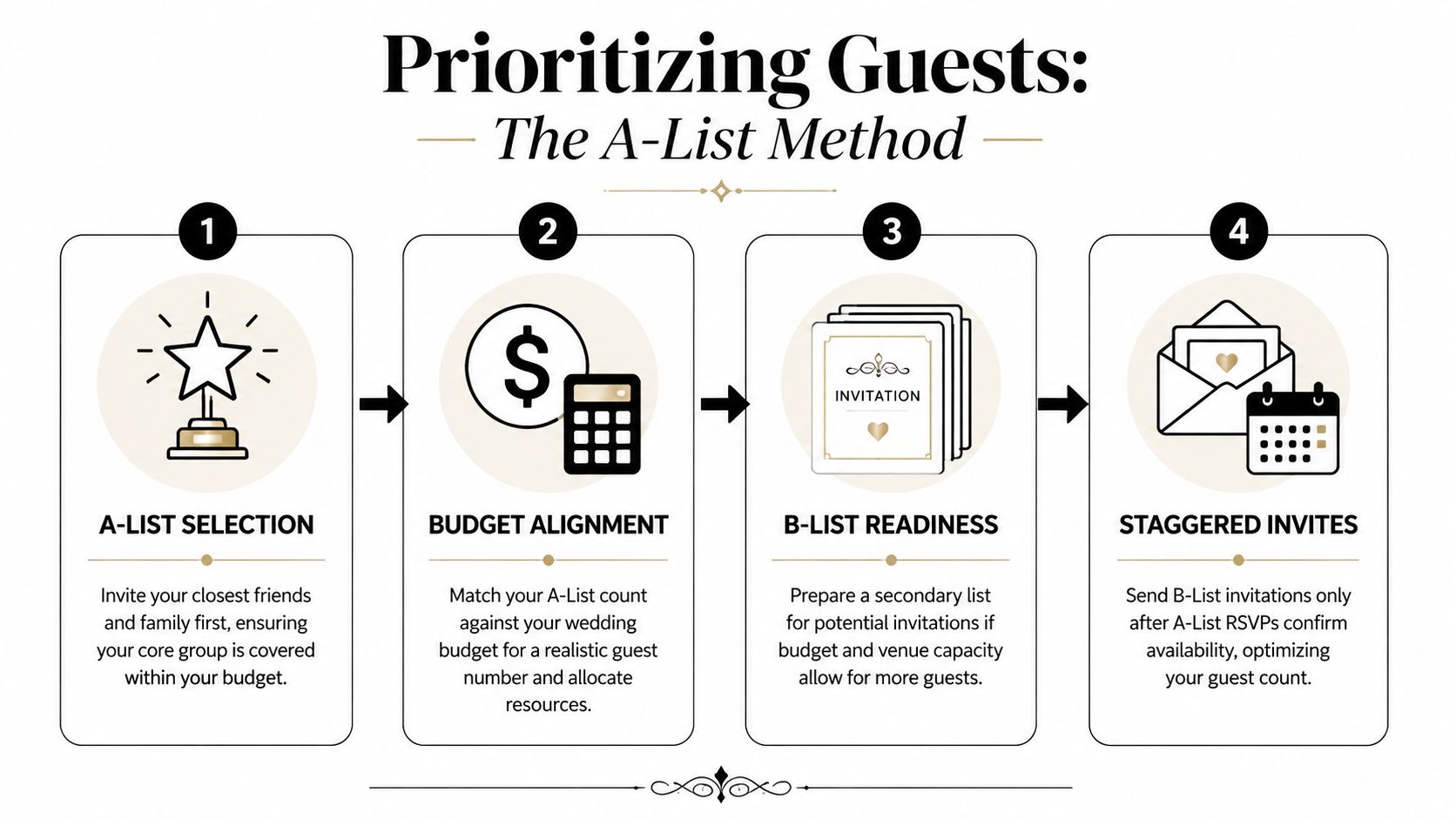
Wedding planners commonly endorse a phased invitation strategy: send A-List invites 8 weeks out with a 3-week RSVP deadline, then send B-List invites 5 to 6 weeks out as space opens. That approach can lead to 92% venue fill rates and 15 to 20% cost savings, according to this phased wedding invitation strategy overview.
What belongs on the A-List
Your A-List is the group without whom the wedding would feel incomplete. Keep this decision emotional in the right way and practical in the strict way.
A-List guests usually include:
Immediate family: Parents, siblings, grandparents, and the relatives central to your life.
Closest friends: The people who are currently active in your life, not just historically important.
Wedding party and their partners: If they're standing with you, they shouldn't be uncertain invites.
Essential relationship figures: Mentors, family friends, or loved ones with clear significance.
B-List guests are still welcome guests. They just aren't first-wave guests. This often includes extended relatives you rarely see, broader friend groups, colleagues, and social connections you'd be glad to celebrate with if seats become available.
How to run staggered invitations without awkwardness
The mistake isn't having a B-List. The mistake is running it sloppily.
Send the first round on time. Give a clear RSVP deadline. Track declines quickly. The moment seats open, send the next wave without creating visible gaps or long delays. The process only feels awkward when couples hesitate and let timing drift.
A few rules make this smoother:
Don't discuss the labels publicly. Guests never need to hear “A-List” or “B-List.”
Group by household. Don't split couples or immediate family units inconsistently.
Stay consistent with plus-one rules. If budget is tight, uneven exceptions create resentment fast.
Use the same invitation style and tone. Later invitations shouldn't look like leftovers.
If you can't explain why one person is invited and another isn't, your categories need work.
Family pressure usually appears here. When parents want extra seats, ask them to rank their requests. A ranked list is easier to work with than a pile of names. It also forces real choices.
A practical line that works well is: “We're inviting in phases so we can stay within the room and budget we already committed to.” It's calm, true, and hard to argue with.
The A-List method isn't about being cold. It's about making deliberate choices before the venue, caterer, and seating plan make them for you.
Streamlining RSVPs from Invitation to Final Count
RSVP tracking becomes miserable when couples invite guests one way, collect responses three other ways, and then try to merge everything by hand. If you want a clean process, build one response path and make it easy enough that guests use it.
That's where a Google Form connected to your master Google Sheet works so well.
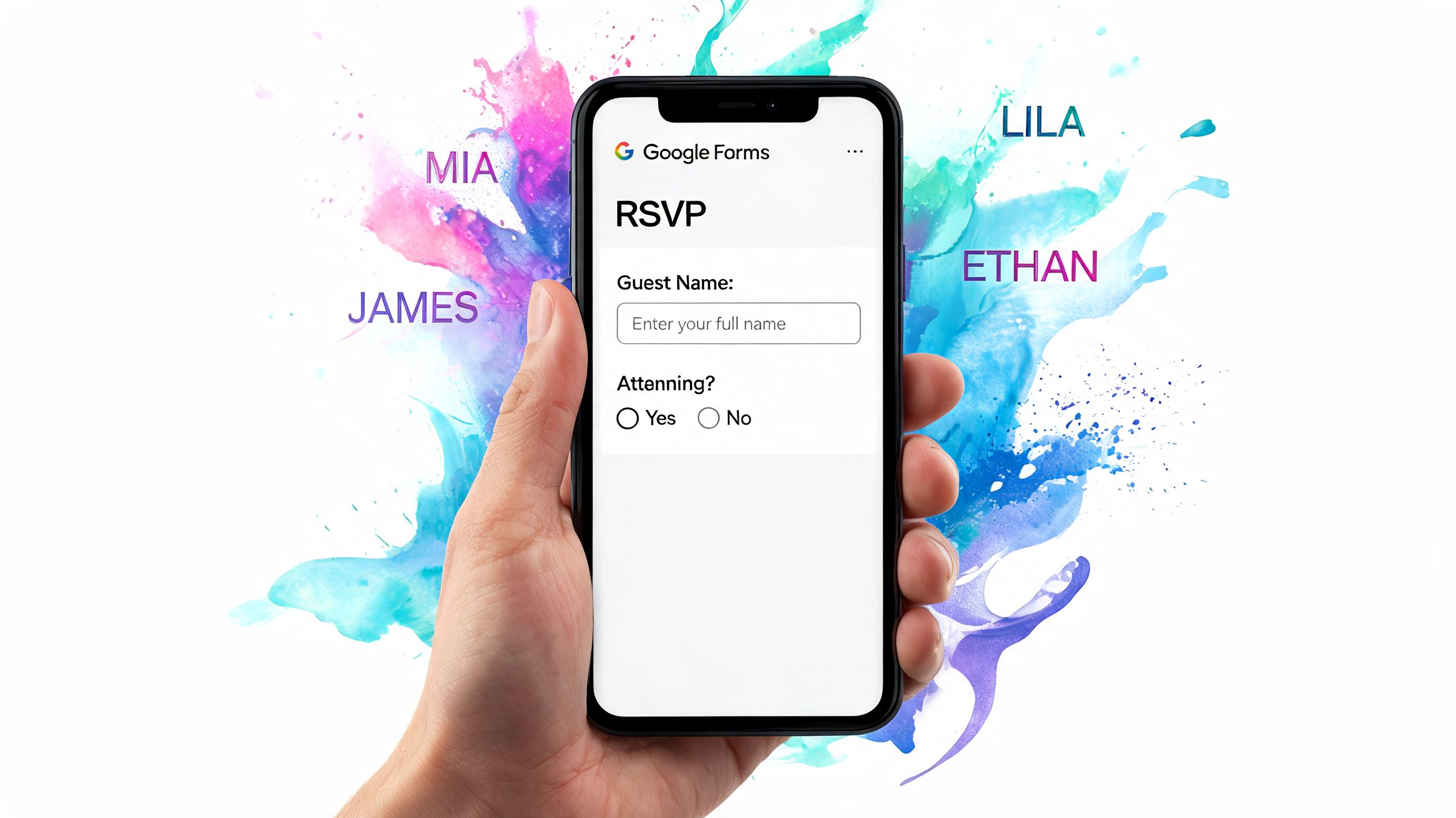
Digital RSVP systems reach 98% attendance accuracy compared with 72% for manual tracking, and connecting RSVPs to a central sheet can reduce invalid entries by 85%, according to this RSVP and check-in workflow analysis. That matters because one wrong meal count or extra household can ripple into seating and catering mistakes.
Build one RSVP path and stick to it
Your invitation can still feel traditional. The response process doesn't need to be.
A good RSVP form should capture only what you need:
Guest name: Match it to your sheet naming format.
Attendance response: Yes or no.
Number attending: Only if the invitation allows multiple named guests.
Meal choice: If catering requires pre-selection.
Dietary restrictions: Keep this separate from meal choice.
Plus-one name: Show this only for guests allowed a plus-one.
Optional notes: Keep this short so the form stays clean.
Link the form responses directly to your sheet. Then create formulas or filtered views that show pending replies, accepted guests, declines, meal counts, and unresolved plus-one questions.
If you want guests to scan directly from the invitation or website, a wedding RSVP QR code guest list guide can help you make that path simple without turning the process into a tech project.
How to follow up without sounding annoyed
Even with a good system, some people won't respond on time. That doesn't mean your process failed. It means you need a follow-up rhythm.
I suggest three stages:
Gentle reminder before the deadline: A short note with the RSVP link.
Direct follow-up right after the deadline: Personal message, no blame.
Final decision message if needed: Let them know you must finalize numbers.
A line that works well is: “We're finalizing our guest count this week and would love to know if you'll be able to join us.” It's polite and clear.
If you're building your planning admin more broadly, this 2025 party planning checklist template is useful because it helps couples connect guest tracking with the other moving parts that tend to pile up at the same time.
Later in the process, it helps to see how a digital workflow is assembled in practice:
A live RSVP sheet does more than count heads. It exposes missing data early, before those gaps turn into phone calls, seating edits, and catering revisions.
This is why I don't recommend collecting RSVPs through random texts or family relays. It feels easy at first. Then someone says, “I told your mom we were coming,” and nobody knows whether that included their child or partner. Forms remove that ambiguity.
From Seating Chart to Day-Of Check-In
After the RSVPs arrive, your guest list evolves from a planning estimate into a functional operations document. A well-built sheet starts paying you back at this stage.
A good list makes seating easier because guests are already grouped, tagged, and clarified. A messy list forces you to solve basic identity questions while trying to place people around the room.
Turn guest data into a usable seating plan
Start with the column that often gets overlooked: Group or Family. If you've labeled people as “college friends,” “partner's cousins,” “work team,” or “immediate family,” you've already done half the sorting work.
From there, build your seating chart in layers:
Core relationships first: Place immediate family, the wedding party, and guests with mobility or access needs.
Natural clusters next: Seat people near those they know well enough to relax with.
Room energy after that: More social groups can sit closer to music and traffic. Quieter relatives usually prefer calmer corners.
Known friction last: Separate people who don't need a reunion at your reception.
A spreadsheet works here because you can sort by group, meal choice, household, and attendance status before you ever move names onto tables.
Check-in should be faster than your cocktail line
The old clipboard method still appears at weddings because it seems simple. In reality, it slows entry, creates duplicate check marks, and depends too much on one person knowing every guest name.
A stronger setup uses your final sheet as the check-in source. From that list, you can prepare:
| Check-in Option | Best Use | What to Watch |
|---|---|---|
| Printed master list | Reliable backup | Can't update in real time |
| Mobile sheet view | Small teams and flexible staffing | Needs clear permissions |
| QR code ticket check-in | Faster arrival flow and cleaner validation | Needs setup before event |
| Hybrid backup system | Weddings with multiple hosts or entrances | Requires role clarity |
One practical option is Darkaa, which works inside Google Sheets and Google Forms to generate QR-based guest records, send them by email or WhatsApp, and support day-of scanning with offline sync. That's useful when you want your planning sheet and your check-in process tied together without moving guest data into a separate dashboard.
The door team shouldn't be solving mysteries. They should be confirming names and welcoming people in.
You should also keep a printed fallback list, even if you plan to scan everyone digitally. Phones die. Wi-Fi gets patchy. Someone forgets their code. A paper backup prevents a small hiccup from becoming a front-door bottleneck.
There's also a newer planning layer worth noting. Emerging AI tools in guest list platforms are being used to address 22 to 28% no-show rates reported in 2026, and some can flag likely no-shows from RSVP patterns so planners can manage waitlists or modest over-inviting, boosting fill rates by up to 35%, according to WeddingWire's discussion of uneven wedding guest attendance. I wouldn't let a tool override common sense, but I would use those signals when you're balancing a tight venue count.
Transportation planning belongs here too. If your sheet already identifies hotel guests, elderly relatives, or groups traveling together, it's much easier to coordinate arrivals and departures. Couples sorting that piece out often find this guide on arranging wedding venue transportation helpful because transportation issues tend to affect check-in timing more than people expect.
The final test of wedding guest list management is simple. When guests arrive, can your team confirm them quickly, direct them clearly, and keep the entrance calm? If the answer is yes, your list did its job.
Common Guest List Questions Answered
Awkward moments still happen, even with a clean system. What helps is deciding your answer before the question lands in your inbox.
How do we say no plus-one politely
Use the invitation wording to prevent confusion. Name the invited guest or named guests clearly. Don't leave it open-ended.
If someone asks directly, keep the answer warm and short: “We're keeping the guest list very tight, so we're only able to include the names listed on the invitation.” Guests generally accept this when the policy is consistent.
When should we send B-List invitations
Send them only after you have enough A-List declines to create real space. Don't send them as a hopeful overlap move. That's how counts drift and people compare timelines.
Keep the tone exactly the same as your first round. The guest doesn't need an explanation of your internal process. They just need a sincere invitation with a clear RSVP deadline.
What if someone shows up unannounced
Treat it as a hospitality moment first and a logistics issue second. Don't argue at the entrance.
Have your door team follow a simple protocol:
Check the master list: Confirm whether the name is missing or misfiled.
Look for household variations: Sometimes the issue is naming, not attendance.
Call a designated decision-maker: One person only. Not the couple.
Use backup seating if available: This is easier when you've held a little flexibility in the room.
If the person wasn't invited, the best response is private, calm, and brief. Your planner, coordinator, or host can say the event is fully accounted for and help them exit gracefully.
When do vendors need the final headcount
Your caterer, venue, rental team, and seating plan all depend on one locked number. Give vendors your final confirmed count by the deadline in your contracts, then stop treating the list as fluid.
A practical rule is to freeze your internal guest list before that vendor deadline so you have time to clean up missing meal choices, table assignments, and check-in details. The closer you get to the wedding, the more expensive “small changes” become.
Consistency matters more than perfect wording. Guests handle firm boundaries better than mixed signals.
If you've built your list in one sheet, tracked invitation waves clearly, and connected RSVPs directly to that sheet, most of these questions become manageable. The stress doesn't disappear, but it stays contained.
If you want to run your wedding guest list inside tools you already know, Darkaa connects Google Sheets and Google Forms with QR code tickets and event check-in, so your guest data can stay in one workflow from RSVP collection to arrival at the door.