
You're probably dealing with one of these scenes right now. A paper list at the entrance. A spreadsheet open on one laptop. Staff asking, “What name was that under?” Guests bunching up at the door while someone scrolls, sorts, and squints. Then the walk-ins start, a VIP says their assistant registered them, and the Wi-Fi drops.
That's usually the moment teams realize attendance isn't just admin. It's front-of-house operations, data quality, security, staffing, and post-event reporting all packed into one process.
A solid attendance tracking system doesn't have to mean buying a heavy enterprise platform or retraining everyone on a new dashboard. For many teams, the practical move is simpler: keep the source of truth in a tool people already know, set up a clear check-in workflow, and make sure the process still works when the venue gets messy. If you run high-volume guest flows and care about the arrival experience as much as the recordkeeping, it also helps to look at adjacent tools like this Solution for high-sharing events so your check-in process supports the broader guest journey instead of fighting it.
Table of Contents
- What Is an Attendance Tracking System
- Comparing Attendance Tracking Methods
- Key Features of a Modern Attendance System
- Selecting the Best System for Your Audience
- Rolling Out Your New Attendance System
- A Simple QR Code Check-In Workflow
- KPIs Reporting and Troubleshooting
What Is an Attendance Tracking System
An attendance tracking system is the process and tooling you use to record who showed up, when they arrived, and whether that presence was valid for the event, session, shift, or access zone.
That definition matters because many teams still think of attendance as “a list with checkmarks.” In practice, the job is bigger than that. You're not only marking presence. You're confirming identity, controlling entry, giving staff a current ledger, and creating records you can trust later when someone asks who attended a session or whether a guest was admitted.
The long history of attendance tracking shows why modern expectations are different. Published overviews note that attendance tracking started with manual time clocks and paper registers in the early 19th century, moved into punch cards in the late 19th century, then into barcode and magnetic stripe cards by the middle of the 20th century, with biometric systems arriving later as accuracy and security became more important. That shift from manual logging to verification and control is outlined in this history of attendance tracking systems.
When attendance stops being a clerical task
At small events, manual tracking can feel “good enough” until the pressure hits. One staff member gets pulled away. Another adds names in a different format. Someone checks in the same guest twice. Now your list is inaccurate before the keynote even starts.
A proper system changes that by standardizing three things:
- Identity check: Is this the right person or ticket?
- Time of record: When exactly did they arrive?
- Operational status: Are they admitted, pending, duplicate, or at the wrong access point?
Practical rule: If your staff has to decide too many exceptions manually at the door, you don't have a system yet. You have a workaround.
What it looks like in real operations
For most organizers, the useful version isn't a giant HR platform. It's a workflow that lets staff import or create a list, issue a unique identifier, check people in quickly, and keep records updated without double entry.
That could be a spreadsheet-backed guest list, QR check-in on phones, or a more controlled setup with zone permissions and multiple entry points. The right choice depends less on hype and more on whether your team can run it calmly under pressure.
Comparing Attendance Tracking Methods
Every attendance method looks fine in a demo. Its true measure is what happens when lines form, staff changes mid-shift, or ten guests arrive with name variations and broken inbox search.
Below is the comparison I use with clients when they're deciding what to adopt.
Attendance Tracking Method Comparison
| Method | Setup Cost | Check-in Speed | Security Level | Ideal Use Case |
|---|---|---|---|---|
| Manual lists and spreadsheets | Low | Slow to moderate | Low | Small gatherings, backup workflows, low-risk internal events |
| QR code check-in | Low to moderate | Fast | Moderate to high | Conferences, school events, graduations, workshops, community events |
| RFID and NFC | Moderate to high | Fast | Moderate to high | High-throughput venues, multi-zone access, repeat-entry environments |
| Biometrics | High | Fast after setup | High | Controlled workplaces, high-security access, identity-sensitive attendance |
Manual lists and spreadsheets
Manual systems survive because they're familiar. Many organizations already have Excel or Google Sheets, and nobody needs hardware beyond a laptop and maybe a printed list.
The trade-off is consistency. Manual check-in depends on staff spelling, search habits, and discipline. It gets slower as the list grows, and it gets weaker when multiple people edit at once without clear rules.
Manual tracking still has a place in two situations:
- As a backup list: Keep a printable roster for outages or dead devices.
- For very small groups: Internal meetings or classroom-sized gatherings where speed and fraud risk aren't major concerns.
What doesn't work is pretending a shared spreadsheet alone is a scalable front-desk system.
QR code check-in
QR codes are the practical middle ground for most organizers. They're simple to distribute, easy for staff to scan on phones, and easier to audit than name-only check-ins.
This method also pairs well with verification logic. A reliable setup can combine GPS, Wi-Fi, or QR validation at a specific checkpoint, which helps reduce proxy check-ins and improves accuracy, as described in this overview of location-aware attendance verification.
For non-technical teams, QR has three operational advantages:
- Staff training is lighter: “Open scanner, scan code, confirm status” is easy to teach.
- Guest flow is clearer: People understand tickets and phone scans.
- Records stay cleaner: Unique codes reduce duplicate interpretation.
If you're comparing spreadsheet-first tools, this guide on a Google Forms event registration alternative is useful because it focuses on workflow trade-offs instead of abstract feature lists.
The best QR setup is boring at the door. Fast scan. Clear status. No hunting through screens.
RFID and NFC
RFID and NFC work well where people move through gates repeatedly or where scanning a visible ticket each time is inconvenient. Venues, staff entrances, and multi-zone environments often benefit from tap-based access.
The downside is hardware and logistics. You need tags, readers, issuance processes, and replacement procedures. If your event is occasional rather than ongoing, that overhead can feel heavy.
RFID is a good fit when entry points are fixed and repeated throughput matters more than setup simplicity.
Biometrics
Biometrics solve a different problem. They focus on identity assurance, not just convenience. If you need stronger confirmation that the person present is the person recorded, fingerprint or facial recognition can help.
But biometrics bring extra responsibilities. You need clear policy, consent handling where applicable, fallback procedures for failed reads, and stronger comfort with privacy concerns. For most event teams, biometrics are more than they need.
If your main pain is line management and attendance records, QR is often the more practical answer. If your pain is impersonation or controlled workplace access, biometrics may be justified.
Key Features of a Modern Attendance System
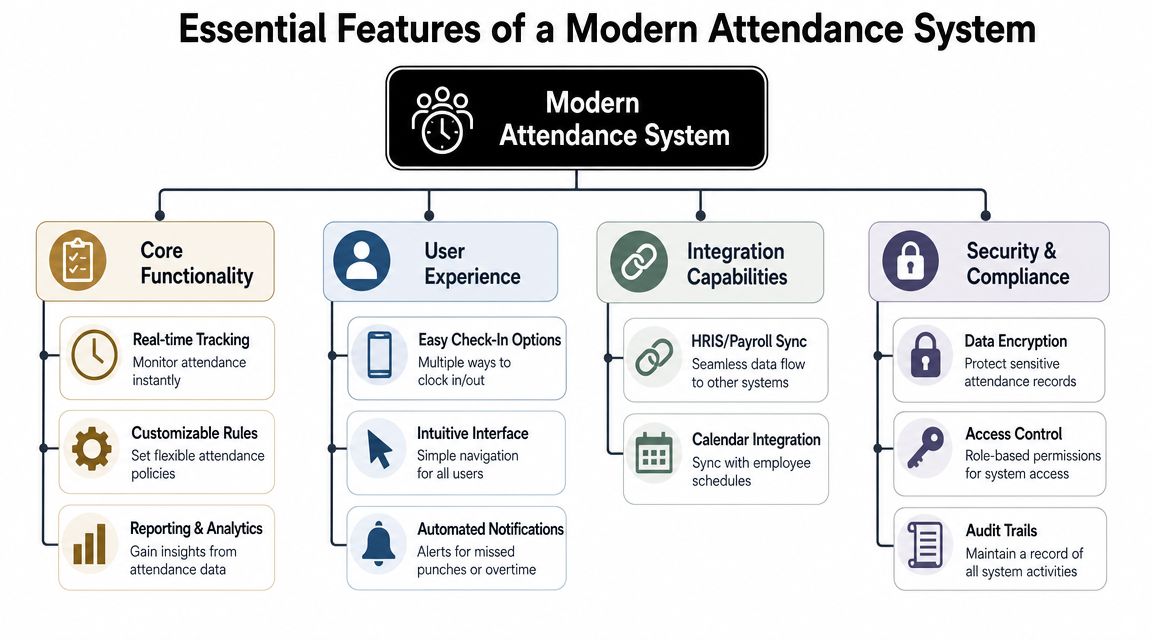
Most software lists sound good until you ask how the system behaves in a lobby with poor reception and three temporary staff members using their own phones. That's when useful features separate themselves from decorative ones.
What operators should insist on
Start with real-time visibility. Staff at the door, the registration desk, and the event lead should all be looking at the same attendance state, not separate versions that need reconciliation later.
Then look for offline behavior. If a product only works when every device has clean internet, it's fragile. A reliable system should let staff continue checking people in, then sync records once connectivity returns.
The next feature is flexible data structure. Attendee records rarely stop at first name and email. You may need session choice, meal note, table assignment, access zone, school year, internal department, or guardian field. If the system fights custom fields, operations get pushed into notes and side spreadsheets.
Integration matters too. Teams work faster when check-in sits inside familiar tools. That's one reason spreadsheet-based operations remain attractive. The system feels less foreign, and handoff between registration, messaging, and reporting is easier. If your venue or workplace setup depends on device placement, power planning, or fixed scanning stations, this background on network infrastructure for autonomous buildings is worth reading because physical infrastructure often decides whether “real-time” features stay real-time.
Questions worth asking before rollout
Don't ask vendors only what a feature is. Ask how it behaves under strain.
- When two scanners hit the same record: Does the system prevent or clearly flag duplicates?
- When the guest list changes late: Can staff add or edit attendees without breaking issued tickets?
- When multiple entry points operate at once: Do all devices stay in sync cleanly?
- When staff rotates: Is the interface simple enough that a replacement can learn it quickly?
- When the event ends: Can you export attendance in a format that accounting, admin, or faculty can use?
One practical example is Darkaa, which turns Google Sheets and Google Forms into QR ticketing and check-in workflows with spreadsheet-based records, phone scanning, offline validation support, and concurrent device use. That model fits teams that want event operations inside Google Workspace rather than in a separate control panel.
A modern attendance tracking system should remove decisions from the door, not add more.
Selecting the Best System for Your Audience
The right attendance setup depends on who you're serving and how messy the day can get. A school office, a conference registration desk, and a festival gate may all use “attendance tracking,” but they don't need the same workflow.
Corporate events and conferences
Corporate teams usually care about polish, speed, and data handoff after the event. They want branded confirmations, clean check-in, and records that marketing, events, or internal ops can use later.
For this audience, the strongest setup usually includes:
- QR-based entry: Faster than name search for most front-desk teams.
- Session-level tracking: Useful when attendance matters beyond the main door.
- Spreadsheet or CRM-friendly export: Because reporting never ends at check-in.
If the event includes VIPs, sponsors, speakers, and walk-ins, choose a system that lets staff edit records on the fly without creating duplicate identities. The list will change. Plan for it.
Schools and education teams
Schools need a different balance. They often value record clarity, repeatability, and simple administration more than flashy front-end features. Staff turnover at the desk can also be a factor, so the process needs to be understandable quickly.
That's why education teams should prioritize:
- Long-term recordkeeping
- Easy attendance review
- Printable fallback options
- Clear role permissions
If your broader operations already touch timetables, student records, and administrative workflows, it helps to explore school administration solutions alongside attendance tools so your process doesn't become another isolated system.
For schools, the best system is usually the one office staff can run confidently without calling IT every time a list changes.
Venues festivals and high-volume entry
Venue and festival operations live or die on throughput. You need quick scans, obvious entry states, and staff who can process exceptions without stopping the line.
This audience should care most about:
- Multiple simultaneous devices
- Zone or session permissions
- Offline-ready scanning
- Fast duplicate detection
RFID can make sense here if the venue runs repeated access patterns and fixed infrastructure. But for many teams, QR still wins because deployment is easier and replacement is simple. A resent ticket is easier to manage than replacing access hardware.
If your crowd includes guests with shared devices, low battery, or weak mobile service, always keep a fallback path. Search by name. Print badges. Maintain a controlled exception desk instead of improvising at the gate.
Rolling Out Your New Attendance System
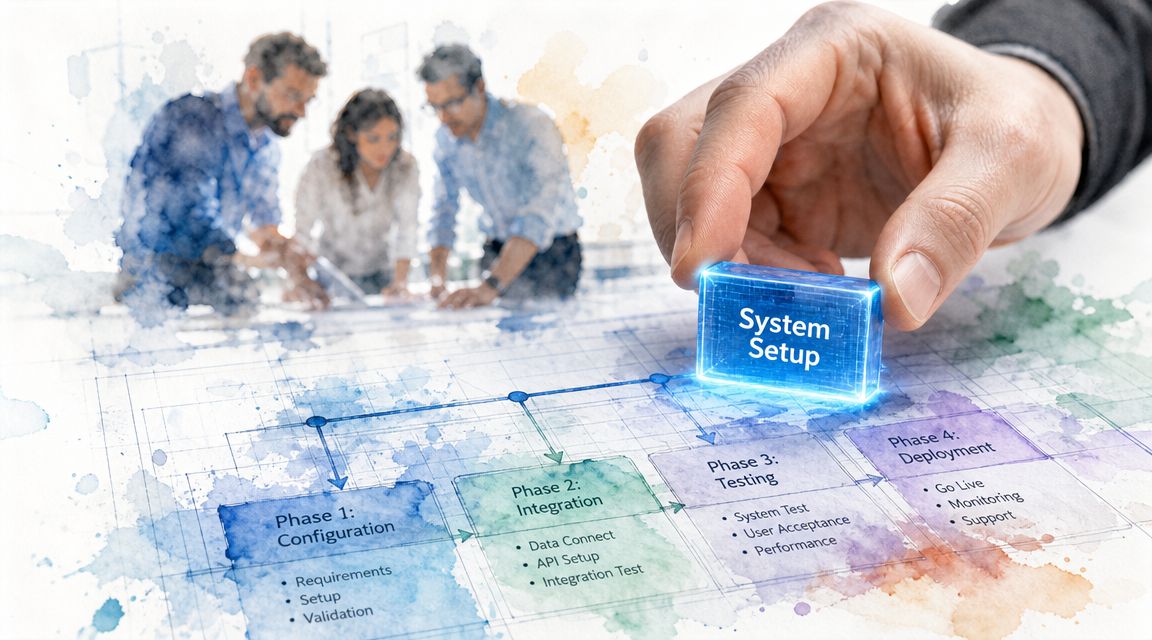
A new attendance tracking system fails most often in rollout, not in selection. The software may be fine. The trouble starts when nobody agreed on field names, scanners weren't tested in the venue, and temporary staff learned the process from each other five minutes before doors opened.
Set up the workflow before people arrive
Treat check-in like an operations system, not a software toggle.
Start with a clean source list. Standardize names, emails, ticket types, access notes, and custom fields before you generate anything. If your team has to “clean it later,” later will happen during guest arrival.
Then define your states. Decide what staff should see for checked in, not found, duplicate, wrong day, wrong zone, and manual override. The fewer judgment calls required at the door, the smoother the entry.
Use a short run sheet for staff:
- Primary action: Scan code.
- If scan fails: Search by approved fields.
- If not found: Send to exception desk.
- If duplicate: Escalate to supervisor or verify identity.
- If walk-in: Add through one controlled device or desk only.
Build for weak connectivity from day one
Offline support isn't a niche feature. It's basic operational protection. Academic and institutional discussion of location-based attendance also notes technical limits such as poor reception, device compatibility issues, and accuracy constraints. More broadly, the ITU estimate cited in this review says 2.6 billion people remained offline in 2023, which is a clear reminder that systems assuming constant connectivity break in real conditions, not edge cases. See the underlying discussion in this review of attendance technologies and connectivity limits.
That matters at remote festivals, basement halls, older campuses, and even busy conference venues where guest density punishes weak networks.
Use an offline-first workflow:
- Preload attendee data onto scanning devices before doors open.
- Assign sync responsibility to one lead who checks reconciliation after connectivity returns.
- Keep a printable fallback list sorted in a way staff can search fast.
- Designate one exception point for edits and walk-ins to prevent conflicting records.
A quick visual walkthrough can help when training event staff on the flow:
Train for exceptions not just the happy path
Most staff can learn “scan ticket” in minutes. What they need practice on is everything around it.
Run a short scenario drill before launch. Include dead phone screens, duplicate scans, ticket under the wrong email, attendee at the wrong entrance, and last-minute guest additions. Those are the moments that create long lines if the team hasn't rehearsed.
If you only train staff on successful scans, you've trained for the least important part of check-in.
A Simple QR Code Check-In Workflow
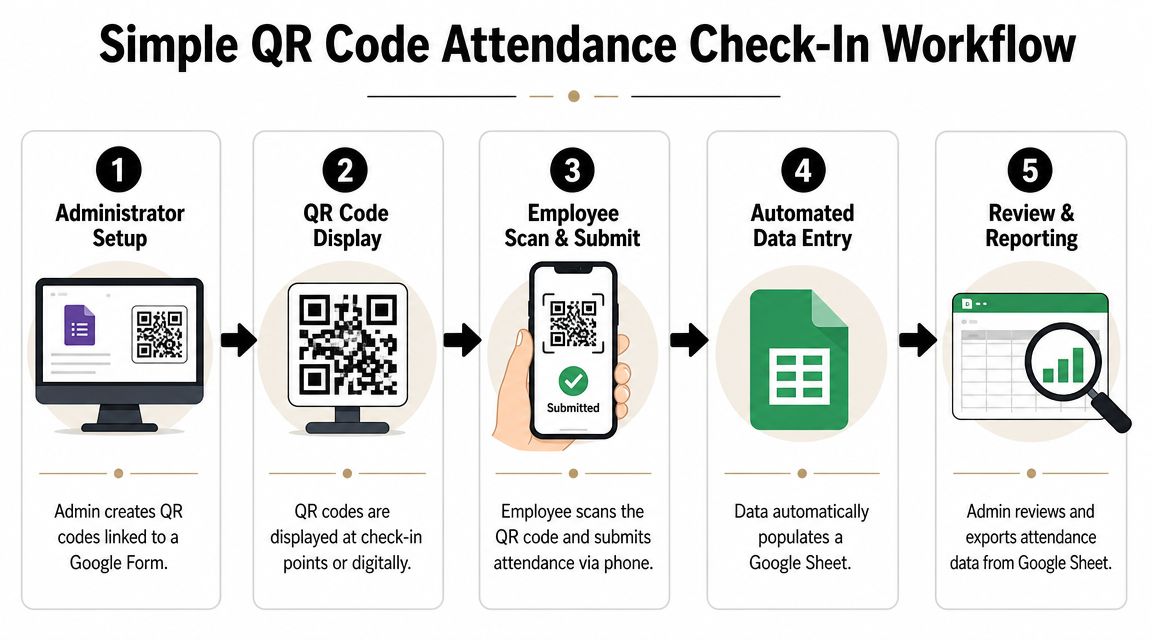
For non-technical teams, the easiest attendance system is often the one that stays inside tools they already use. That's why QR workflows built around Google Sheets tend to work well. Staff know the spreadsheet. Admin knows where the list lives. Reporting doesn't require exporting from three different systems.
How the flow works in practice
Start with one spreadsheet as the source of truth. Each row is one attendee. Include the fields you'll need at the door, not just the fields someone happened to collect during signup.
Then generate unique QR code tickets for Google Sheets from that list and send them to guests. If your registrations come through forms, the same structure works well with QR code attendance for Google Forms because each response can map directly into an attendee record.
At the venue, staff use phones for QR code ticket check-in for Sheets. The scanner reads the code, checks the record, updates attendance, and sends that status back to the sheet when connected or after reconnection if the workflow supports offline operation.
The practical benefit isn't just speed. It's that everything stays connected:
- Registration list
- Ticket identity
- Check-in status
- Post-event export
You don't have one tool collecting signups and another tool trying to guess who arrived.
Why this setup suits non-technical teams
Spreadsheet-first QR systems work because they reduce tool switching. The operations lead can review the list, the communications person can send updates, and the front-desk team can scan without learning a large event platform.
They also handle late edits better than many people expect. If someone changes a guest category, adds a plus-one, or corrects a spelling issue, the team can update the source record instead of patching multiple databases by hand.
This style of workflow is especially strong for schools, internal events, community programs, graduations, and agency-run events where different people own registration, door operations, and reporting.
KPIs Reporting and Troubleshooting
An attendance tracking system earns its keep after the event as much as during the line at the door. If you only use it to mark people present, you're missing the planning value.
Guidebook notes that the common no-show formula is (Registrations - Actual Attendance) / Registrations × 100, and it reports industry averages of 20% to 40% for free events and 5% to 15% for paid events in its explanation of session attendance versus registration data. That's why attendance records affect more than a headcount. They shape room planning, staffing, seating, and catering assumptions.
The numbers that actually help operations
Track a short set of KPIs that your team will use:
- Attendance rate: Who registered versus who arrived.
- No-show rate: Especially useful for repeat event planning.
- Peak arrival window: Helps schedule staff and open extra check-in points next time.
- Average resolution time for exceptions: Shows whether the desk process is working.
- Duplicate or invalid attempt patterns: Useful for tightening ticket handling and entry rules.
If you need a structured output for analysis, use an attendee summary format for reporting that keeps exports readable for non-technical stakeholders.
Common check-in problems and fixes
Some issues show up at almost every event.
- QR code won't scan: Increase screen brightness, clean the camera lens, and let staff search by approved fields instead of retrying endlessly.
- Guest says they registered but isn't found: Send them to one exception desk, not to whichever staff member looks available.
- Duplicate entry appears: Verify whether the guest already entered through another gate before overriding the record.
- Walk-ins pile up: Use one controlled add-on process so new records follow the same naming and field rules as pre-registered guests.
Good troubleshooting protects the line first. Detailed reconciliation can happen after entry pressure drops.
The pattern is simple. Clean inputs, clear statuses, one source of truth, and a fallback when the network misbehaves. That's what turns attendance from a scramble into an operational system.
If you want a spreadsheet-first way to run attendance without moving your team into a new platform, Darkaa lets you manage QR ticketing and check-in from Google Sheets and Google Forms, including offline-capable scanning, custom attendee fields, and multi-device entry workflows.
QR Code Attendance Tracking with Google Forms or Google Sheets
If your attendee list already lives in Google Forms or Google Sheets, you do not need a separate attendance system. The QR Code Ticket add-ons turn each form response or sheet row into a personal QR code, and every scan at the door writes the attendance record back into your sheet.
- Collect registrations with a Google Form, or keep your list in a Google Sheet — one row per person.
- Install the add-on: QR Code Ticket for Google Forms or the Google Sheets version. It generates a unique QR code ticket per person and emails it automatically (WhatsApp delivery available).
- At the door, staff open the check-in page on any phone — no app to install — and scan each code. Duplicates are blocked automatically.
- After the event, your sheet holds the full attendance record: who came, when they arrived, and who never showed.
It is free for small events (up to 10 attendees), so you can test the whole workflow before your real event. For classes and recurring sessions rather than one-off events, see our guide to recurring attendance tracking.