From Chaos to Control. Rethinking Event Entry
A line at the door is never just a line. It's your first operational stress test. If guests can't find the right entrance, if staff can't verify access fast enough, or if one choke point starts backing up, the problem spreads fast across the whole venue.
The hard lesson in modern crowd management is that safety starts before doors open. After the 1989 Hillsborough tragedy, the UK's 1990 Taylor Report helped push crowd safety away from reactive control and toward venue layout, controlled ingress and egress, zoning, and risk planning before attendees arrive. That shift still defines good practice now, and density remains the core issue. At above about 6 persons per square meter, people can lose the ability to move freely and crush conditions can develop, which is why experienced teams focus on usable space, bottlenecks, and controlled pathways first, not just more guards at the gate (density-based crowd safety planning after Hillsborough).
That's also why event tech matters. Good tools don't replace planning. They make planning executable. If you already run operations in Google Sheets or collect registrations in Google Forms, you can build practical systems for ticketing, zoning, scanning, communication, and reporting without moving the whole team into a new platform.
Table of Contents
- 1. QR Code-Based Digital Ticketing
- 2. Multi-Zone and Session-Based Access Control
- 3. Real-Time and Post-Event Attendance Analytics and Reporting
- 4. Offline-First Check-In Capability
- 5. Printable Badges and Physical Identification
- 6. Tiered Entry Points and Staggered Arrival Windows
- 7. Staff Training and Role-Based Permission Systems
- 8. Real-Time Communication and Dynamic Adjustment
- 9. Bulk Email and WhatsApp Distribution for Pre-Event Communication
- 10. Custom Field Data Integration for Smart Access Control
- 10-Point Crowd Management Strategy Comparison
- Your Blueprint for Flawless Event Flow
1. QR Code-Based Digital Ticketing
Paper lists slow the line down. Printed tickets get lost, screenshots get forwarded, and manual name checks fall apart the moment arrivals bunch up. QR-based digital ticketing fixes the front door because it gives every guest a unique, fast-to-scan credential.
A practical advantage lies in simplicity. If your attendee list already lives in Sheets, you can generate and send QR code tickets directly from that list instead of exporting data into a separate event system. That matters when you need to make a late name change, resend a ticket, or split guests into different entry paths.
Make the ticket do more than prove entry
A good QR ticket should carry the exact information staff need at the point of contact. That may be admission type, date, zone, session, or guest category. At a conference, that lets one scanner send standard attendees left, VIP guests right, and speakers to a staffed desk without stopping the line.
For ideas on ticket formats that work in real operations, review these event ticket examples. The best layouts are easy to scan, easy to read at a glance, and clear about what the holder is allowed to do.
- Send with a backup plan: Include a short note for guests who arrive with a dead phone, damaged screen, or no smartphone.
- Test every scanning device: Don't assume camera performance will be fine under venue lighting.
- Time delivery carefully: Sending tickets shortly before the event reduces the chance they get buried in an inbox.
- Use branded PDFs when needed: They look more professional and are easier for some guests to retrieve than app-only tickets.
Practical rule: If a ticket needs staff explanation at the gate, it's badly designed.
2. Multi-Zone and Session-Based Access Control
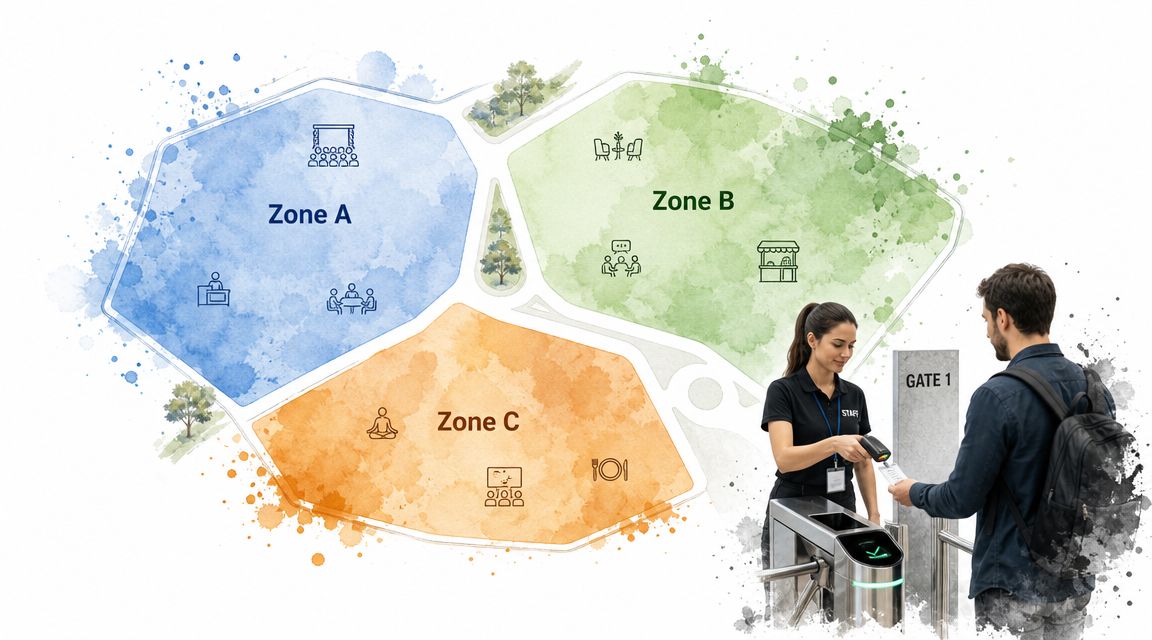
Most crowd problems aren't full-venue problems. They're local failures. One lobby fills up. One session room gets overloaded. One gate receives the wrong audience. That's why dividing the venue into zones works so well. It contains pressure before it spreads.
Events that use structured crowd management services report 78% fewer safety incidents and higher satisfaction than events without them, according to one industry source. The same guidance stresses zoning, separate entry and exit routes, and real-time density monitoring as core operating habits, not nice extras (professional crowd control services and event safety).
Map the venue like an operator
A zone map has to match how people move. At a multi-track conference, “Main Hall,” “Workshop Rooms,” and “VIP Lounge” sounds tidy on paper, but what matters is where queues merge, where guests hesitate, and where staff can intercept them before they enter the wrong space.
Session permissions are key. With session check-in permissions, a ticket can authorize access to only the sessions or areas tied to that guest. That reduces arguments at room doors and keeps oversubscription from turning into hallway congestion.
- Color-code for speed: Badges or tickets should make zone type obvious from several feet away.
- Staff the boundaries, not just the main gate: The pressure often shifts inside the venue.
- Post signage before the decision point: Guests need direction before they reach a fork in the flow.
- Track capacity in Sheets: A shared operational sheet is often enough to monitor room limits and flag trouble spots.
3. Real-Time and Post-Event Attendance Analytics and Reporting
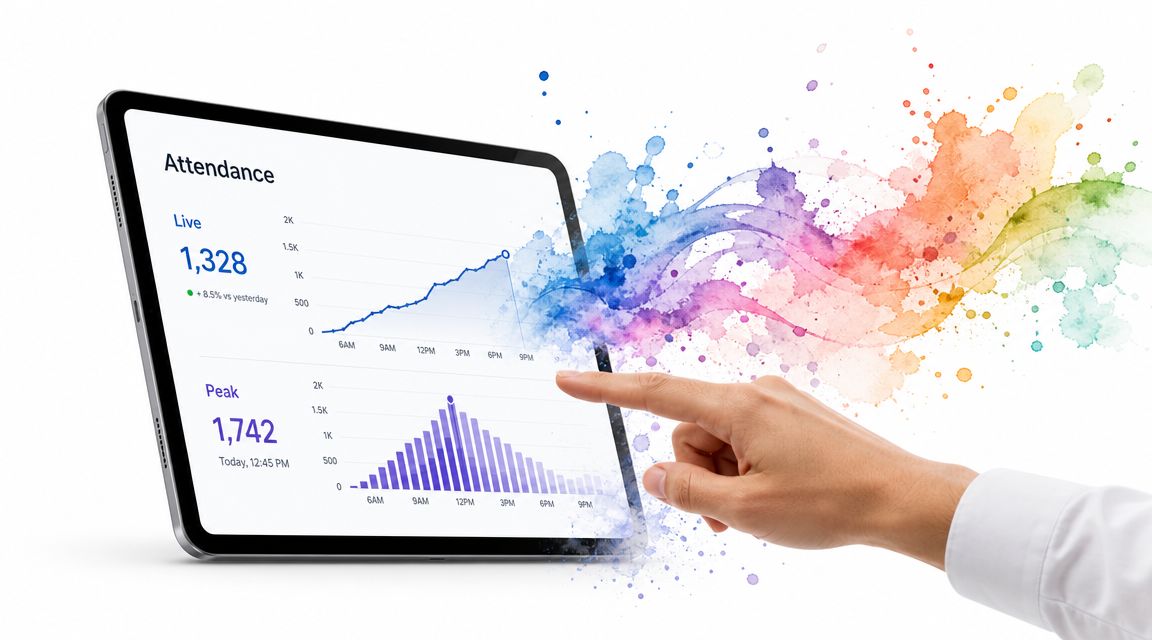
If you can't see what's happening, you're guessing. Real-time attendance data turns crowd management from instinct into live operations. You can spot a slow gate, a session filling early, or a registration desk getting swamped before it becomes a safety issue.
This is one reason the wider crowd analytics space keeps moving toward real-time tools. In that adjacent market, real-time analytics is projected as a high-growth segment at about 30% CAGR, with North America holding about 45% of the market and Asia-Pacific about 20%. The same research points to hybrid frameworks that combine IoT, AI, drones, fog or cloud computing, and automated access control for planning and live monitoring (crowd analytics market outlook and technology mix).
What to watch during live operations
At a practical level, most event teams don't need a command center full of screens to benefit from analytics. A live Google Sheet fed by QR scans can already answer the questions that matter. Which gates are moving. Which session is near limit. Who hasn't arrived yet. Whether staff need to be moved.
A QR code ticket check-in for Sheets gives organizers a simple way to write scan results and timestamps back into an operational spreadsheet. For a university ceremony, that can show which college section is filling first. For a concert, it can show whether one entrance is lagging because of bag checks or poor signage.
Watch trends, not just totals. A gate with a moderate line that isn't moving is often more dangerous than a busy gate that keeps clearing.
After the event, review no-shows, peak arrival periods, and room-by-room attendance patterns while the day is still fresh. The useful question isn't “How many came?” It's “Where did our plan hold, and where did friction start?”
4. Offline-First Check-In Capability
Wi-Fi fails. Cellular service gets overloaded. Outdoor venues have dead spots. Basement halls and temporary structures can kill connectivity at the worst possible moment. If your check-in process depends on a perfect connection, it isn't a serious crowd strategy.
Offline-first scanning gives staff a way to keep moving guests through the door even when the network disappears. The device validates against a locally stored list, records the result, and syncs back once the connection returns. That's not a luxury for festivals, remote retreats, beach events, and large campus ceremonies. It's operational insurance.
Build for failure, not ideal conditions
The mistake teams make is treating offline mode as a backup they'll figure out later. It needs its own setup and rehearsal. Every scanner should have the latest attendee data loaded before doors open, and staff should know exactly what changes when the system is offline.
A citywide charity run is a good example. One check-in point near the start line may have strong service, while another in a park or side street may have none. Staff still need to admit registered participants quickly and avoid duplicate entries when devices reconnect.
- Preload every device: Don't rely on one lead staff member to hot-spot the team at the last minute.
- Assign one sync check owner: Someone should periodically test whether devices are reconnecting cleanly.
- Brief staff on duplicate handling: They need to know what to do if one guest appears already checked in after sync.
- Protect battery life: Offline scanning is pointless if devices die halfway through arrival.
What doesn't work is a half-offline setup where the attendee list is only available on one phone. That creates a single point of failure and turns the backup into another bottleneck.
5. Printable Badges and Physical Identification
Digital entry is fast. Physical badges are visible. In a lot of venues, you need both. Once guests are inside, the challenge shifts from admitting them to identifying them quickly without rescanning every doorway.
Badges help staff make instant decisions. At a trade show, exhibitors need floor access before attendees do. At a corporate event, some floors or meeting rooms may be restricted. At a graduation, staff may need to separate graduates, family guests, faculty, and vendors without slowing movement.
Where badges solve real problems
The best badges are designed for staff, not for marketing. Large names help at hospitality desks. Strong color bands help zone staff. QR codes help when visual verification isn't enough and someone needs a deeper check.
A registration workflow built around QR code attendance for Google Forms can keep badge data connected to the same source used for ticketing and check-in. That reduces bad imports, mismatched names, and last-minute edits in multiple files.
- Pre-print where possible: High-volume preprinting reduces queue pressure at the main desk.
- Keep an exception station nearby: Name corrections, missing registrations, and badge reprints should not block the core line.
- Use durable holders: Bent paper inserts and lost badges create avoidable friction.
- Match badge colors to permissions: Staff should understand access levels instantly.
A badge is a crowd tool when it answers a question before staff have to ask it.
6. Tiered Entry Points and Staggered Arrival Windows
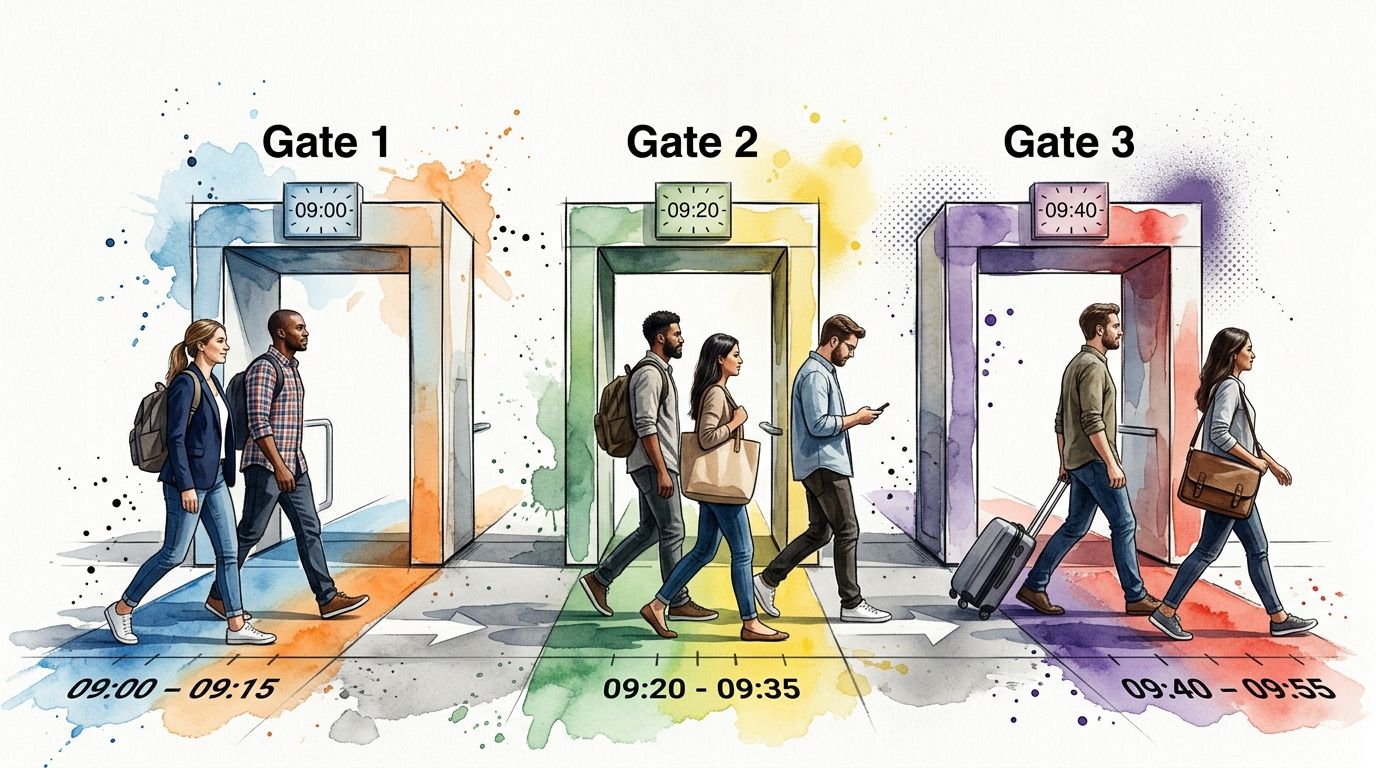
If everyone arrives in the same thirty-minute window, no entry system looks good. Tiered entry points and staggered arrival windows spread pressure across time and space. That's one of the simplest crowd management strategies because it works with human behavior instead of fighting it.
A large graduation is a classic example. Graduates, faculty, accessible-entry guests, general attendees, and VIP invitees don't need the same route or arrival time. Splitting them by gate and window protects the ceremony from a single large surge at one entrance.
How to make staggered entry stick
This only works when the assignment is explicit. “Please arrive early” isn't a crowd plan. A ticket should show the arrival window and gate clearly, and reminder messages should repeat it in plain language.
At concerts, I've seen teams fail because they created multiple gates but didn't clearly tie ticket holders to one. Guests joined the shortest visible line, even when it was the wrong one. The result was staff conflict, re-queuing, and a messy merge point.
- Label gates by audience type: North Gate for VIP, East Gate for General Admission, and so on.
- Keep one overflow procedure: Late arrivals need a clear path that doesn't break the main plan.
- Use signage far from the door: Redirect people before they commit to the wrong queue.
- Coordinate with parking and drop-off: Entry timing collapses when transport routes all feed one side of the venue.
The trade-off is obvious. Staggered entry requires stronger communication and more disciplined staffing. But it's far easier to manage planned complexity than an uncontrolled arrival surge.
7. Staff Training and Role-Based Permission Systems
A good crowd plan fails fast when staff improvise under pressure. People need clear roles, clear authority, and clear system access. The scanner at Gate B shouldn't be making VIP exception calls. The floor usher shouldn't be able to override every permission rule because a guest sounds confident.
This matters even more as event operations become more tech-enabled. The crowd management service market is projected to grow at a 13.2% CAGR from 2025 to 2031, with demand tied to public safety, large-event coordination, and smart technology adoption. That shift suggests buyers increasingly care about operational capabilities like real-time monitoring, access control, and incident response support, not just static staffing models (crowd management service market forecast).
Train for the handoff points
Most failures happen where one role hands a guest to another. Entry scanner to security. Registration desk to badge printer. Usher to session monitor. Those transitions need scripts and escalation rules.
For a corporate seminar, one team can handle QR scanning, another can manage badge pickup, and a supervisor can resolve mismatches or VIP issues. If each person knows their lane, the guest keeps moving. If everyone has partial authority and no one owns the exception process, the line stalls.
- Define roles in writing: Keep responsibilities short and concrete.
- Train on real scenarios: Duplicate ticket, wrong zone, late VIP, missing badge, accessibility request.
- Limit system permissions: Give staff only the tools they need for their station.
- Run a live rehearsal: The best training happens in the actual venue with the actual route.
What doesn't work is a rushed pre-event briefing where everyone nods and no one practices. Staff confidence is part of crowd flow. Guests hesitate when staff hesitate.
8. Real-Time Communication and Dynamic Adjustment
No plan survives first contact with actual arrivals. One bus unloads late. Rain pushes people to a covered entrance. A speaker meet-and-greet causes an unexpected hallway build-up. Your team needs live communication so they can adjust before a local issue becomes a crowd problem.
That adjustment doesn't need to be dramatic. Sometimes the right move is opening one more scan lane. Sometimes it's shifting two ushers to a stairwell, pausing entry to a full breakout room, or redirecting late arrivals to a secondary route.
Set the rules before pressure hits
A command post works best when decision rules are already agreed. If Gate 1 slows, who can open Gate 2. If one room reaches capacity, who activates overflow. If weather changes ingress patterns, who updates signage and attendee messages.
A shared Google Sheet can serve as a lightweight control board for operations, security, and registration leads. Pair that with radios or a mobile coordination app, and the team can act on the same information instead of chasing updates verbally. For teams comparing communication options, these benefits of two-way radios for events are easy to see in practice during peak arrival.
The best real-time adjustment is small and early. Teams get into trouble when they wait for a minor queue to become an obvious crisis.
I like short operational huddles during peak periods. Not long meetings. Just a quick reset on what's building, what's clearing, and whether staffing or access rules need to shift.
9. Bulk Email and WhatsApp Distribution for Pre-Event Communication
A lot of crowd congestion starts as an information problem. Guests arrive at the wrong gate. They bring bags that need extra screening. They don't know their session time, seating area, or parking route. By the time they reach staff, the mistake is already consuming space and attention.
That's why pre-event messaging is one of the most underrated crowd management strategies. Good communication reduces preventable friction before anyone leaves home. For a festival, that means prohibited items and entry rules. For a seminar, it means arrival windows, parking, and what floor to go to. For a graduation, it means guest seating and when doors close.
Send fewer messages, make them better
The strongest messages are short, specific, and timed to the decisions people make. First send the ticket and the main logistics. Then send a reminder close enough to matter. Then send a final update if conditions change.
Teams using Google Workspace often get the cleanest workflow by sending from the same Sheets-based attendee list used for ticket generation. That keeps names, ticket status, and contact details in one place instead of splitting email and check-in operations across multiple tools. If WhatsApp is part of your process, this guide to manage WhatsApp mass messaging is useful for planning distribution.
- Lead with the action: Gate, time, parking, ID requirement.
- Put the ticket in the first message: Don't make guests hunt through older emails.
- Use WhatsApp for time-sensitive updates: It's often better for same-day changes.
- Test every link before sending: Broken directions create instant confusion at scale.
Plain language beats polished marketing copy here. Guests don't need hype on event morning. They need to know where to go.
10. Custom Field Data Integration for Smart Access Control
Not every attendee should move through the venue the same way. A speaker needs backstage access. A sponsor may need exhibitor setup hours. A guest with mobility needs may need a different route. A volunteer may need check-in at a staff desk, not the public gate.
That's where custom fields become operational, not administrative. If your registration process captures role, session type, accessibility needs, company, dietary notes, or internal department, staff can route people correctly without a long conversation at the door.
Use data that changes operations
The test is simple. Only collect fields that affect access, service, or planning. If a field won't change where the person goes, what staff need to know, or how the venue is prepared, it's probably clutter.
For an educational event, accessibility-related fields can help ushers direct guests to the right entrance or seating support. For a corporate offsite, department or team data can help sort arrivals into the right activity groups. For a conference, role-based fields can separate speaker handling from attendee flow.
- Keep required fields focused: Too many questions hurt registration completion.
- Use dropdowns and checkboxes: Clean data is easier to act on than free-text guesswork.
- Test with sample records: Make sure scanning rules match the intended permissions.
- Brief staff on sensitive fields: Accessibility or VIP information should be handled carefully and consistently.
Done well, custom fields let the system answer operational questions before staff have to. Done badly, they create noise and slow registration. The difference is discipline.
10-Point Crowd Management Strategy Comparison
| Strategy | 🔄 Implementation complexity | ⚡ Resource requirements & efficiency | ⭐ Expected effectiveness | 📊 Key advantages | 💡 Ideal use cases |
|---|---|---|---|---|---|
| QR Code-Based Digital Ticketing | Low–Medium, setup with Google Sheets & distribution workflows | Low, smartphone tickets, scanners at entry, internet for distribution | High ⭐⭐⭐⭐, reduces fraud, enables real-time check‑ins | Real‑time attendance, touchless entry, low printing cost | Tech conferences, concerts, corporate events |
| Multi-Zone & Session-Based Access Control | High, detailed zone mapping and permission rules | Medium–High, multiple entry points, trained staff, system integrations | High ⭐⭐⭐⭐, prevents overcrowding, enforces access tiers | Granular access control, zone analytics, VIP separation | Multi‑track conferences, large festivals, multi‑day events |
| Real-Time & Post-Event Analytics & Reporting | Medium, dashboards and Sheets sync configuration | Medium, reliable internet, analytics tools, trained analysts | Very High ⭐⭐⭐⭐⭐, enables live decisions and ROI measurement | Immediate operational insights, no‑show tracking, trend analysis | Large conferences, venues needing density control, recurring events |
| Offline-First Check-In Capability | Medium, caching logic and sync conflict handling | Medium, mobile devices with local storage; less reliance on connectivity | High ⭐⭐⭐⭐, ensures uninterrupted check‑ins in poor coverage | Resilience to outages, broad device compatibility, auto‑sync | Outdoor festivals, remote venues, multi‑location events |
| Printable Badges & Physical Identification | Medium, badge design and on‑site printing workflow | Medium–High, printers, supplies, staff for printing | Medium–High ⭐⭐⭐, strong on‑site ID and security | Visual IDs, quick verification, networking facilitation | Security‑sensitive events, trade shows, hybrid conferences |
| Tiered Entry Points & Staggered Arrival Windows | Medium, scheduling and attendee assignment logistics | Low–Medium, communication systems, extra staff at gates | High ⭐⭐⭐⭐, reduces bottlenecks and wait times | Even arrival distribution, improved safety, lower queues | Large capacity events, graduations, stadiums |
| Staff Training & Role-Based Permission Systems | Medium, develop roles and training materials | Low–Medium, training time, supervisor oversight | High ⭐⭐⭐⭐, improves consistency and data quality | Reduced errors, clear escalation, controlled access | Large staffed events, security‑sensitive conferences |
| Real-Time Communication & Dynamic Adjustment | High, command center, decision protocols, reliable comms | High, live dashboards, radios/apps, empowered staff | Very High ⭐⭐⭐⭐⭐, proactive crowd mitigation and safety | Rapid redeployment, documented decisions, improved safety | Events with unpredictable attendance, outdoor/weather‑sensitive |
| Bulk Email & WhatsApp Pre-Event Communication | Low, template setup and scheduling from attendee lists | Low, messaging platform, valid contacts, scheduling tools | Medium–High ⭐⭐⭐, improves preparedness and on‑time arrival | Reduced venue confusion, higher attendance, timely updates | Events 100+ attendees, multi‑day conferences, outdoor events |
| Custom Field Data Integration for Smart Access Control | High, design registration fields and mapping logic | Medium, registration forms, logic rules, staff training | Very High ⭐⭐⭐⭐⭐, enables personalized, automated routing | Personalized access, accommodation handling, faster check‑ins | Complex conferences, accessibility‑sensitive events, VIP tiers |
Your Blueprint for Flawless Event Flow
The best crowd management strategies share one idea. They prevent pressure instead of reacting to it late. That means planning entry routes before doors open, assigning access before people arrive, giving staff clear authority, and using live information to make small corrections early.
You don't need a giant control room to do this well. Organizations can build a strong operating system with the tools they already use. A Google Form can collect the right attendee data. A Google Sheet can hold the master list, zone assignments, and live check-in status. QR tickets can move people through the door faster. Offline validation can protect you when connectivity drops. Badges can help staff verify access inside the venue without starting a new queue every twenty feet.
The practical order matters. Start with the attendee journey, not the software. Map how a guest gets invited, registers, receives instructions, arrives, checks in, and moves through the venue. Then find the pressure points. Is it the main gate. Session room turnover. VIP handling. Late arrivals. Badge pickup. Accessibility routing. Once you know where the friction lives, the right tools become obvious.
Keep the plan grounded in physical flow. Technology helps, but it can't rescue a bad layout. Clear signage, separate routes where possible, visible staff positions, and realistic zoning still do the heavy lifting. The system should support those choices, not distract from them.
It also helps to treat communication as part of safety, not just marketing. Guests who know their gate, arrival window, and access rules are easier to process and less likely to create backups. Staff who know their exact role are faster, calmer, and more consistent. That consistency changes the feel of an event. People may never say, “The crowd plan was excellent,” but they do notice when entry feels smooth and the venue feels under control.
If you want a Google Workspace-based approach, Darkaa is one option that fits this operating style. It works with Sheets and Forms for QR ticketing, check-in, access permissions, badges, bulk distribution, and offline scanning, which makes it relevant for teams that want better flow without adopting a completely separate dashboard.
Good crowd management protects safety, but it also protects experience. When entry is smooth, staff are confident, and movement through the venue feels natural, the event starts on the right note. That's the standard worth aiming for. For a broader security view, this guide on ensuring safe and successful events is a useful companion to operational planning.
If you want to run these crowd management strategies inside tools your team already knows, Darkaa lets you turn Google Sheets and Google Forms into a QR ticketing, check-in, badge, and attendance workflow without rebuilding your process from scratch.