The warning signs usually show up a week before the event.
Your attendee list lives in one spreadsheet. VIP updates sit in email threads. Dietary notes are buried in a form export. Someone printed a guest list too early, so the version at the registration desk is already wrong. On event morning, a volunteer asks which list is final, the sponsor manager asks who has checked in, and the person at the door is dealing with a line that's growing faster than the team can manually tick names.
That's the point where many teams realize they don't have a software problem. They have a workflow problem.
An event management platform fixes that when it acts as the operating system for the event, not just a registration page with a nicer design. Instead of forcing staff to bounce between spreadsheets, inboxes, PDF attachments, payment records, and printed lists, it gives the team one place to manage attendee data, ticket status, check-in, communication, and reporting.
That shift isn't a niche trend anymore. The market for event management software is projected to grow from USD 8.40 billion in 2024 to USD 17.33 billion by 2030 according to Grand View Research's event management software market report. That matters because it reflects how organizers now treat these systems as operational infrastructure, not optional extras.
Table of Contents
- Introduction Beyond Spreadsheets and Email Chains
- What Is an Event Management Platform Really
- Core Features That Actually Matter
- The Benefits of a Unified Platform
- Who Uses Event Management Platforms and How
- Your Buyers Checklist How to Choose the Right Platform
- Implementation From Plan to Launch
Introduction Beyond Spreadsheets and Email Chains
Many teams don't start with a platform. They start with whatever is familiar.
That usually means Google Sheets, Excel, Google Forms, inbox folders, shared drives, and a lot of manual coordination. For a while, that setup seems manageable. Then the event gets bigger, the attendee types multiply, and the same small cracks turn into operational problems: duplicate entries, missing confirmations, outdated lists, staff using different versions of the truth, and no clean way to answer simple questions like who has arrived, who hasn't, and which session is over capacity.
I've seen the same pattern repeatedly. The planning side feels busy but survivable. The damage shows up on-site. Check-in slows down because names are misspelled or split across tabs. A sponsor asks for attendance data and the team can't pull it without cleanup. Someone has to manually reconcile walk-ins against pre-registered guests while the door queue keeps moving.
Practical rule: If your check-in process depends on one person knowing where everything is, you don't have a system yet.
A real platform changes the day-to-day work because it replaces patchwork coordination with one controlled workflow. Registration feeds the attendee list. Ticket delivery connects to the same record. Scans update status immediately. Session access, badges, notes, and post-event reporting all stay tied to the same attendee profile.
What matters isn't that the software has a long feature list. What matters is that the operations team stops improvising. That's the difference between “we can probably make this work” and “we know exactly what happens at the door.”
What Is an Event Management Platform Really
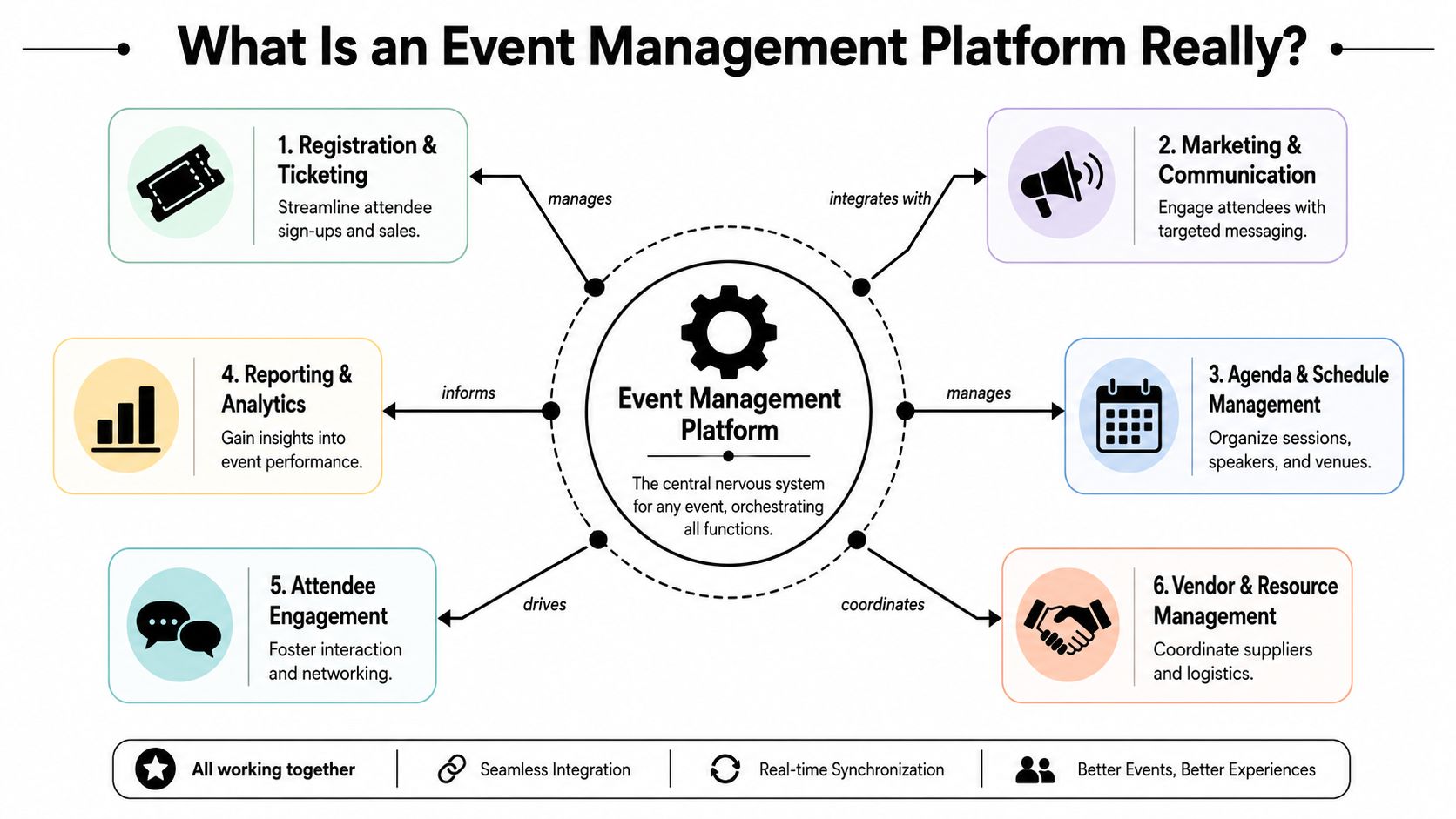
An event management platform is the central nervous system of an event. It connects the moving parts so the team doesn't have to manually stitch them together.
If you think of tools like Asana or Trello as places where project tasks stay organized, an event management platform does something similar for the event lifecycle. The difference is that it has to manage real attendee records, live operational changes, on-site execution, and post-event measurement, all in one flow.
One workflow instead of five disconnected tools
A proper platform should cover the full event path:
- Before the event: registration, ticketing, confirmations, reminders, event pages, agenda setup
- During the event: check-in, badge printing, attendance tracking, access control, staff coordination
- After the event: attendance records, engagement review, exports, follow-up, ROI reporting
That doesn't mean every event needs a giant enterprise suite. It means the pieces that matter must work together.
Technical value is operational data consolidation. By keeping attendee records, engagement signals, and attendance outcomes in one workflow, platforms reduce reconciliation errors and improve reporting fidelity from sign-up to post-event ROI analysis, as explained in CrowdComms' guide to choosing the right event management platform.
The platform is only useful if staff can run it fast
A lot of software demos look polished because they focus on configuration screens, templates, and design controls. On-site teams care about different things.
They need to know:
- Can staff check people in fast on multiple devices?
- Can the system handle last-minute edits without breaking records?
- Can someone search by name when a guest can't find a ticket?
- Can the platform work with the tools the team already uses?
For many organizations, that last point matters more than another flashy engagement module. A platform that fits existing systems often gets adopted faster than one that asks everyone to move into an entirely new environment. If your team already works in Google Workspace, it's worth comparing heavyweight platforms with options built for cloud event management inside familiar workflows.
The best event management platform isn't the one with the most screens. It's the one your registration team can trust under pressure.
Core Features That Actually Matter
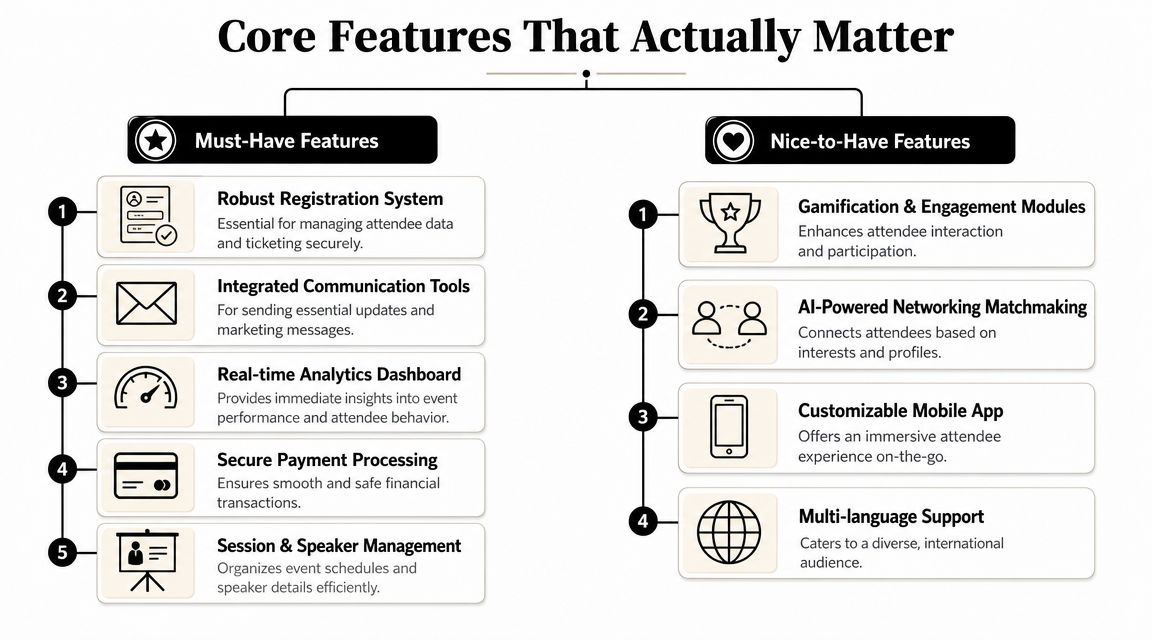
Most buying mistakes happen because teams shop for features in the abstract. They compare vendor lists instead of looking at what creates stress on event day.
The features that matter most are the ones that remove bottlenecks at registration, reduce mistakes at the door, and keep data clean enough to use afterward.
Registration that doesn't create cleanup work
Registration looks simple until you need multiple ticket types, custom fields, companion guests, session choices, access levels, and updates after submission.
A useful setup does three things well:
- Captures the right fields upfront: not just name and email, but the operational details staff will need later
- Generates usable records: every submission should become a clean attendee profile, not another row that needs manual fixing
- Supports ticket delivery cleanly: confirmations, downloadable passes, and mobile-friendly QR codes should all tie back to one source
Systems that generate QR code tickets for Google Sheets can make sense for teams that already manage guest data there. Instead of exporting and rebuilding lists elsewhere, they can issue tickets directly from the same dataset they use to manage attendance.
Check-in that works under pressure
Check-in is where weak tools get exposed.
If scanning is slow, if the interface is confusing, or if the system depends on perfect connectivity, the problem becomes visible to every attendee standing in line. A smooth registration site won't save you at the door if staff can't verify tickets fast.
The check-in side should support:
- Multiple concurrent devices: one scanner at a busy entrance is rarely enough
- Fast search fallback: staff need to find attendees by name, email, or ticket reference when phones die or inboxes are slow
- Offline validation: venues don't always have stable internet, especially at large halls, outdoor spaces, older campuses, or temporary sites
- Live sync back to the master record: attendance status should update centrally, not on isolated devices that need cleanup later
This is also where an event-driven design makes practical sense. Event-driven architecture allows separate parts of a system to react asynchronously, which improves scalability and resilience during spikes like registration surges or venue opening check-ins, as outlined in Wikipedia's overview of event-driven architecture. You don't need to be an engineer to care about that. You care because your line at 8:55 a.m. can't wait for a tightly coupled system to catch up.
Integrations that fit the team you already have
Many event teams aren't trying to replace every tool they use. They're trying to stop duplicate work.
That's why integrations often matter more than “all-in-one” branding. If your CRM, email tools, spreadsheets, forms, or analytics workflow already exist, the right platform should fit into that environment with as little friction as possible.
What usually works:
- Platforms that sync attendee data cleanly with systems used by marketing, sales, or admin teams
- Tools that work inside Google Workspace for organizations already using Forms, Sheets, Drive, and Gmail
- Simple exports and imports when full native integration isn't necessary
What usually doesn't work:
- A rigid platform that forces every stakeholder into a new dashboard for basic tasks
- A system where changes on-site don't reliably make it back to the master attendee list
- Complex permissions that confuse volunteers and temporary event staff
One practical example is Darkaa, which turns Google Sheets and Forms into a QR code ticketing and check-in workflow with offline scanning, real-time sync, and multi-device operation. That kind of setup can suit teams that want QR code ticket check-in for Sheets without rebuilding their operations around a separate enterprise platform.
If you're tightening budgets before you buy, it also helps to review the wider event cost picture. A strong financial roadmap for successful events can clarify whether you need broad platform depth or a simpler stack focused on registration and on-site control.
Reporting that helps after the doors close
A platform earns its keep after the event too.
Modern event systems are expected to centralize data that teams commonly track, including registrations, check-ins, no-shows, session attendance, app interactions, ticket sales, sponsorship revenue, and ROI, as described in Momentus' overview of event management analytics. The important part isn't that every event uses every metric. It's that the platform makes the relevant ones visible without manual reconciliation.
If your post-event report starts with “first we had to merge three spreadsheets,” the system didn't do enough.
The Benefits of a Unified Platform
The easiest way to understand the value is to compare two event days.
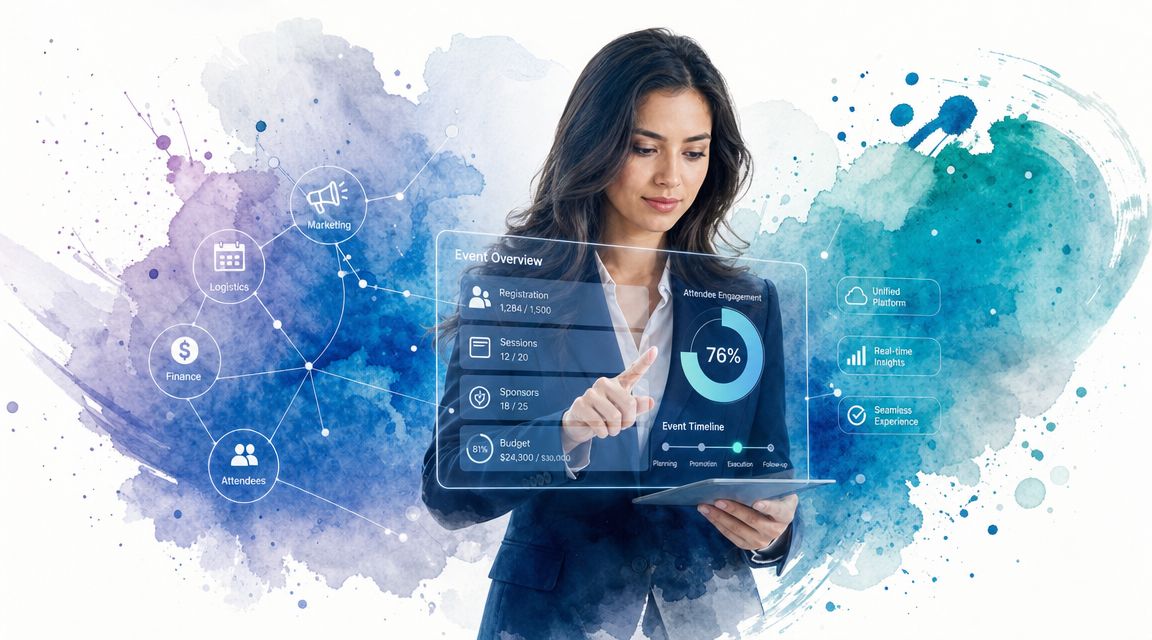
In the first, staff are cross-checking names across tabs, calling someone at headquarters to confirm edits, and manually updating attendance after the doors open. In the second, one system handles registrations, ticket status, check-in records, and the live attendee list. Same event. Very different workload.
Less admin friction
Manual systems create hidden labor. Teams spend time exporting, renaming files, updating duplicate lists, and correcting mistakes that only exist because the workflow is fragmented.
That matters more now because budgets are tight. A 2024 industry survey found that 73% of event professionals expect budgets to stay flat or decline, which makes time savings and staffing efficiency from automated check-in and list management much more important for proving value, according to Executivevents' review of event management software.
A unified platform won't remove all work. It removes the work that shouldn't exist in the first place.
A calmer attendee experience
Attendees don't care what software you bought. They notice whether the event feels organized.
They notice when:
- the confirmation email is easy to find
- the QR code scans on the first try
- the line moves quickly
- staff know whether they're registered for a session or meal
- walk-ins can be handled without confusion
Those moments shape how professional the event feels. Fast check-in is part operations, part hospitality.
Better decisions after the event
A unified platform also gives organizers cleaner evidence for future planning.
Instead of guessing which invite source worked, which sessions filled up, or where drop-off happened, the team can review what occurred in one dataset. That makes future staffing, room planning, communication timing, and ticket structure easier to improve.
Smooth events are usually built on boring foundations: one record, one workflow, one source of truth.
Who Uses Event Management Platforms and How
The shape of the platform changes with the event. The underlying need doesn't. Every organizer wants less manual coordination and more control when things get busy.
Corporate conference teams
A corporate event manager running a conference usually needs more than ticket sales. They need session structures, VIP handling, branded communication, staff permissions, sponsor visibility, and clean reporting afterward.
In practice, the biggest win is consistency. The attendee who registered for the conference should be the same attendee record used for workshop access, badge printing, and follow-up. When that link breaks, the operations team ends up doing manual patchwork in the middle of a live event.
Universities and schools
Education teams often need something simpler but no less reliable. Graduation, open days, department workshops, alumni events, and internal training sessions all involve attendance control, but not every institution wants a large standalone platform.
That's where workflows tied to familiar tools can help. A university administrator may use Google Forms for signups and then layer in QR code attendance for Google Forms to manage arrivals without creating a separate process that casual staff need to learn in one afternoon.
Festivals and live events
Festival promoters and venue teams live closer to operational risk.
Connectivity can be unreliable. Entry windows are compressed. Staff are often temporary. Capacity management matters. The wrong setup creates long queues very quickly, especially when people arrive in bursts rather than a steady flow.
For these teams, offline scanning and real-time updates matter more than polished back-office screens. If the system fails at the gate, nothing else matters.
Nonprofits and community organizations
Nonprofits often need flexible systems because every event is slightly different. A gala, donor reception, fundraiser, community workshop, or volunteer event may all run under the same organization with different staffing models and budgets.
The right platform here is usually one that scales without forcing over-complexity. RSVP handling, guest lists, donations or ticket tracking, and a simple door process go further than advanced modules that no one on the team will use.
Your Buyers Checklist How to Choose the Right Platform
Most vendors can demo a polished registration flow. Fewer can answer the operational questions that matter once attendees start arriving.
A useful buying process is less about asking “What features do you have?” and more about asking “What happens when real event conditions get messy?” That includes late edits, weak Wi-Fi, temporary staff, privacy requests, and post-event reporting deadlines.
Questions that expose weak platforms quickly
Start with workflow fit.
- How will this work with our existing tools? If your team lives in Sheets, Forms, Drive, Gmail, or a CRM, ask exactly how data moves and who has to maintain that flow.
- What does check-in look like for temporary staff? Don't accept a verbal answer. Ask for the actual operator view.
- What happens offline? If the vendor says offline support exists, ask how validation, conflict handling, and sync behave in practice.
- How hard is it to correct attendee data on event day? Name changes, transferred tickets, walk-ins, and access changes should not require a support ticket.
Security belongs on the shortlist too. If you're running public-facing events, campuses, or large in-person gatherings, software decisions intersect with physical operations. This is also where broader planning around managing event security risks becomes useful, especially when your entry process, staffing model, and access control all affect the attendee experience.
Data governance deserves harder questions than it usually gets. Event platforms collect personal data, and many now layer in AI-driven processing. A 2024 IAPP survey cited by Accruent found that 73% of privacy professionals said their organizations were using or planning to use generative AI, which increases scrutiny around consent, retention, and cross-border data handling in event tech, as discussed in Accruent's article on hybrid event management and data governance.
If a platform can't explain how it supports deletion requests, access auditing, consent handling, and regional compliance expectations, that's not a small gap.
For teams comparing lighter-weight options, it's worth looking at practical tools built specifically for event registration workflows rather than assuming a larger suite is automatically the safer buy.
Event Platform Evaluation Checklist
| Evaluation Criteria | Key Questions to Ask |
|---|---|
| Registration workflow | Can we create custom fields, ticket types, and attendee categories without workarounds? |
| Check-in operations | Can multiple staff scan at once, and what happens if internet access drops? |
| Ease of use | How much training will volunteers, contractors, or front-desk staff need? |
| Google Workspace fit | Does it work with Google Sheets, Google Forms, Gmail, and Drive if that's where our team already works? |
| Data accuracy | Does attendance sync back to one master record in real time or through exports later? |
| Reporting | Can we pull usable check-in and attendance reports without manual cleanup? |
| Pricing model | Are we paying for features we won't use, or is pricing tied to actual event usage? |
| Privacy and compliance | How are consent, retention, audit access, and deletion handled? |
| Access control | Can we manage different sessions, zones, days, or guest permissions cleanly? |
| Support under pressure | What happens if we need help on event day? |
Buy for the entrance table, not the sales demo. That's where weak systems show themselves.
Implementation From Plan to Launch
The best rollout is usually smaller than teams expect.
Start with one internal event, a staff session, workshop, or controlled guest-list event where the stakes are lower and the team can learn the workflow without a public queue forming at the door. Use that test to check data flow, ticket delivery, staff permissions, and search behavior on mobile devices.
Then train the people who will run check-in. Keep it short. They need to know how to scan, search, correct a record, and handle exceptions. They don't need a full admin tour.
Before launch day, test three things in the actual venue if possible:
- Offline behavior: don't assume connectivity will hold
- Device readiness: phones, tablets, chargers, and login access
- Fallback materials: badges, printable lists, or manual procedures if needed
Physical planning still matters too. Small execution details, including signage and welcome materials, shape how organized the event feels. If you're finalizing attendee-facing items, a guide to selecting custom logo swag can help you align giveaways and printed materials with the overall experience.
For teams building a more reliable operations stack, it also helps to review how event platforms connect with the broader workflow of event logistics software. Registration is only one piece. Launch goes smoother when check-in, staffing, access control, and attendee movement are planned together.
If you want to keep your event workflow inside Google Workspace, Darkaa is one option to consider. It turns Google Sheets and Google Forms into a QR ticketing and attendance system with branded ticket delivery, offline-capable scanning, multi-device check-in, and sync back to your spreadsheet, which suits teams that want tighter on-site control without moving into a completely new dashboard.