If you're planning events in 2026, you're probably facing the same tension many event organizers are. Leadership wants broader reach. Sponsors want cleaner reporting. Attendees want flexibility. Your team, meanwhile, does not want to run two separate events with the same headcount.
That's where hybrid event management either becomes practical or painful.
The planners who do this well don't treat hybrid as a bonus livestream added three weeks before launch. They build one operating system for two audiences from the start. That's a different job than traditional event production, but it doesn't require a huge broadcast budget or a brand new software ecosystem. In many cases, it works better when the workflow stays simple, familiar, and tightly connected.
Table of Contents
- Introduction What Going Hybrid Means Today
- Understanding the Core of Hybrid Event Management
- Building Your Hybrid Event Tech Stack
- A Practical Workflow from Planning to Post-Event
- Engaging Both Audiences and Measuring Success
- Your Future Events Are Stronger Hybrid
Introduction What Going Hybrid Means Today
A common planning conversation now sounds like this: the venue is booked, the speakers are confirmed, and then someone asks whether remote access should be offered for people who can't travel. That question used to feel optional. It doesn't anymore.
Hybrid event management has moved into the normal operating model for many event teams. By 2025, 83% of meetings were expected to include an in-person component, and 89% of event marketers viewed hybrid events as important to their organization's strategy, according to this 2025 hybrid events industry summary. That matters because it shows the format isn't a workaround. It's part of standard portfolio planning.
What changed in practice is simple. Organizers didn't replace live events. They added digital access where it improved reach, flexibility, or continuity. For conferences, internal summits, association meetings, and education programs, that shift opened the door to new audiences without abandoning the value of being in the room.
Practical rule: Hybrid works best when you're solving a business problem, not chasing a format trend.
The business problems are familiar. Your speakers have followers in multiple regions. A sponsor wants more registrants than your room can hold. A customer success team wants clients to join key sessions without requiring travel. A university wants parents, alumni, and off-site staff to participate in the same ceremony or symposium. None of that requires a giant technical reinvention. It requires an operational model that your team can realistically maintain.
That's the core challenge. Not whether hybrid is viable. Whether you can run it without creating duplicate work, fragmented data, and a second-class experience for one audience.
Understanding the Core of Hybrid Event Management
Hybrid event management makes more sense when compared to producing a television show with a live studio audience. There's one production, one run of show, and one editorial goal. But there are two audiences consuming it in different ways.
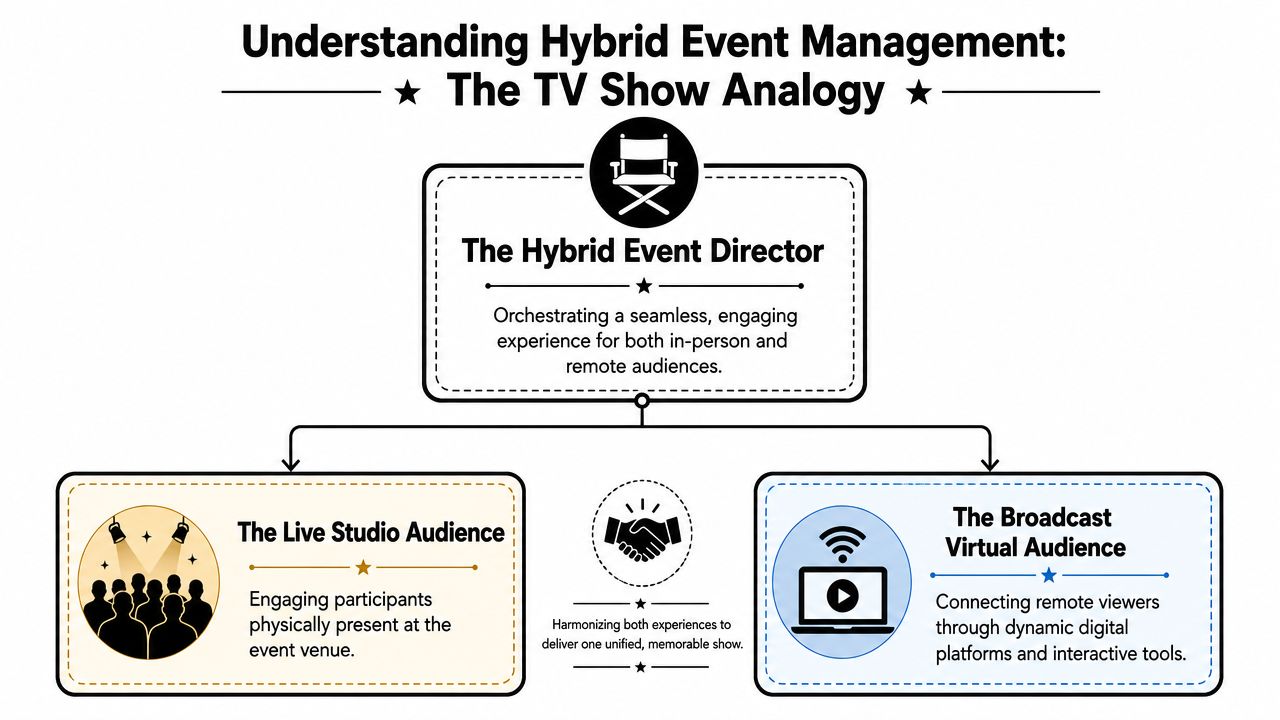
One event two real experiences
The in-person audience experiences the venue, signage, stage energy, hallway conversations, catering, and spontaneous interactions. The virtual audience experiences framing, audio quality, screen graphics, moderated chat, and whether the content feels designed for them or merely transmitted to them.
That's why hybrid is not just streaming. Streaming is one technical layer. Management is the larger discipline that coordinates registration, access, content flow, audience support, timing, moderation, and reporting across both modes.
A simple way to break it down:
- In-person experience: Seating, check-in, room flow, speaker support, sponsor placement, and on-site staff coordination.
- Virtual experience: Broadcast quality, access links, digital agenda, chat moderation, polls, replay logic, and remote support.
- Digital bridge: The systems and staff decisions that keep both audiences connected to the same event outcome.
If that bridge is weak, the event splits in half. People in the room feel like they're attending the main event. People online feel like they've been handed surveillance footage.
The bridge between the room and the screen
Lean teams often get poor advice here. A lot of guidance assumes you have separate crews, a dedicated virtual host, multiple camera operators, and plenty of production support. In reality, many organizations need a lower-overhead model. As noted in this hybrid event planning overview for leaner teams, existing guidance often assumes substantial production capacity and doesn't answer how smaller teams should decide which features are worth the cost.
That's the decision that matters most. Not “Can we add hybrid?” but “What level of hybrid can we deliver well?”
If your team can't support parity, don't fake parity. Design an intentionally simpler virtual experience instead.
That may mean fewer breakout options, a tighter agenda, one strong room instead of three weaker ones, or limited virtual networking instead of a rushed attempt at full-featured digital community. Good hybrid event management protects experience quality by matching ambition to staffing.
For teams evaluating platforms, the useful question isn't who has the longest feature list. It's which system helps your team coordinate the essentials without multiplying handoffs, making an event management platform comparison for practical workflows more useful than a glossy feature matrix.
Building Your Hybrid Event Tech Stack
The most expensive hybrid setup isn't always the most effective. The stack that tends to hold up under pressure is the one your team can operate confidently, troubleshoot quickly, and report from cleanly.
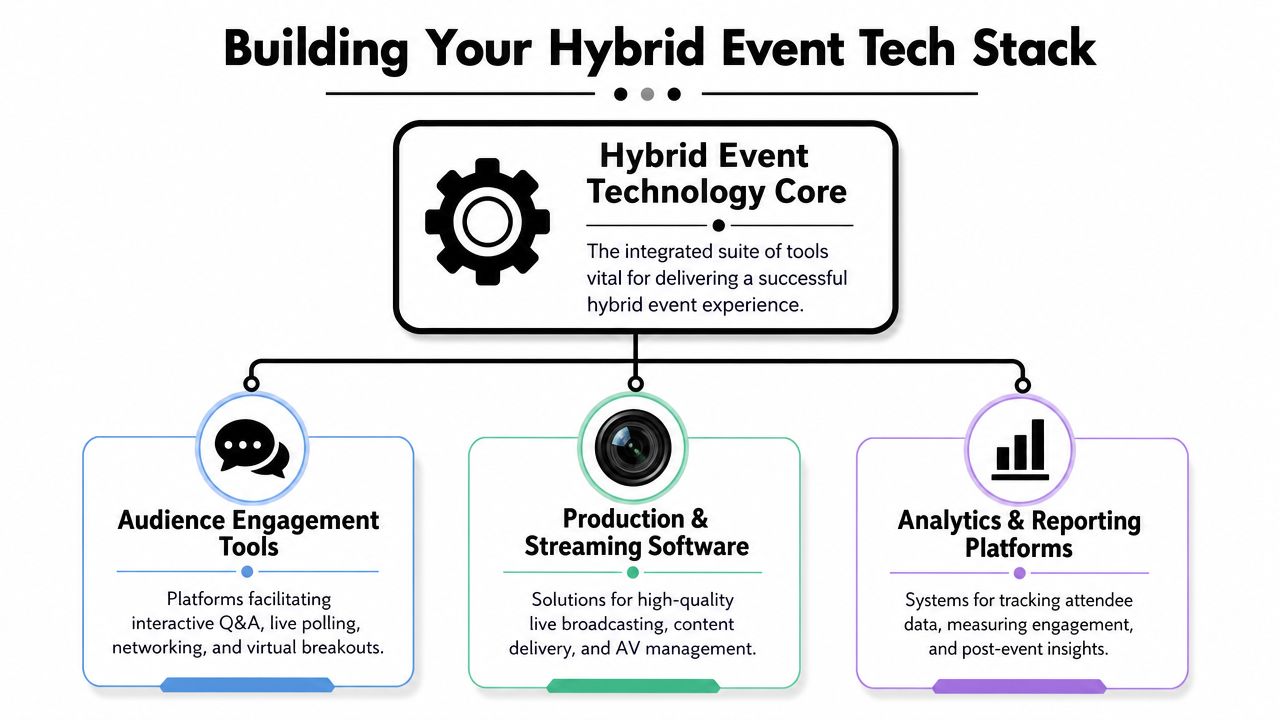
Three systems that matter
I think about the stack in three layers.
First, you need production and streaming. This includes cameras, microphones, switching, encoding, presentation capture, and the platform where remote attendees watch. The key planning question is not just “Can it stream?” It's “Can remote attendees clearly hear every speaker, see every slide, and recover quickly if something fails?”
Second, you need engagement tools. Polls, Q&A, chat, moderated questions, and session interaction live here. The right setup depends on format. A leadership town hall needs a different interaction model than a sponsor-heavy conference. Some sessions need active moderation. Others just need a clean question queue and visible polls.
Third, you need an operational hub. This is the least glamorous part and the one that usually determines whether the event stays manageable. Registration data, attendee categories, check-in status, access permissions, communications, exports, and post-event reporting need one dependable source of truth.
A useful planning lens is this short table:
| Function | What it must do well | What usually breaks |
|---|---|---|
| Production | Deliver stable audio and video | Weak venue internet, bad mic discipline |
| Engagement | Let both audiences participate | Virtual questions ignored, fragmented tools |
| Operations | Keep attendee data unified | Duplicate records, manual imports, mismatched statuses |
Why familiar tools lower overhead
An integrated stack reduces complexity because hybrid events need registration, content delivery, engagement, analytics, and collaboration to work together. Industry guidance summarized by Harvard Business Review on hybrid event challenges recommends using one platform or connected system that interoperates with CRM, marketing automation, and analytics tools to avoid duplicate workflows and unify attendee data.
For many teams, Google Workspace can serve as the backbone of that operational hub. Google Sheets gives you a live attendee database. Google Forms handles intake, session requests, or check-in responses. Google Drive holds assets and exports. Gmail supports segmented comms if your scale is appropriate. The value isn't novelty. It's that Google Workspace is broadly familiar to users.
That's why I often prefer a cloud workflow built around tools people already open every day. A practical cloud event management setup beats a shiny platform if the shiny platform forces manual reconciliation after every update.
Redundancy is part of the stack
The technical risk in hybrid isn't only a total stream failure. It's any weak link from capture to delivery. According to AVIXA guidance on hybrid event production, organizers should do end-to-end testing in the actual venue, monitor internet speed and mic levels live, and keep backup internet hotspots, redundant AV equipment, and a secondary streaming link ready.
That changes how you budget and plan. Backup isn't an optional upgrade. It's part of the minimum workable design.
Use this as a pre-show check:
- Primary and backup connectivity: Test venue internet, then test your fallback path.
- Audio first: People forgive a less cinematic image faster than bad sound.
- Secondary stream plan: Know how attendees will be redirected if the main route fails.
- Live monitoring: Assign someone to watch the attendee-side experience, not just the control table.
- Real venue testing: Rehearsals in a different environment don't tell you enough.
A hybrid show fails one broken handoff at a time. The fix is layered redundancy, not optimism.
A Practical Workflow from Planning to Post-Event
The cleanest hybrid workflows don't start with software. They start with decisions. Once those are clear, you can build a process that stays light enough for a small team and structured enough for a larger one.
Start with separate audience goals
Don't write one vague event goal and assume it covers everyone.
For each audience, define what success means. In-person attendees may be there for networking, sponsor meetings, and deeper immersion. Virtual attendees may be there for access to content, specific sessions, or convenience. When these goals differ, your operations should differ too.
A simple planning sequence works well:
- Name the audience groups: On-site attendees, virtual attendees, speakers, sponsors, staff, press, VIPs.
- Assign access rules: Who can attend which sessions, enter which zones, or receive recordings.
- Map communication paths: In-person guests need arrival instructions. Virtual guests need access links, time-zone clarity, and replay expectations.
- Define attendance signals: What counts as attendance for each format in your reporting model.
This matters commercially too. Hybrid events can produce 50% better attendance rates and 71% higher registration than pure in-person events because travel, cost, and geography barriers are reduced, according to this hybrid event statistics summary. Those gains only help if your registration and attendance workflow can handle both audiences without splitting the data.
Run registration and ticketing from one sheet
A common pitfall for many teams is overcomplicating things. They use one system for registration, another for badge lists, another for virtual access, and then a manual spreadsheet to reconcile them all. That creates delays and bad data right where you can least afford it.
A lower-overhead option is to use Google Sheets as the attendee master and build outward from there.
A practical model looks like this:
- Google Form for intake: Collect registrations, attendance type, session preferences, and custom fields.
- Google Sheet as master list: Clean the data, assign tags, define ticket type, and track status.
- QR code tickets for Google Sheets: Generate one ticket per attendee row so the same source list drives door control.
- Email or WhatsApp distribution: Send tickets and event instructions from the data you already maintain.
- QR code attendance for Google Forms: Let staff scan or record arrivals into a connected form-based workflow so status updates go straight back into your sheet.
This is also where one Google Workspace-based tool can fit naturally. Darkaa turns Google Sheets and Forms into a QR code ticketing and check-in workflow, including ticket generation, distribution, scanning, and sync back to the spreadsheet. That kind of setup is useful when you want QR code ticket check-in for Sheets without moving your team into a separate dashboard.
The best registration system is the one your operations team can still trust after six rounds of attendee changes.
For teams producing recurring webinars, streamed keynotes, or session clips after the event, a documented post-production process matters too. This guide to video workflow automation is a useful reference if your team is trying to standardize how recordings get edited, scheduled, and published after the live program.
Day-of delivery without chaos
Hybrid events often fall apart at the handoff points. Not at strategy level. At the door, at speaker check, at link distribution, at the moment a remote attendee asks a question and nobody in the room sees it.
Day-of discipline comes from assigning control points.
| Control point | Owner | What they watch |
|---|---|---|
| On-site check-in | Registration lead | Arrival flow, badge issues, duplicate records |
| Virtual room access | Platform lead | Access links, waiting room issues, attendee support |
| Stage and stream sync | Show caller or producer | Session timing, cues, transitions |
| Cross-audience interaction | Moderator | Q&A intake, poll display, speaker prompts |
Later in the workflow, when your staff needs to see how the moving parts connect, a short visual explainer helps more than another SOP document.
What happens after the event
Post-event discipline is where hybrid starts paying off.
Because your attendee data, ticket status, and participation records live in one place, follow-up gets easier. Export the attendee list by audience type. Identify no-shows, checked-in guests, virtual attendees who accessed the event, and people who should receive recordings or next-step outreach.
A useful post-event sequence:
- Segment by participation: On-site attended, virtual attended, registered but absent, speakers, sponsors.
- Send relevant follow-up: Slides, recordings, sponsor offers, session resources, or thank-you notes.
- Log operational notes fast: Where check-in slowed, where chat moderation lagged, where the run of show broke.
- Preserve the template: Don't rebuild the same workflow next time.
That last point is the difference between doing one hybrid event and building a hybrid system.
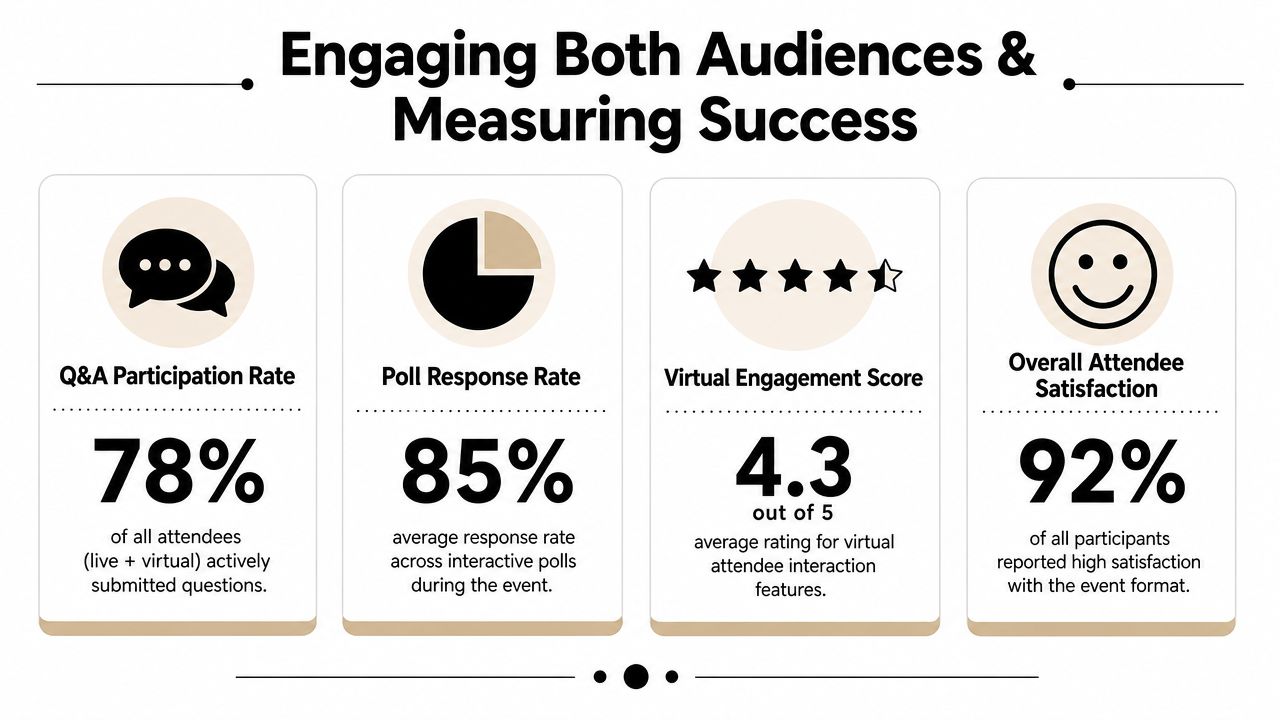
Engaging Both Audiences and Measuring Success
Engagement in hybrid events doesn't happen because both audiences are present. It happens because someone deliberately gives them shared moments and clear ways to participate.
Create shared moments on purpose
The easiest mistake is to run the room for the in-person audience and assume the stream will translate the experience. It won't.
What does work is simple and repeatable:
- Use one moderated Q&A queue: Don't let room mics and virtual chat compete as separate universes.
- Run polls visible to everyone: If both audiences can see the same result, they feel part of the same session.
- Acknowledge remote attendees verbally: Speakers should answer online questions by name or location when relevant.
- Give the virtual audience a host or moderator: If you can't assign a separate host, assign one staffer to own remote participation.
- Design transitions carefully: Dead air feels longer online. Fill handoffs with slides, prompts, or clear holding language.
Remote attendees don't need a copy of the room. They need a version of the event that feels intentionally produced for screen-based attention.
Build a reporting model that executives can read
Measurement is where many hybrid programs still get fuzzy. Existing guidance often tells teams to track engagement, but it rarely explains how to compare in-person and virtual outcomes in a way that supports budget decisions. That gap is called out directly in this hybrid ROI measurement discussion.
The answer isn't pretending all metrics are identical. The answer is building parallel metrics that are comparable enough to support decisions.
A practical reporting model:
| Event goal | In-person signal | Virtual signal | Combined view |
|---|---|---|---|
| Reach | Check-ins | Accessed stream | Total participating audience |
| Session interest | Room attendance | Session views or dwell time | Session demand by topic |
| Interaction | Mic questions, booth visits | Chat, polls, Q&A submissions | Engagement intensity |
| Follow-up potential | Meetings, scans, survey intent | CTA clicks, surveys, resource downloads | Qualified post-event audience |
Store these in one master sheet if that's what your team can maintain reliably. That's often enough. You don't need a complex BI stack to produce useful reporting if the source data is clean.
If your team is refining the operational side of attendance capture, this overview of an attendance tracking system for events is relevant because the reporting quality depends heavily on what gets captured at registration and check-in.
What doesn't work is flooding stakeholders with activity counts that don't answer a business question. More data isn't the same as better measurement. A smaller set of aligned metrics usually tells the truth faster.
Your Future Events Are Stronger Hybrid
Hybrid event management gets easier when you stop treating it like a premium add-on and start treating it like an operating model.
The teams that run it well usually do three things consistently. They design for one event with two real audience experiences. They keep the tech stack integrated enough that data doesn't scatter across five tools. And they build workflows around familiar systems so the event can scale without adding unnecessary overhead.
That's why a Google Workspace-centered approach works for so many organizations. It keeps planning, ticketing, attendance, and reporting close to the tools people already understand. The result is less training, fewer manual exports, and a cleaner handoff from planning to live delivery to post-event analysis.
Hybrid isn't automatically simpler than in-person. It isn't cheaper in every case either. But it is more adaptable, more resilient, and often more valuable when the workflow is designed well.
The strongest hybrid events don't try to impress with complexity. They remove friction. That's what scales.
If you want to keep hybrid operations inside Google Workspace, Darkaa gives you a practical way to generate QR code tickets from Google Sheets or Forms, send passes, and run check-in with attendance syncing back to your spreadsheet. For teams that want a lower-overhead workflow instead of another standalone event dashboard, that's a useful place to start.