The email usually looks harmless. “Can you take point on the annual conference?” Then the calendar invites start, stakeholders pile in, and what sounded like a straightforward assignment turns into venue holds, speaker logistics, budget approvals, registration questions, dietary notes, badge changes, and a flood of last-minute attendee edits.
That's the moment activity is often confused with coordination. They start chasing tasks instead of building a system. Good corporate event coordination works the other way around. You decide how the event will run before the event starts running you.
That matters because this isn't a side task anymore. Corporate events sit inside a major commercial market. One market study estimated the global event management market at $1,311.4 billion in 2019 and projected it to reach $3,605.8 billion by 2027. The same study estimated North America at $506.2 billion in 2019, with a projected 54.3% CAGR, which tells you how much operational discipline now matters in the events business (event management market outlook).
If you've just been handed an event and feel underwater, that feeling is normal. The fix isn't heroics. It's a repeatable operating model, the same mindset behind any guide for successful team projects: clear ownership, visible timelines, controlled handoffs, and one source of truth.
Table of Contents
- Defining Your Event Blueprint and Budget
- Assembling Your Event Team and Vendors
- Streamlining Attendee Registration and Ticketing
- Executing Flawless Day-Of Event Operations
- Measuring Success with Post-Event Reporting
- Conclusion Your Path to Coordination Mastery
Defining Your Event Blueprint and Budget
Most event problems begin before any guest sees them. They begin when the brief is vague, the budget is optimistic, and nobody agrees on what success means.
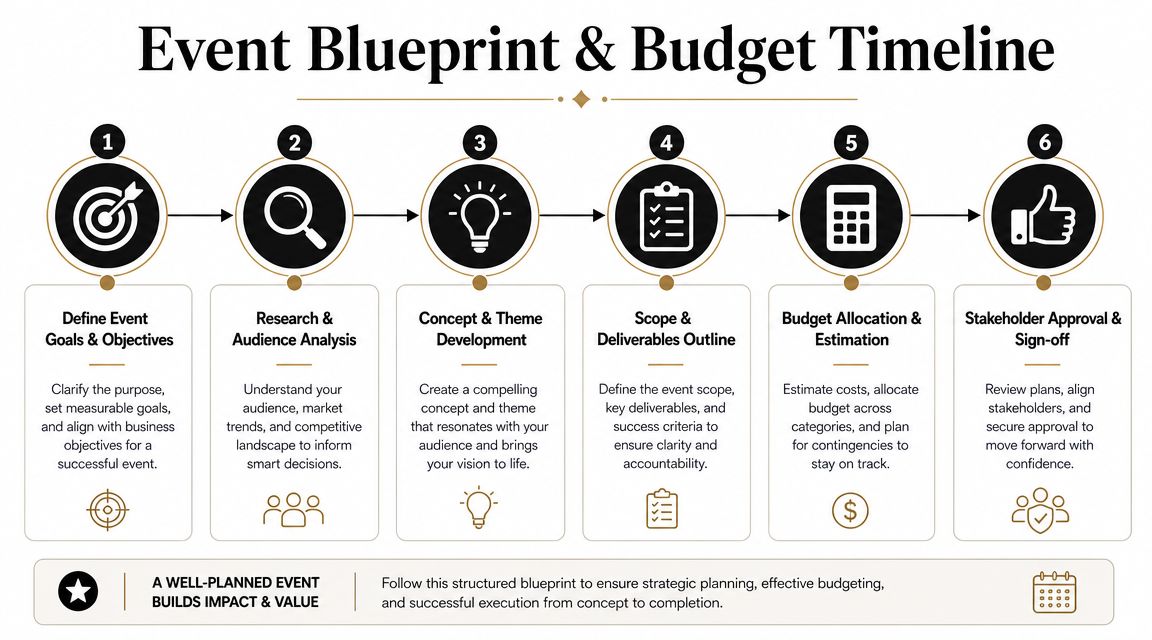
A reliable corporate event workflow starts with measurable objectives and a detailed master timeline. That seven-step structure is a common recommendation in event management guidance because it makes success measurable instead of anecdotal (seven-step event management process).
Start with outcomes not activity
Don't begin with “We need a conference in October.” Begin with outcomes that can be judged later.
A better brief sounds like this:
- Sales outcome: Generate qualified conversations for the commercial team.
- Internal outcome: Train regional managers on a new process and verify attendance.
- Partner outcome: Give sponsors or internal business units defined visibility and lead capture opportunities.
- Brand outcome: Position the company clearly in front of a targeted audience.
When teams skip this step, they overbuild. They add sessions that don't serve a goal, they approve nice-to-have production, and they invite audiences that don't belong in the room.
Practical rule: If a line item doesn't support an event objective, question it before it reaches procurement.
Audience definition belongs here too. If you're inviting clients, prospects, staff, or channel partners, each group changes your registration flow, message timing, and room design. Promotion should match that audience. If your event depends on social visibility, tighten your message early and borrow from proven viral growth social media strategies instead of posting generic countdown graphics in the final week.
A short planning checklist helps keep this phase disciplined:
- Write the event goal in one sentence.
- List the audiences in priority order.
- Define what attendees must do, learn, or receive.
- Set approval owners for budget, content, venue, and communications.
Here's a useful walkthrough for the planning sequence:
Build the master timeline before booking chaos
The master timeline is your control document. It's not a vague project plan. It's the calendar of every irreversible decision.
Include milestones for venue hold, contract signature, registration launch, speaker confirmation, design approval, attendee reminder emails, catering final numbers, print deadlines, run-of-show lock, staff briefing, and post-event survey send.
A simple working format:
| Phase | Critical decision | Owner |
|---|---|---|
| Pre-launch | Approve scope and budget | Executive sponsor |
| Registration | Open form, ticketing, confirmations | Event operations |
| Content | Lock agenda and speaker assets | Program lead |
| Production | Confirm AV, staging, signage | Logistics lead |
| Final week | Freeze attendee lists and staffing assignments | Event director |
Budget for decisions not surprises
Bad budgets lump costs into broad categories. Good budgets expose risk.
Split your budget into visible operational buckets: venue, food and beverage, AV, staffing, registration and check-in, speaker travel, signage, print, contingency, and post-event follow-up. Then mark each line as fixed, variable, or likely to change late.
Watch the usual weak spots:
- Hidden venue charges: Power, furniture, loading access, overtime, cleaning, and internet often appear late.
- Last-minute attendee changes: Reprints, badge edits, walk-ins, and revised seating can push labor and materials up.
- Approval delays: A cheap quote that expires during internal review often becomes an expensive quote.
The budget should tell you where the event can break before the event breaks there.
Assembling Your Event Team and Vendors
Events don't fail because one person forgot a task. They fail because nobody owned the handoff between tasks.
That's why staffing and vendor selection matter as much as concept and budget. In the United States, the Bureau of Labor Statistics reported 155,800 meeting, convention, and event planners in May 2024 and projected 5% employment growth from 2024 to 2034, which shows how established and specialized this work has become (meeting, convention, and event planners overview).
Hire for reliability not polish
A smooth vendor meeting means very little. What matters is whether the vendor can execute under time pressure, follow revisions, and escalate problems early.
When evaluating caterers, AV teams, printers, security staff, transport partners, or check-in support, look for these signals:
- Response quality: Do they answer the actual operational question, or just send a brochure?
- Revision discipline: Can they version quotes and run sheets cleanly?
- Day-of realism: Do they explain setup windows, staffing assumptions, and venue dependencies clearly?
- Accountability: Is there one named decision-maker on their side?
Ask for sample documents, not just promises. A clear production schedule tells you more than a polished pitch deck.
Build a communication structure people will actually use
Most event teams suffer from too many channels, not too few. Email holds approvals. Chat handles urgent issues. A live planning sheet tracks owners and deadlines. A run-of-show covers event day. Keep each channel distinct.
I've seen teams create five overlapping planning docs and then wonder why the sponsor package, seating chart, and speaker times all conflict. One operational source of truth beats a stack of almost-correct files.
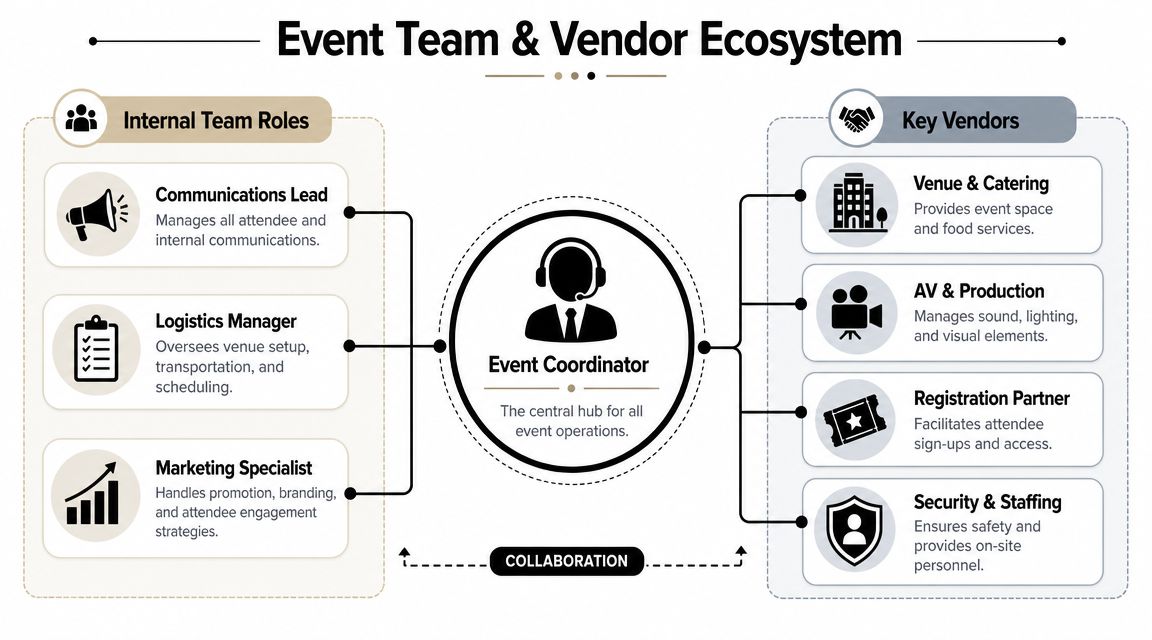
Use a role map before the event goes live:
- Executive sponsor: Approves scope changes, budget exceptions, and high-risk decisions.
- Event lead: Owns timeline, cross-functional coordination, and final calls.
- Logistics lead: Handles venue, setup, catering, room turns, and vendor sequencing.
- Registration lead: Owns attendee data, ticketing, check-in, and exception handling.
- Communications lead: Manages invitations, reminders, speaker briefs, and attendee updates.
People don't need more updates. They need to know what they own, when they need it, and what happens if they miss it.
Contracts should also reflect real operations. Add service times, deliverables, cancellation terms, revision windows, named contacts, access requirements, and what happens if equipment or staffing falls short. A vague contract creates an expensive event day.
Streamlining Attendee Registration and Ticketing
At 8:05 a.m., the registration line is backing up, one sponsor insists their guest is on the list, and the person at the desk is switching between an email inbox, a PDF guest list, and a spreadsheet that no one trusts. That mess usually starts weeks earlier, when the team builds registration in too many places.
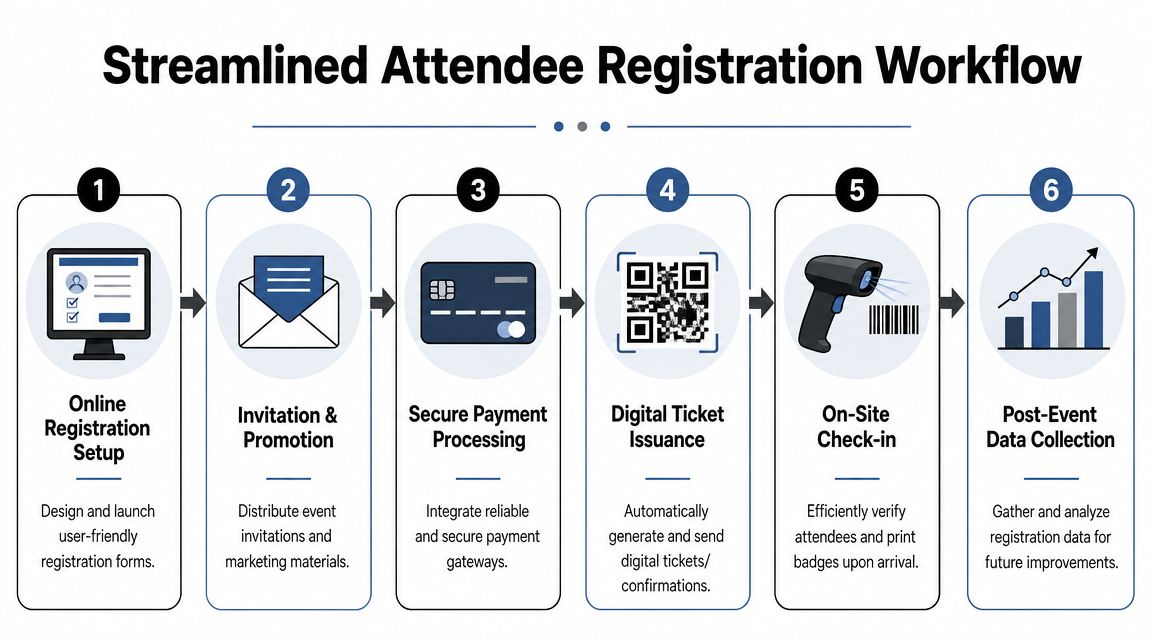
Registration should do four jobs well. Capture the right attendee data, issue the right ticket, control access at the door, and leave you with records leadership can use after the event. A polished RSVP page alone does not solve that. Teams still need attendance proof, access control, and clean records tied to one attendee list. That gap shows up often in real-world planning problems, as noted in this overview of corporate event planning challenges.
Why expensive platforms often create new problems
Large event platforms can help. They can also add cost, training overhead, and a second data system your team now has to maintain.
I see this mistake a lot in corporate events that are operationally moderate but administratively messy. Internal conferences, partner briefings, training days, and multi-track company events often do not fail because the software lacks features. They fail because no one can fix a registration error quickly, trace the source of truth, or train temporary staff on the check-in workflow.
The trade-off looks like this:
| Approach | What you gain | What you risk |
|---|---|---|
| Full standalone platform | Broad feature set | Longer setup, more training, split ownership |
| Google-based workflow | Familiar tools, faster adoption | Requires cleaner process rules |
| Manual RSVP and spreadsheets | Low setup at first | Duplicates, weak validation, poor reporting |
If your team already runs on Google Workspace, keeping registration, ticketing, and attendance inside that environment is often the smarter move. Staff already know the tools. Corrections happen faster. Ownership stays visible. For teams comparing options, this guide to choosing an event registration tool for practical event workflows is a useful reference.
A practical Google Workspace workflow
Start with a Google Form. Use it as the front door and ask only for fields you will use in operations. Name, company, email, ticket type, session selection, dietary needs, access level, and approval status are common examples. If a field does not affect seating, catering, access, reporting, or follow-up, question why you are collecting it.
Send responses into a Google Sheet and treat that Sheet as the master attendee record. That is where accessible tools start to beat heavier platforms for many corporate teams. Marketing can manage invites. Operations can clean records. front-desk staff can work from scan views or filtered tabs. Finance can review attendance later without asking for an export from a platform only one person knows how to use.
Specialized add-ons can fill the gaps that plain Forms and Sheets do not cover on their own. They can generate unique QR tickets from form responses, send branded tickets in bulk from a Sheet, and sync scan-based check-ins back to the live attendee list. Darkaa is one example of that model. It adds QR ticketing and check-in functions to Google Sheets and Google Forms without forcing the team into a separate event suite.
That setup works because it mirrors how event operations run. Different people need different levels of access, but they still need one record system.
What clean attendance control looks like
A registration workflow is usable only if the team at the door can answer four questions immediately:
- Is this person registered?
- Have they already checked in?
- What access do they have?
- Where is the attendance record stored?
Those answers should come from one live record, not a mix of inbox searches, printed lists, and handwritten notes.
For seminars, internal compliance sessions, and hybrid events, use one master attendee record per person. Every scan, walk-in update, spelling correction, or manual override should update that same record. Teams that keep side lists for later cleanup usually pay for it twice. First in slower check-in, then again in post-event reconciliation.
A fast check-in line looks good. A reliable attendance record is what protects the team after the event, when leadership asks who attended, who did not, and whether access was handled correctly.
The goal is not fancy software. The goal is a registration system your team can run under pressure, fix without escalation, and audit after the room is empty.
Executing Flawless Day-Of Event Operations
Event day is not the time to make creative decisions. It's the time to execute the decisions you already made, flag exceptions quickly, and keep the attendee experience calm even when the back end gets noisy.

Run the day from one live document
Your run-of-show should be minute-specific where timing matters and owner-specific everywhere else. If no owner is named, the task doesn't exist.
A usable run-of-show includes:
- Opening and access times: Vendor load-in, staff arrival, registration open, room open.
- Stage moments: Welcome, keynote, panels, breaks, sponsor remarks, Q&A, close.
- Operational triggers: Coffee reset, signage swap, lunch release, room turn, livestream start.
- Escalation notes: Who decides if timing slips, a speaker changes, or a session moves rooms.
Keep a print version for leadership and a live version for operators. Leadership doesn't need every cable run and catering checkpoint. Operations does.
If you need a deeper planning reference before the event date, this guide on event logistics planning is a useful companion to your run sheet.
Plan for the failures you can predict
Most event-day stress comes from pretending common failures are unexpected. They're not. Speakers run late. Wi-Fi drops. The badge printer jams. A VIP arrives unannounced. Walk-ins show up after registration closed.
Prepare short response rules in advance:
- If a speaker is late, decide how long you'll hold, what content can move forward, and who informs the audience.
- If internet fails, know which parts of check-in, presentations, or scans can continue offline.
- If walk-ins exceed expectation, assign one desk for exception processing so the main line keeps moving.
- If the agenda slips, define who has authority to cut content or shorten breaks.
A small control table helps on site:
| Issue | First response | Final decision owner |
|---|---|---|
| Speaker delay | Hold room, contact speaker, adjust cueing | Event lead |
| Check-in backlog | Open exception desk, redirect staff | Registration lead |
| AV failure | Switch backup input, notify stage manager | Production lead |
The smoothest events aren't problem-free. They're run by teams who already decided what to do when problems appear.
Measuring Success with Post-Event Reporting
A lot of event teams stop at “attendance was strong” or “feedback seemed positive.” That's not reporting. That's memory.
Post-event evaluation works best when it functions like a formal data pipeline: collect feedback from attendees, staff, vendors, and sponsors, compare outcomes against original goals, analyze attendance and engagement data, and archive the result for future use (post-event evaluation best practices).
Treat reporting like an operational handoff
The first mistake is waiting too long. Send surveys while the experience is still fresh. Gather operational notes from staff and vendors immediately, before people move on to the next job and details blur.
The second mistake is reporting only what's easy to count. Headcount matters, but it rarely answers the business question on its own.
Collect from several angles:
- Registration data: Who signed up, canceled, didn't show, or arrived late.
- Check-in records: Who attended and when they entered.
- Session-level activity: Which sessions filled, which ones underperformed, and where flow broke down.
- Qualitative feedback: What attendees, speakers, and sponsors found confusing or useful.
For survey design, use concise prompts that produce usable answers. If you want sharper attendee input, these examples on how to improve business with guest feedback are a practical starting point.
Build a report stakeholders can act on
A useful report is short enough to read and detailed enough to defend.
Structure it like this:
Original objective
State what the event was supposed to achieve.Operational outcome
Summarize attendance, delivery quality, schedule adherence, and issue handling.Audience response
Include key themes from surveys and comments.Data integrity
Confirm how attendance was recorded and where the final records live.Recommendations
List what to repeat, remove, simplify, or automate next time.
If your team wants a stronger framework for attendance analysis and event follow-up, this reference on attendance statistics for events helps connect raw participation data to better planning decisions.
The post-event report isn't a victory lap. It's the document that makes the next event easier to run and easier to approve.
Archive the final attendee list, check-in status, survey output, vendor notes, and final budget version together. Six months later, that archive will matter more than anyone expects.
Conclusion Your Path to Coordination Mastery
Corporate event coordination gets easier when you stop treating it like a pile of separate jobs. It's one operating system. Objectives shape scope. Scope shapes budget. Budget shapes staffing. Staffing shapes execution. Execution creates the data you use to improve the next event.
That's why smart workflows beat brute force. You don't need more apps, more meetings, or more heroic last-minute effort. You need a tighter blueprint, cleaner ownership, and tools your team can use under pressure.
The practical advantage of working with familiar systems is hard to overstate. When registration, ticketing, check-in, and reporting stay close to the tools people already know, adoption friction drops and handoffs get simpler. That matters just as much as features.
If you've been handed a corporate event and feel like you're starting from chaos, that's not a sign you're unqualified. It usually means nobody has given you a clear framework yet. Once you build one, the work becomes manageable, then repeatable, then professional at a very high level.
The best event directors aren't guessing more effectively than everyone else. They're running a better system. Build that system once, refine it after every event, and you'll stop surviving events and start directing them.
If you want to run registration, QR ticketing, and attendance verification inside tools your team already uses, Darkaa is a practical option. It turns Google Sheets and Google Forms into a QR code ticket and check-in workflow, so you can create branded tickets, manage attendee records, and validate attendance without moving your team into a separate platform.