You're probably dealing with this right now. Admissions is planning an open day, alumni relations is selling tickets for reunion weekend, student affairs needs attendance records for mandatory workshops, and commencement is coming with its own seating, guest list, and check-in headaches. Every team has its own spreadsheet, its own form, its own inbox, and its own version of the truth.
That setup breaks down fast on a university campus. Universities run high-volume, high-stakes events across departments that don't share the same systems, the same compliance obligations, or the same workflows. One bad sync, one duplicate list, or one Wi-Fi outage at the door can turn a routine event into a mess for staff and a poor experience for students, parents, alumni, and faculty.
Table of Contents
- The Modern Campus Event Challenge
- Required Features for University Event Success
- Integrating Software into Your Campus Ecosystem
- Ensuring Security Accessibility and Compliance
- Decoding Pricing Models and Navigating Procurement
- Your Implementation Checklist and Change Management Plan
- Real Campus Use Cases and Measuring What Matters
- Frequently Asked Questions
The Modern Campus Event Challenge
Graduation is the easiest example because the failure points are obvious. The registrar has one list. The events office has another. Guest tickets are tracked somewhere else. Security needs a clean entry process. Staff at the doors need check-in to keep moving even when the network slows down. Then someone changes room assignments, adds accessibility requests, or updates VIP seating at the last minute.
That same fragmentation shows up all year. Open days, admitted student events, faculty lectures, board meetings, donor dinners, new student orientation, career fairs, student organization programming, and continuing education sessions all need planning, communication, registration, attendance, and reporting. Most campuses still spread that work across forms, email threads, PDFs, spreadsheets, calendar invites, and manual exports.
The problem isn't that universities lack effort. The problem is that they're trying to run an institutional event operation with consumer tools and disconnected systems.
Practical rule: If your staff has to reconcile attendance after the event by hand, you don't have an event system. You have a patchwork.
That's why event software has moved from “nice if we can budget it” to operational infrastructure. The global event management software market is valued at USD 11.31 billion in 2026 and projected to reach USD 32.62 billion by 2034, growing at a CAGR of 14.16%, according to Fortune Business Insights on event management software market growth. That projection matters because it reflects a broad shift toward digital tools that can handle complex scheduling, resource management, and real-time updates.
Events shape the whole student lifecycle
On a campus, events aren't side projects. They influence recruitment, yield, belonging, retention, advancement, and alumni engagement. A chaotic admitted-student event hurts enrollment. A weak orientation experience creates friction at the exact moment students need clarity. A disorganized alumni weekend damages goodwill with people you want to keep close to the institution.
That's why I advise universities to stop buying event tools for single departments in isolation. Buy for the campus ecosystem.
The real cost of staying fragmented
The obvious cost is staff time. The less obvious cost is poor visibility. When data is trapped in separate tools, leaders can't see which events drive enrollment, which audiences attend, or which follow-up actions matter.
Universities need event management software for universities that creates one source of truth across departments, not another app that one office likes and everyone else works around.
Required Features for University Event Success
Most event software demos look fine. They all show registration pages, confirmation emails, and a mobile scanner. That's not the hard part. The hard part is whether the platform survives a campus environment with multiple departments, mixed permissions, accessibility requirements, and unreliable Wi-Fi.
Why generic event tools fail on campus
The biggest miss is offline operations. Universities host events in stadiums, old auditoriums, rural campuses, temporary tents, and international sites where connectivity isn't reliable. That's not a fringe problem. The most underserved question is how to handle QR ticketing with offline validation in low-bandwidth campus environments. 42% of campus events in 2025 occurred in venues with Wi-Fi instability, causing 28% of check-in failures during peak admission days, according to this analysis of higher education scheduling and event efficiency.
If a vendor assumes constant cloud access, I'd treat that as a red flag. You need the ability to scan first and sync later, not apologize to guests while staff refresh a browser.
A second common failure is weak access control. Universities don't just run one-room events. They run orientations with tracks, conferences with parallel sessions, ceremonies with guest limits, and restricted events for specific cohorts. If the software can't handle multi-day schedules, session-level permissions, and different attendee types cleanly, it won't last.
A third miss is tool sprawl. The registration form lives in one place, tickets in another, check-in in another, and reporting somewhere else. If you want a good benchmark for what modern buyers look for in a platform, this guide on event management platform evaluation is useful because it focuses on workflow, not flashy demo screens.
This visual captures the feature stack universities need.
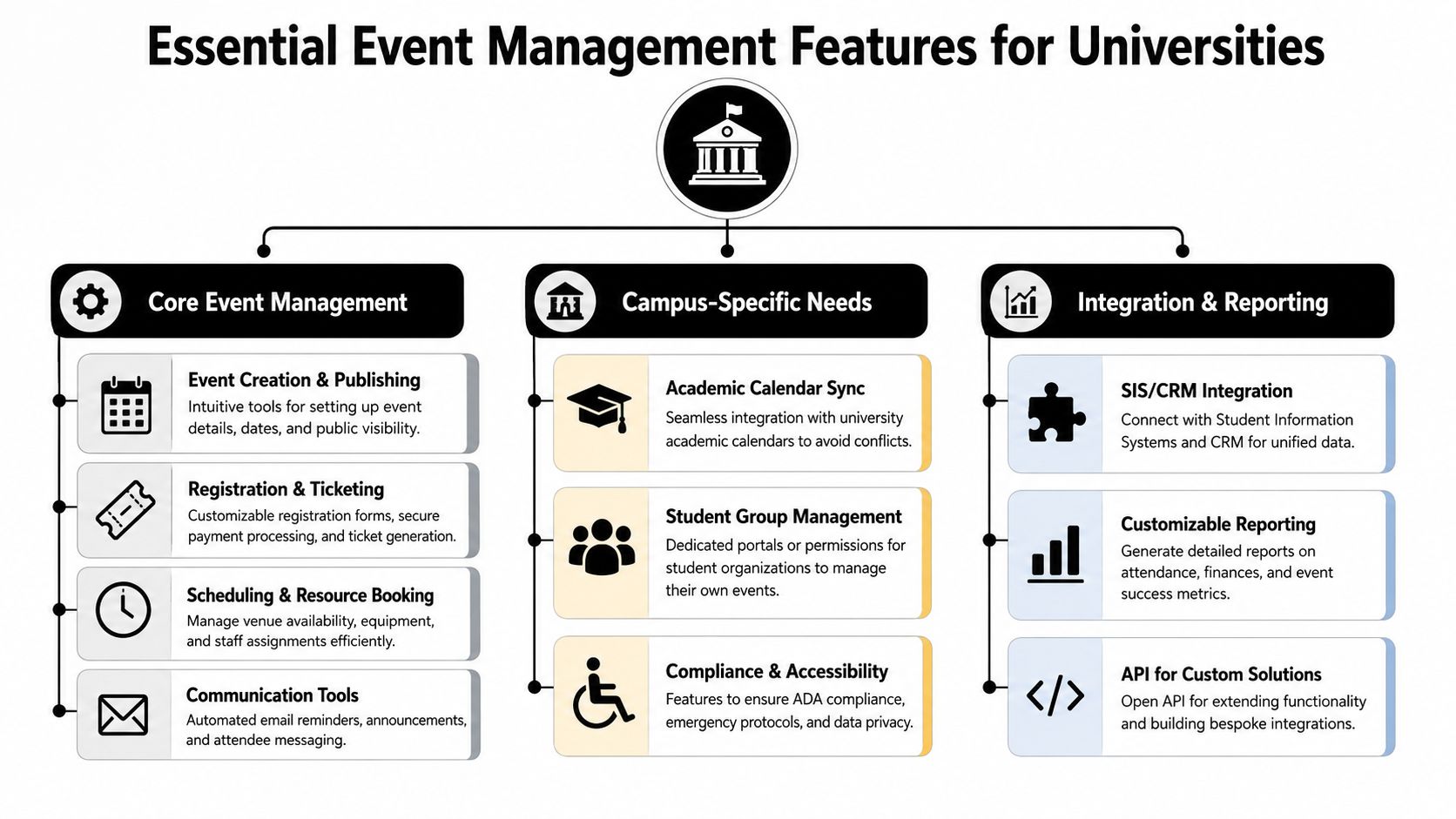
The feature checklist I'd insist on
Here's the shortlist I'd put into an RFP.
- Offline QR validation: This is essential for commencement, open days, and any venue where bandwidth gets shaky.
- Flexible ticket structures: You need guest tickets, staff passes, student-only access, VIP zones, and session-level entry rules.
- Google and Microsoft workflow compatibility: Staff won't adopt a system that forces them to abandon the tools they already use.
- Branded outputs: Tickets, badges, and confirmation messages should look like they came from the university, not the vendor.
- Multi-department permissions: Admissions, alumni, student affairs, and central events need different levels of control.
- Attendance proof and exportability: Teams need clean logs for compliance, follow-up, and audit purposes.
- Bulk communication tools: Last-minute room changes and cancellations have to reach attendees fast.
- Hybrid support: Some events need both onsite check-in and remote participation support without separate workflows.
I'd also get very specific about use cases in vendor conversations. Ask whether the platform can support QR code tickets for Google Sheets for graduation guest lists, QR code attendance for Google Forms for mandatory workshops, and QR code ticket check-in for Sheets when several departments need to share a live roster without moving into a new dashboard.
Buy for your worst event day, not your easiest one.
If the software can't handle orientation week, commencement, and a rural venue with poor connectivity, it isn't university-grade.
Integrating Software into Your Campus Ecosystem
Universities make expensive mistakes when they buy event software as a standalone convenience tool. It may work for one office for a semester. Then reporting breaks, duplicate records pile up, and someone starts manually comparing attendance files against the student system.
That's not a software problem alone. It's an architecture problem.

Why standalone software creates expensive admin work
The campus system that matters most is the SIS. If event attendance can't connect to student records, you'll end up with manual reconciliation. That's still common. 68% of higher ed institutions rely on legacy SIS like PeopleSoft that lack native event-sync capabilities, forcing manual reconciliation of attendance that takes admissions teams 15–20 hours per event, according to Ready Education's discussion of campus event management integration issues.
That figure tracks with what campuses experience in practice. It's not just admissions either. Student affairs needs attendance for required programming. Housing may need participation records tied to compliance workflows. Academic units may need proof of attendance for seminars or milestones. Alumni teams need event data connected back to constituent history.
When event software doesn't connect cleanly, staff become the middleware.
What good integration actually looks like
A good integration model does three things well.
First, it pulls in the right source records. That might mean enrolled students from the SIS, prospects from the CRM, or departmental invite lists from Google Sheets or Microsoft 365.
Second, it writes attendance and engagement data back to the systems that matter. If staff scan a ticket, that attendance record shouldn't die inside the event tool.
Third, it supports normal campus work habits. People shouldn't need to learn a complicated admin interface just to send tickets, check lists, or reconcile attendance.
Here's the test I use with clients:
| Integration question | Good answer | Bad answer |
|---|---|---|
| Where does attendee data originate | Existing campus systems | Manual import every time |
| Where does attendance end up | Back in SIS, CRM, or shared ops tools | Locked in vendor reports |
| How are updates handled | Automatically or with simple workflows | Export, clean, upload, repeat |
For many institutions, practical workflow matters as much as deep enterprise integration. That's why I usually recommend evaluating tools that work with everyday systems staff already trust. This guide to Google Workspace automation for operational workflows is a useful example of how to reduce friction instead of adding another layer of admin overhead.
A university doesn't need another data island. It needs event operations that fit the systems people already use.
If you remember one thing from procurement discussions, make it this. Event data has to travel cleanly across your campus ecosystem or the software will turn into another reporting headache.
Ensuring Security Accessibility and Compliance
Too many evaluations get sloppy. Teams focus on registration design, mobile apps, and ticket layouts, then treat compliance as a legal review at the end. That's backwards. Security and accessibility should eliminate weak vendors before the demo stage.
Security is a procurement gate not a nice-to-have
Universities hold sensitive data across multiple event types. Student details. Parent and guardian information. Internal staff records. Sometimes health-related data for medical education or continuing medical education events.
For universities managing medical schools, HIPAA compliance is a hard requirement, not a bonus feature. Failure to protect patient-related data can result in federal penalties exceeding $50,000 per violation, and compliant platforms have been shown to reduce data breach incidents by 78%, according to InEvent's review of university event software requirements.
That should change how you buy. Ask vendors about encryption, role-based access controls, and audit logs. Ask who can see attendee data, who can export it, and how activity is tracked. If the answers are vague, stop the process.
FERPA matters too, even if your event platform never touches clinical information. If a system is handling student participation, educational records, or identifiers tied to institutional processes, privacy controls need to be explicit and enforceable.
A strong setup should also support reliable attendance verification, especially when records feed into compliance, course participation, or mandatory training workflows. This overview of attendance verification workflows is useful because it focuses on proving presence in a way operations teams can use.
Accessibility has to be built in
Accessibility often gets reduced to “our forms work on mobile.” That's not enough. Registration pages, confirmation emails, schedules, tickets, and updates all need to be usable by people with disabilities.
The policy environment is tightening, and universities should treat accessibility as part of institutional risk management. If your team needs a practical primer on the standards that now matter, this guide to ADA Title II web accessibility is worth reading because it connects accessibility obligations to digital experiences that public institutions control.
Use these checks during evaluation:
- Registration accessibility: Can users complete forms with assistive technologies?
- Readable communications: Are confirmation and update messages understandable and structured clearly?
- Ticket usability: Can attendees access and present tickets without unnecessary barriers?
- Role permissions: Can staff access only what they need, not entire attendee datasets?
- Auditability: Can the institution verify who changed what and when?
If accessibility and compliance are “phase two,” the product isn't ready for campus deployment.
Security failures create legal exposure. Accessibility failures create exclusion and risk. Both damage trust. Universities can't afford to treat either as optional.
Decoding Pricing Models and Navigating Procurement
University buyers often ask which pricing model is best. The wrong question is “Which model is cheapest?” The right question is “Which model fits our event mix, budgeting process, and approval culture?”
How pricing models behave in higher ed
Here's the comparison I use when reviewing vendors.
| Pricing Model | Best For | Potential Pitfall |
|---|---|---|
| Per attendee | Large institutions with uneven event volume and occasional peak events | Costs can spike around major campus events |
| Subscription based | Universities that want predictable budgeting across departments | You may pay for capacity or modules teams don't fully use |
| Per event | Campuses with a few high-stakes annual events | Can become inefficient when departments run many smaller events |
Per-attendee pricing works when your event calendar is concentrated around key moments like orientation, commencement, and admissions yield programs. Subscription models are better when multiple offices will use the system continuously. Per-event pricing can be sensible for institutions testing a tool before wider rollout.
But software price alone won't tell you the whole story. Universities should compare total operational cost, including setup time, staff training, support, and any add-ons for check-in, reporting, badge design, integrations, or accessibility work. If you want a useful frame for evaluating hidden compliance-related software costs, this breakdown of costs of H&S compliance software is relevant because it shows how “base price” often excludes the features institutions need.
How to build a procurement case that survives review
A strong business case doesn't rely on abstract efficiency claims. It ties the purchase to campus pain that leadership already understands.
Use this structure:
Start with a broken workflow
Show where staff currently duplicate effort, lose visibility, or rely on spreadsheets after the event.Tie the platform to institutional outcomes
Connect it to enrollment operations, student experience, alumni engagement, or compliance risk reduction.Show operational simplicity
Procurement teams like solutions that reduce manual handling and don't create another support burden for IT.Request a pilot
Ask vendors to prove the workflow with a real campus event, not a polished generic demo.
I also recommend writing your RFP around scenarios, not feature buzzwords. Ask how the system handles graduation guest ticketing, orientation attendance, medical education privacy requirements, and multi-department approvals. Vendors can fake feature lists. They struggle to fake operational fluency.
Your Implementation Checklist and Change Management Plan
A bad implementation can sink a good product. I've seen campuses buy the right software and still fail because nobody cleaned the data, nobody clarified ownership, and every department assumed someone else would define the process.
What to do before go-live
Start with data. Clean your attendee lists, event categories, department names, and role definitions before migration. If admissions calls it “admitted student day,” student affairs calls it “yield event,” and advancement has its own naming scheme, your reporting will be unreliable from day one.
Then assign ownership. One person should own the platform day to day. That doesn't mean centralizing every event. It means having a clear operator who can manage standards, permissions, training, and vendor contact.
Use this checklist before your pilot:
- Map current processes: Identify how events are requested, approved, promoted, and reported today.
- Clean source data: Remove duplicates and fix inconsistent fields before import.
- Define roles: Decide who can create events, edit branding, scan tickets, and export records.
- Set naming standards: Make sure departments categorize events consistently.
- Choose the pilot event carefully: Pick something important enough to test the workflow, but not so politically risky that one hiccup kills adoption.
This rollout checklist is a helpful visual for keeping the project grounded.
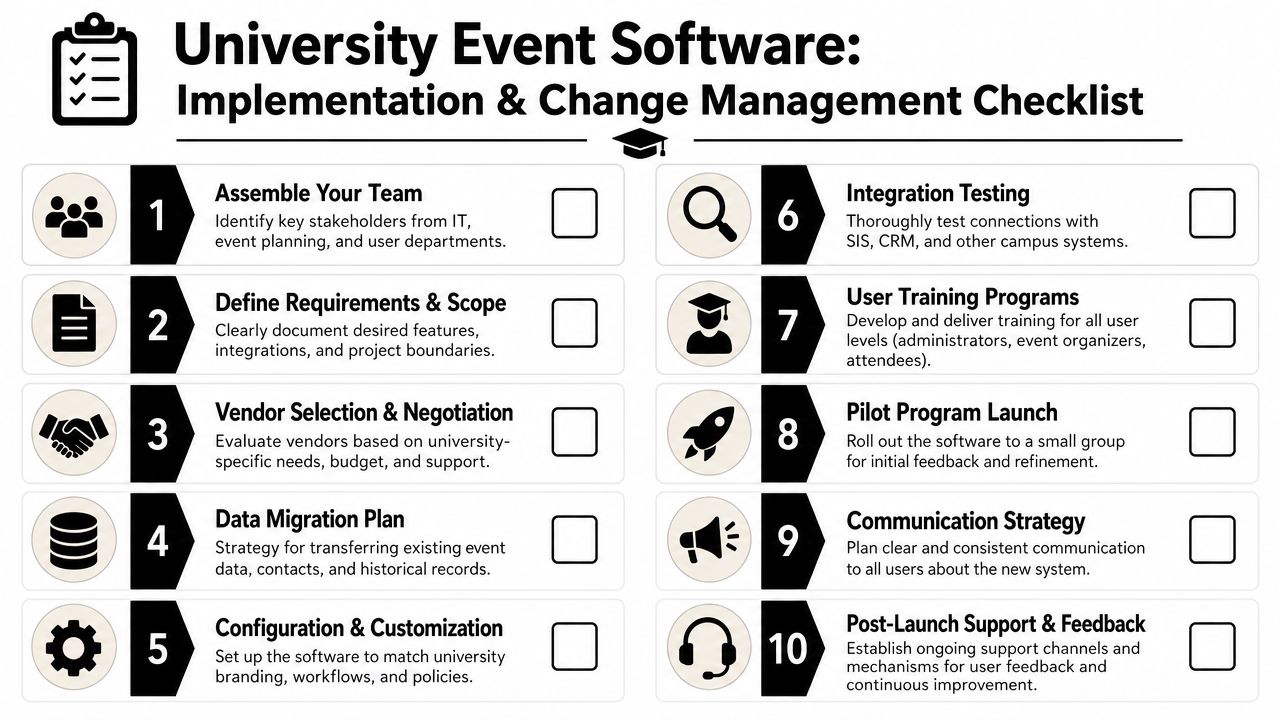
The campus rollout plan that works
Universities don't change behavior because IT sent an announcement. Adoption happens when each department sees that the new process removes friction from its own work.
That means your rollout should be message-specific.
- Admissions wants speed: Show how check-in, updates, and post-event follow-up get easier.
- Student affairs wants flexibility: Show that high-volume workshops and repeated programming can be managed consistently.
- Advancement wants cleaner records: Show how attendance flows into constituent history and outreach.
- Central IT wants control: Show how permissions, integrations, and security are governed.
The most effective campus “super user” is usually not the most technical person. It's the person other departments already trust to solve event problems.
Training should also be role-based. Door staff need a fast check-in workflow. Department admins need event setup and exports. Central operators need governance and troubleshooting. Don't dump all users into one generic training session and call it implementation.
Finally, define success for the pilot before launch. If you don't agree on what “working” means, every stakeholder will judge the rollout differently.
Real Campus Use Cases and Measuring What Matters
The best proof of value isn't a feature list. It's a campus workflow that becomes easier to run and easier to measure.
Where universities get value first
Admissions usually sees returns fastest. Open days and yield events have clear attendance goals, a high communication load, and a direct link to enrollment. When check-in is smooth and schedule changes reach people quickly, the event feels competent. That affects how families read the institution.
Orientation is another strong use case. Universities need attendance records across many sessions, often with different requirements for students, families, and staff. A system that tracks who attended what saves a lot of follow-up work later.
Then there's commencement. That's where weak software gets exposed. Guest lists shift, entry windows matter, and the venue network may not cooperate. If the platform can't handle high-volume check-in and fallback procedures, staff end up printing lists and improvising.
Alumni and advancement events need a different lens. The value isn't only turnout. It's whether attendance feeds future engagement, sponsorship, donor outreach, or chapter activity. Teams running sponsored events may also benefit from better pricing discipline. If you're trying to formalize sponsorship packages instead of guessing, this resource on how to charge for sponsorships is useful because it pushes teams to tie inventory and audience value to a repeatable framework.
What to measure after launch
The most concrete case in higher ed is Indiana Tech. After implementing specialized event management software, Indiana Tech increased its student yield from 40% to 82%, a 105% relative improvement, and the platform's analytics let the team track which engaged students deposited and enrolled, according to Guidebook's higher education event software case study.
That's the right lesson. Don't stop at registration counts. Measure outcomes tied to institutional goals.
Use KPI categories like these:
- Enrollment impact: Which attendees later deposited or enrolled
- Attendance quality: Which sessions people joined, not just registered for
- Operational efficiency: Where staff no longer need manual reconciliation or duplicate communications
- Stakeholder experience: Whether updates, entry, and scheduling ran smoothly enough to reduce confusion
- Advancement value: Whether attendance supports future outreach, giving conversations, or sponsor retention
Registration is an activity metric. Enrollment, retention, and follow-up action are outcome metrics.
If your software can't help you connect events to those outcomes, it may still be useful operationally. But it won't be strategic.
Frequently Asked Questions
Do universities really need dedicated event software
Yes, if multiple departments run events and attendance data matters after the event ends. Shared calendars and forms aren't enough when you need ticketing, check-in, reporting, permissions, and compliance controls in one workflow.
What's the first feature I should prioritize
Offline check-in. Campuses deal with unreliable connectivity more often than vendors admit. If entry depends on perfect internet access, your most important event day is exposed.
Should event software connect to the SIS or CRM first
Start with the system that owns the records you need for action after the event. For student-facing events, that's often the SIS. For advancement and alumni use cases, it may be the CRM. The wrong answer is leaving the event platform isolated.
How do I get buy-in from multiple departments
Lead with each department's pain, not your preferred technology. Admissions cares about speed and yield visibility. Student affairs cares about manageable attendance tracking. Advancement cares about clean records and follow-up. Frame the same platform differently for each group.
What should I ask vendors in a demo
Ask them to show a real campus scenario. Graduation guest tickets. Orientation session tracking. Medical education privacy controls. Multi-department permissions. Last-minute schedule changes. If they can only show generic conference workflows, keep looking.
How should we measure success after launch
Don't stop at registrations. Track attendance accuracy, staff time reclaimed, quality of follow-up data, and whether event participation connects to outcomes that leadership already values.
If your team wants a practical way to run campus events inside tools people already use, Darkaa is worth a look. It turns Google Workspace into a working event system with QR code tickets for Google Sheets, QR code attendance for Google Forms, branded tickets and badges, bulk delivery by email or WhatsApp, and offline-capable check-in that syncs back to your live data. For universities that want less dashboard sprawl and faster adoption, that's a strong fit.