
You're probably dealing with some version of the same mess most planners hit at least once. Registrations live in one spreadsheet. Payment confirmations sit in email. A few VIP names arrive by text. Someone updates the guest list from an old CSV. Then the night before the event, your team tries to merge everything into one “final” file and hopes nobody sold the last seat twice.
That setup works until it doesn't. The moment you need clean records, fast check-in, or a clear answer to “who has arrived?”, manual coordination starts breaking down. An online event ticketing system fixes that by turning ticket sales, attendee records, QR delivery, and entry validation into one working process instead of four disconnected tasks.
This isn't a niche upgrade anymore. The global online event ticketing market was valued at USD 45.74 billion in 2026 and is projected to reach USD 79.77 billion by 2034, growing at a 7.2% CAGR, driven by digital event management and the revival of live and hybrid events, according to Straits Research's online event ticketing market analysis.
Table of Contents
- From Spreadsheet Chaos to Seamless Check-ins
- How an Online Ticketing System Actually Works
- Core Features Every Event Planner Needs
- Choosing Your System Deployment and Integration
- Security and Operational Best Practices
- The Ultimate Vendor Selection Checklist
- Your Implementation Checklist for a Flawless Event
From Spreadsheet Chaos to Seamless Check-ins
A lot of teams don't start with software. They start with urgency.
A school graduation gets announced. A company workshop needs registrations by Friday. A community fundraiser opens with a simple form, then grows into paid tickets, guest categories, plus-one rules, and a check-in table run by volunteers who weren't in the planning meetings. That's where spreadsheet chaos begins. The spreadsheet itself isn't the problem. The problem is everything happening around it.
One file tracks RSVPs. Another tracks paid status. Someone marks “confirmed” manually after checking bank transfers. The catering lead wants dietary notes. The venue wants a final count. The front desk asks for a printable list “just in case.” By then, nobody trusts the master list because there are three versions of it.
Practical rule: If your team has to reconcile attendee status by hand the day before the event, you don't have a ticketing system. You have a patchwork process.
A proper online event ticketing system gives each attendee one record and each ticket one status. Sold, sent, scanned, not scanned, cancelled, reassigned. That sounds basic, but it changes everything operationally. Your staff stops asking where the latest file is. Your check-in team stops guessing whether a screenshot is valid. Your event lead can answer attendance questions without opening five tabs.
For smaller teams, that system doesn't have to mean a giant platform with a whole new dashboard. Many planners can start with a cleaner workflow using tools they already understand, especially if they want more control than a marketplace setup gives them. If you're weighing lower-cost options, this guide to free event ticketing tools and approaches is a practical place to compare what you need versus what vendors try to bundle.
How an Online Ticketing System Actually Works
The easiest way to understand ticketing is to stop thinking about the ticket image as the ticket itself.
Consider a library card. The card isn't the book. It's the reference that helps the system find the right record quickly. A QR ticket works the same way.
Early in the attendee journey, the flow is straightforward:
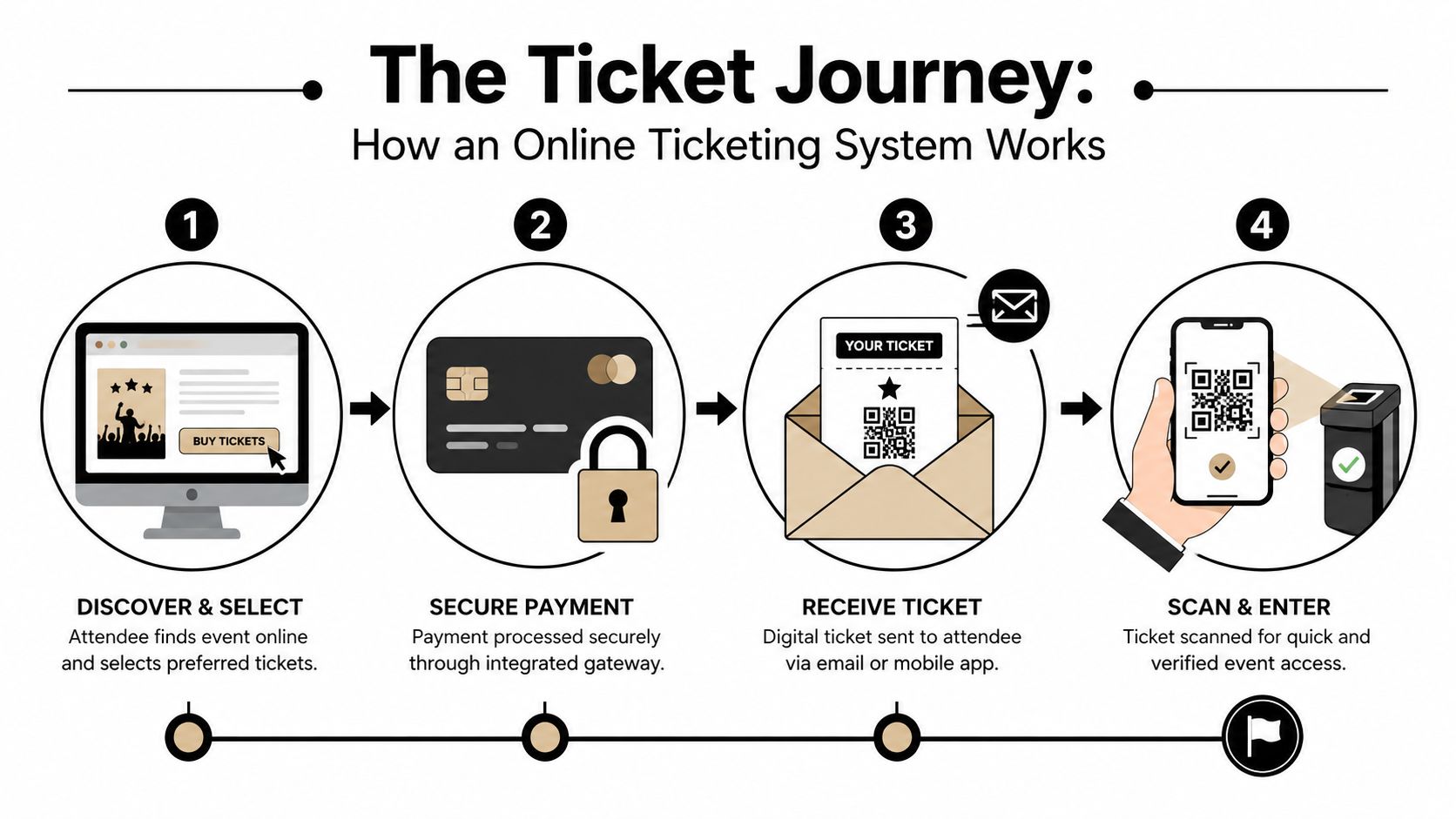
The ticket record matters more than the image
An attendee selects a ticket, pays through your checkout flow, and receives a ticket by email or mobile delivery. The useful part isn't the PDF design. It's the record created behind it. That record ties together the person, event, ticket type, access rights, and current status.
A QR code ticket functions as a digital key, embedding a unique, encrypted reference string. When scanned, the system instantly verifies the ticket's existence, validity for the event, and checks that it has not been previously used, flagging it as redeemed to prevent reuse, as explained in Tickera's guide to event ticket QR codes.
That's why a screenshot can still work if the code is readable, and why a beautiful ticket design means nothing if the validation record is wrong. The system checks the reference, not the visual polish.
For paid events, the checkout layer matters as much as the scanner. If you're comparing gateways, wallet options, and billing flows across regions, this overview of SaaS and e-commerce payment methods is useful because payment friction often creates more lost conversions than planners expect.
What happens at the door
At check-in, the scanner reads the QR code and asks the system a few simple questions:
- Does this ticket exist
- Is it valid for this event
- Has it already been used
- Does it grant access to this date, session, or zone
If the answer is yes, staff gets a clean approval and the record updates to scanned. If not, the system should show the reason clearly. Duplicate. Wrong day. Wrong entrance. Cancelled ticket. Unknown code.
That clarity matters more than fancy animation. Door teams need quick decisions they can trust.
A short walkthrough helps if you want to see the flow in action:
A slow scanner creates a human bottleneck fast. A clear validation response keeps the line moving and reduces arguments at the entrance.
Core Features Every Event Planner Needs
Feature lists are where a lot of ticketing advice goes off track. Vendors pile everything into one page, and planners end up comparing tools by volume instead of usefulness. A better way is to sort features by when your team needs them.
Before the event
Before launch, focus on setup features that reduce manual fixes later.
- Flexible ticket types: You need early bird, VIP, staff, sponsor, student, comp, or table-based tickets when the event model gets even slightly complex.
- Custom fields that serve operations: Dietary restrictions, organization name, session choice, graduation class, or emergency contact. These aren't “nice extras.” They drive seating, catering, credentials, and staffing.
- Branded ticket delivery: Your confirmation email and ticket design should look like part of the event, not like a generic receipt from a third-party platform.
- Mobile-friendly purchase flow: If checkout feels clumsy on a phone, people delay buying or ask your team to “just invoice me.”
Music concerts and festivals captured 36.12% of the global online event ticketing market share in 2025, and that segment is progressing at a 3.92% CAGR through 2031, with demand shaped by personalized ticketing, contactless entry, mobile-first buying, and analytics-led pricing, according to Mordor Intelligence's market report on online event ticketing.
If you're building QR-driven registration and entry flows, this guide on using a QR code for event registration and access is useful because it connects the attendee experience with the actual check-in workflow.
At the venue
Venue features should help staff make quick, consistent decisions under pressure.
| Need at the door | What the system should do |
|---|---|
| Fast line movement | Scan quickly and return a clear result |
| Entry control | Restrict by date, session, role, or zone |
| Team coordination | Let multiple staff check in attendees without confusion |
| Backup operations | Continue if the network drops |
Weak systems often demonstrate their shortcomings. Some are fine at selling tickets but poor at handling split entrances, volunteer staffing, or mixed guest categories. For simple meetups, that may be acceptable. For conferences, graduations, concerts, and multi-session events, it becomes expensive in staff time and guest frustration.
After check-in starts
Once people begin arriving, planners need live operational visibility, not just sales totals.
- Attendance tracking: Not just who bought, but who entered.
- Session-level scanning: Important for workshops, continuing education, and controlled access areas.
- Exportable records: Your finance, compliance, or client team may need the data outside the ticketing interface.
- Printable fallbacks: Some venues still need lists, badges, or backup credentials.
On-site lesson: The best feature is often the boring one your team uses under stress without asking for help.
Choosing Your System Deployment and Integration
This is the decision point most buying guides skip. Do you want one large platform that does everything inside its own environment, or do you want a system that plugs into tools your team already uses?
Both models can work. The right choice depends on your event shape, staff habits, and how much control you need over the attendee record.
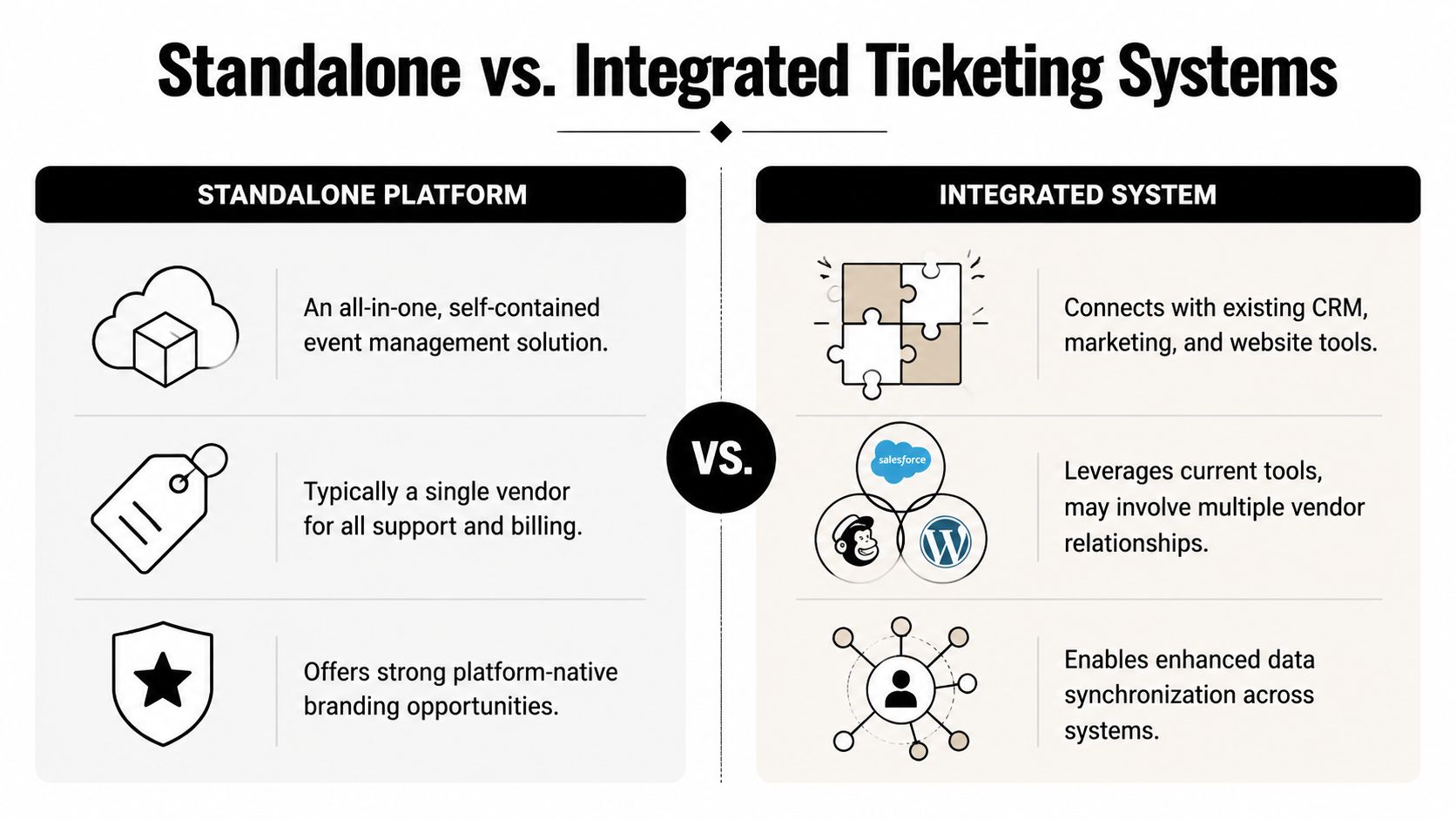
When a standalone platform makes sense
A standalone SaaS platform is usually the fastest route if you want a ready-made storefront, built-in payment setup, and one vendor relationship. For public ticket sales at scale, especially when discoverability matters, this can be efficient. Your team logs into one dashboard, configures the event, publishes the page, and starts selling.
That simplicity has trade-offs:
- Less control over workflow: You work the way the platform expects you to work.
- More training overhead: Staff must learn a new interface and often a new reporting logic.
- Data living elsewhere: Your attendee data may sit outside the spreadsheets, forms, or internal systems your team already depends on.
Large systems can still be the right answer for high-volume public events. But they're not automatically the right answer for every planner.
When an integrated workflow is the better fit
An integrated workflow is often stronger for organizations that already run operations in Google Workspace. Schools, associations, nonprofits, internal event teams, and agencies often prefer this because the attendee list already lives in Sheets or starts in Forms.
Instead of replacing the existing process, the better move is to formalize it.
That's where tools that create QR code tickets for Google Sheets, QR code attendance for Google Forms, or QR code ticket check-in for Sheets are practical. They let planners keep the source data in a familiar place while adding ticket creation, delivery, scanning, and attendance updates on top of it. Darkaa is one example of that model. It turns Google Sheets and Google Forms into a QR ticketing and check-in workflow, including branded ticket sending, offline-capable scanning, and attendance sync back to the sheet.
This approach works especially well when the event isn't just “sell a ticket and scan once.” It helps when you need staff imports, sponsor lists, badge printing, session-based permissions, or handoffs between operations and admin teams who already work in shared sheets.
The offline question most teams ask too late
Connectivity problems aren't rare edge cases. They show up at outdoor festivals, campus buildings, temporary venues, and overloaded entrances. Most content fails to address offline ticket validation, despite data showing that 30% of global events face connectivity issues during check-in, leading to delays and attendee frustration, according to Zeffy's discussion of online ticket sales software for nonprofits.
So ask the hard question early. If the internet drops at the gate, what happens next?
A good answer isn't “our dashboard is cloud-based.” A good answer explains how scans continue, how duplicates are handled, and how records sync afterward.
If a vendor can't walk you through offline entry in plain language, they probably haven't built it for real event conditions.
Security and Operational Best Practices
Security in ticketing isn't abstract. It shows up as a duplicate scan at Gate B, an attendee holding a valid confirmation for the wrong session, or a front-desk volunteer unsure whether to let someone through.
The best systems separate what must happen instantly from what can wait. In scalable ticketing systems, real-time processing is essential for gate validation and fraud detection, as delays can damage trust or revenue. In contrast, non-critical processes like marketing analytics can run in batches to balance cost and performance, as outlined in Inspeerity's analysis of what ticketing data must be real time.
Real-time where it counts
At the entrance, your system should validate tickets immediately and update redemption status fast enough that the same code can't slip through another gate moments later. This matters even more when you run multiple doors, session resets, or mixed entry permissions.
That doesn't mean every report has to refresh every second.
Your sales summaries, campaign analysis, and trend reports can tolerate delay. Your gate logic can't. Teams that treat everything as equally urgent often overspend in the wrong places and still miss the operational basics.
Operational habits that prevent bad event days
Technology helps, but procedure still matters. The most reliable teams do a few simple things every time:
- Lock the source of truth: Decide where attendee status is updated, and don't let side lists drift.
- Define exception handling: Train staff on what to do with duplicates, name changes, missing emails, and wrong-session arrivals.
- Separate scan roles: Don't make every volunteer a full admin if all they need is entrance approval.
- Keep backup materials: Bring printed lists, badges, and a manual escalation path for edge cases.
A modern large-scale system also needs architecture that can handle sudden spikes, low-latency reads, and strong consistency around seat or inventory state, according to this practitioner breakdown of large-scale ticketing system design. You don't need to be an engineer to use that insight. You just need to ask whether the system was built for bursty launch traffic and reliable validation under pressure.
The Ultimate Vendor Selection Checklist
A vendor demo can look polished and still hide the details that cause trouble on event day. Don't ask “does it have QR codes?” Ask the questions that reveal how the system behaves when things get messy.
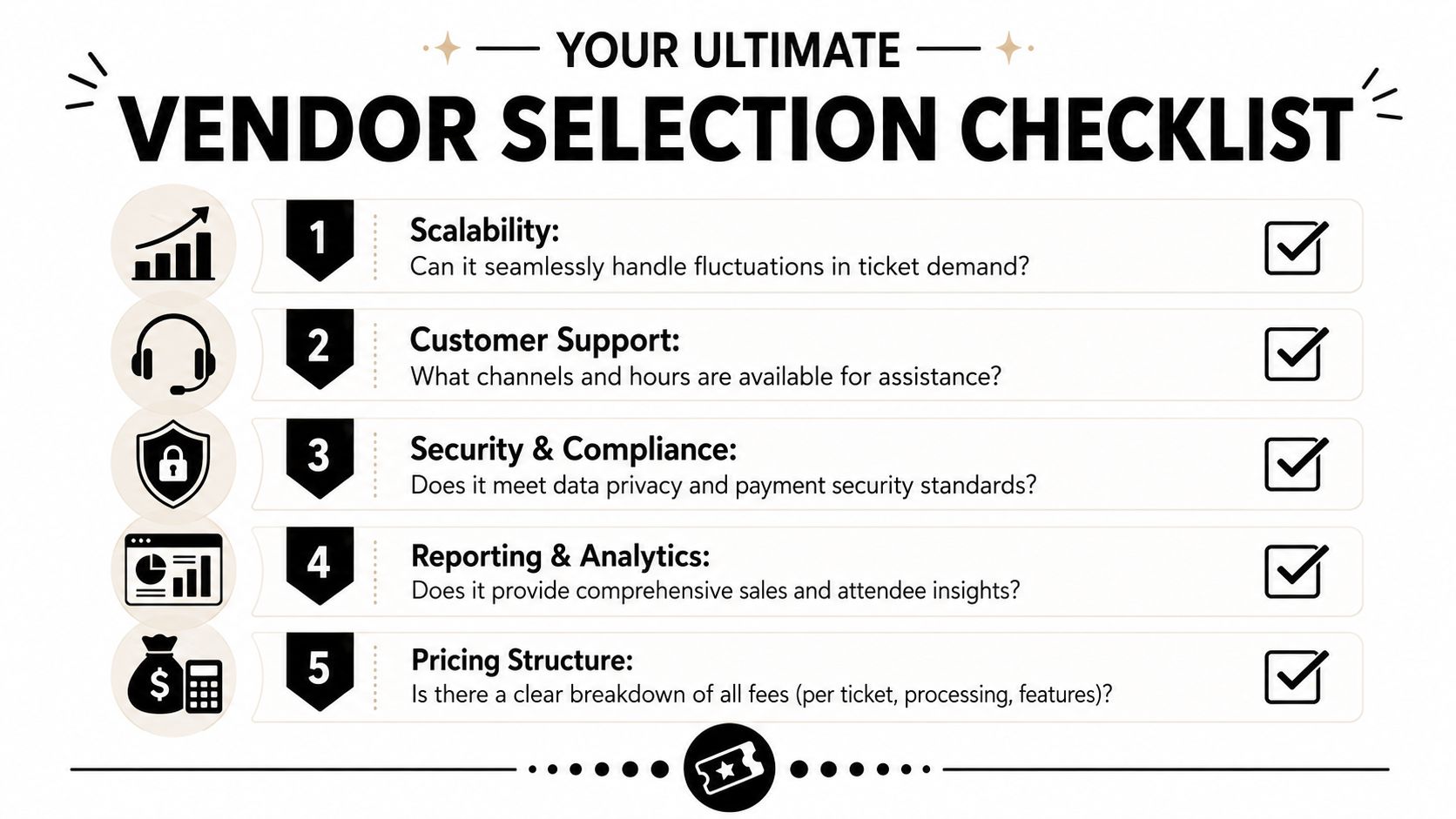
Questions to ask before you sign anything
A reliable event entry system must support offline scanning, real-time ticket validation, unique QR codes for every ticket, and detailed attendance tracking to be considered enterprise-ready, according to TicketSpice's guide to creating QR codes for event tickets.
Use that as your baseline, then ask the vendor these:
- What happens if the venue loses internet? Ask for the exact offline workflow, not a general assurance.
- Can multiple staff scan at the same time? This matters for parallel entrances and rush periods.
- How are duplicate scans shown to staff? The response should be immediate and unambiguous.
- Can the system handle different access rules? Useful for VIP areas, multi-day passes, workshops, and staff-only zones.
- Where does attendee data live, and how do we export it? You don't want to discover lock-in after the event.
- What support do we get during live operations? Ask about event-day hours and response channels.
- How clear is the fee structure? Look for ticket fees, processing fees, feature gates, device limits, and credit expiry.
- Can we test the full flow before launch? You want a sandbox or at least a realistic trial path.
If you want a broader shortlist before vendor calls, this roundup of the best event ticketing software options helps frame the categories and trade-offs.
What a solid answer sounds like
Good vendors answer operationally. They explain the scan flow, permission model, and fallback process in plain language. Weak vendors answer with feature labels.
“Show me what the volunteer sees on the scanning screen” is often a better question than “Do you support check-in?”
That one question tells you whether the company understands live event work or only understands sales pages.
Your Implementation Checklist for a Flawless Event
Once you've chosen the system, the real job is setup discipline. Most event-day problems come from skipped testing, unclear permissions, or rushed data imports.
Build the workflow in the right order
Start with the event structure, not the artwork.
- Create the event and ticket types. Set dates, capacities, categories, and access rules first.
- Connect payments or confirm your registration path. Paid event, free RSVP, invite-only guest list, or internal attendance flow.
- Prepare attendee fields carefully. Capture only what you'll use on-site or in follow-up.
- Design the ticket and confirmation message. Include timing, venue details, and what attendees should present at entry.
- Set up your data intake. QR code attendance for Google Forms can be useful if registrations start from a form and need to feed directly into ticket generation.
- Train the check-in team on the live scanning tool. If your process runs from shared sheets, QR code ticket check-in for Sheets keeps the staff workflow close to the source list.
A visual setup example helps when you're building ticket generation from spreadsheet data:
Test the live path, not just the settings
Don't stop after creating the event. Run a full rehearsal.
- Submit a real registration
- Receive the ticket on a real phone
- Scan it on the device staff will use
- Test a duplicate scan
- Test an invalid ticket
- Test your offline procedure
- Confirm attendance writes back to your reporting view
For promotion, schedule your launch and reminder posts before the rush starts. If your team needs help choosing a social queueing tool, PostSyncer's picks for scheduling tools are a practical starting point for coordinating event announcements without manual posting all week.
A smooth online event ticketing system doesn't come from buying the biggest platform. It comes from choosing a workflow your team can run confidently, then testing it like the doors open in an hour.
If you want to keep ticketing inside Google Workspace, Darkaa is built for that workflow. It lets teams create QR code tickets from Google Sheets or Google Forms, send branded tickets, and run check-in with offline-capable scanning that syncs attendance back to the same system your staff already uses.