You're probably staring at a launch date that feels too close, a guest list that keeps changing, and a team that's talking about stage design while nobody owns check-in. That's a common failure pattern in product launch event planning. The room can look perfect and still feel badly run the moment a VIP waits in the same line as general guests, a journalist can't find their badge, or staff have no idea who should access the demo area.
That's why I treat launch planning as an operations project first and a marketing moment second. The reveal matters. The narrative matters. Media matters. But guests remember the experience in sequence: invite, confirmation, arrival, entry, seating, session flow, follow-up. If any of those break, the product absorbs the damage.
Most launch guides spend their time on venue mood boards, speaker prep, and social buzz. Those matter, but they don't solve the core pressure points. The hard part is building a system that handles segmented invitations, QR tickets, live check-in, access control, late changes, and post-event follow-up without forcing your team into five disconnected tools.
Table of Contents
- The High-Stakes World of Product Launch Events
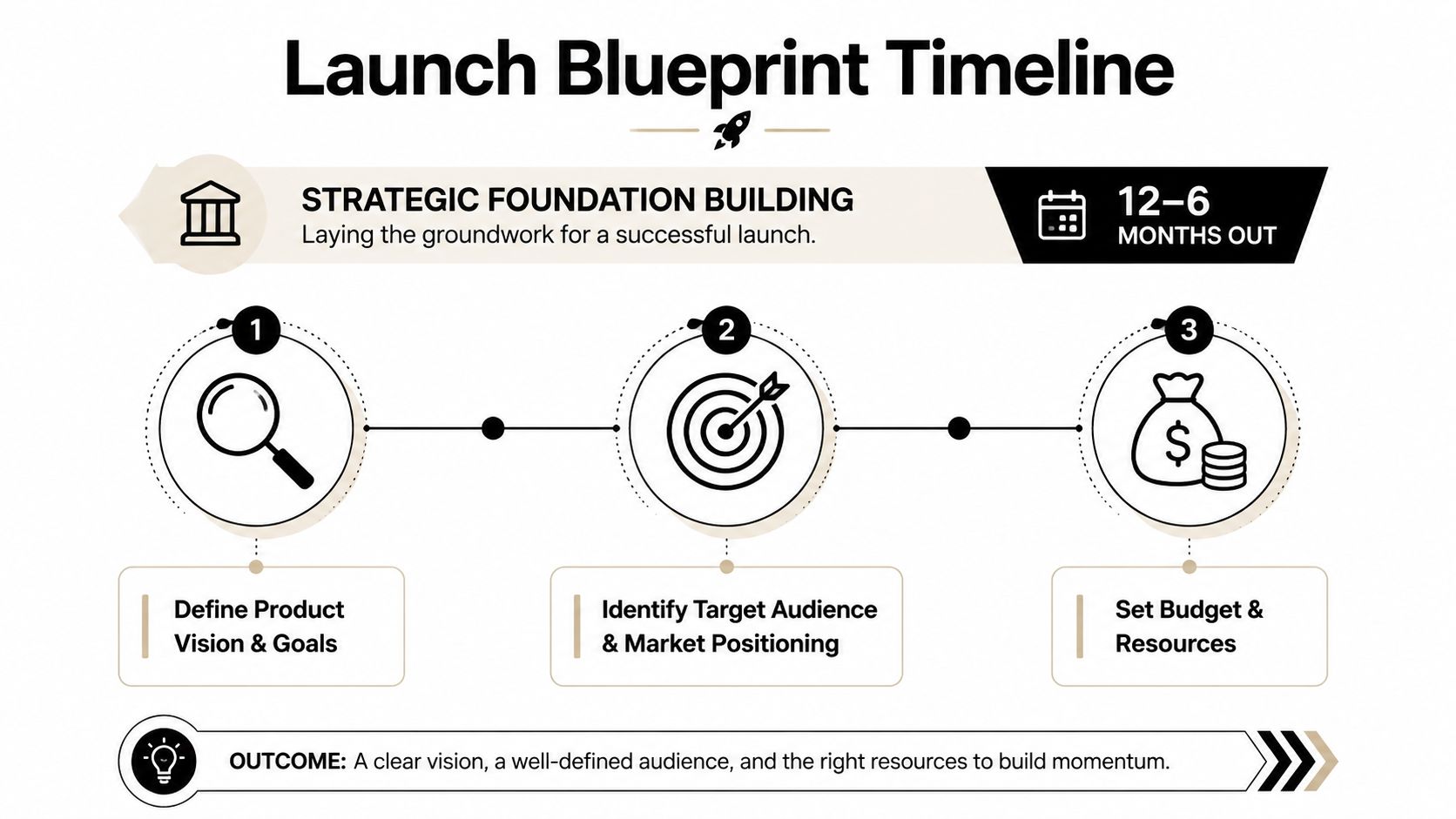
- Building Your Launch Blueprint (12-6 Months Out)
- Designing the Attendee Experience (6-3 Months Out)
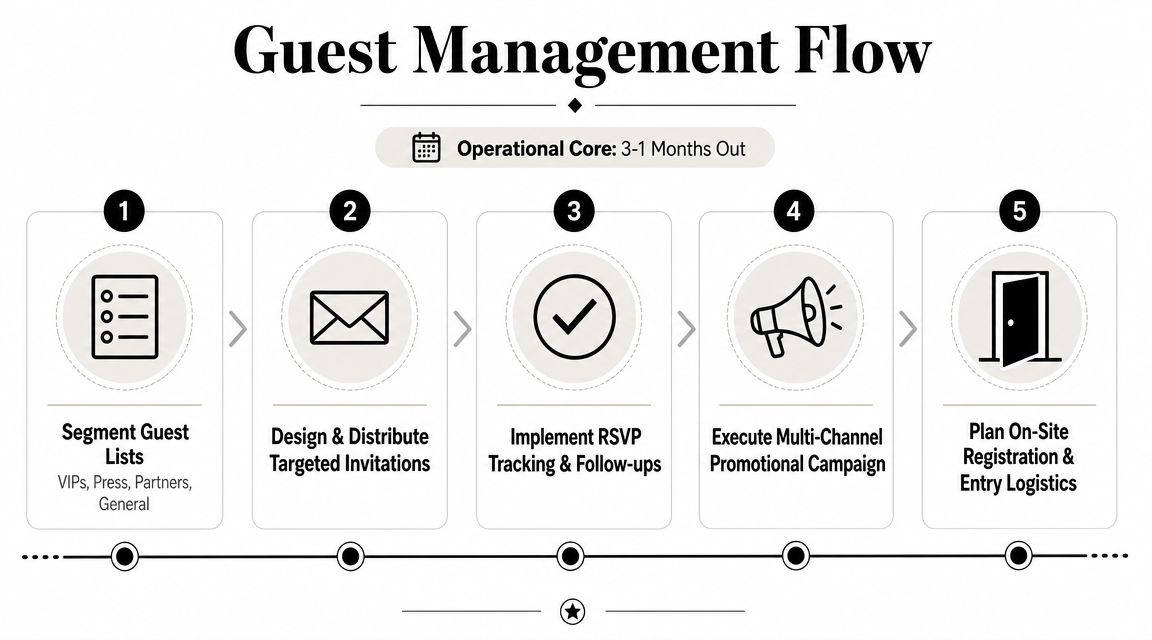
- Guest Management and Promotion (3-1 Month Out)
- The Final Countdown and Day-Of Execution
- Measuring Success and Post-Event Follow-Up
- Frequently Asked Questions
The High-Stakes World of Product Launch Events
The first ten minutes of a product launch usually tell you how the rest of the night will go.
Guests arrive at once. Media check names against embargo lists. VIPs expect to be recognized without waiting. Sales reps are texting to ask whether their accounts have checked in. If the front door stalls, the room feels disorganized before anyone sees the product. People carry that impression with them.
That pressure makes launch events different from a recurring conference or an internal meeting. There is rarely much room for recovery. You are managing reputation, access, timing, and data capture at the same time, often with leadership watching in real time. The broader market context also matters here. Teams are expected to treat events as a serious commercial channel, which means the standard is higher than “the stage looked good.”
I've seen smart teams spend weeks refining the reveal moment and almost no time building the check-in operation that supports it. That trade-off shows up fast. A spreadsheet, a folding table, and a printed guest list might get people through a casual event. It breaks down quickly when arrivals need different badge types, approvals, escorts, timed demos, restricted access, or on-site changes.
Smooth entry sets the tone for everything that follows. Guests read operational quality as brand quality.
That is the part many launch guides miss. They focus on messaging, promotion, and production value. Those pieces matter, but guest management is what holds the experience together. Registration data affects staffing. Badge logic affects access control. Check-in speed affects crowding, agenda timing, and the mood in the room. If those systems are loose, the launch feels cheaper than it should.
What strong launch operations look like
A well-run launch usually has a few clear operating traits:
- Defined attendee groups: Press, buyers, partners, staff, speakers, VIPs, and general guests each need different handling.
- One working system: Registration status, approvals, ticketing, check-in, and notes sit in the same place.
- Clear access rules: Staff know who can enter each area and what to do when a guest is flagged or missing.
- Fast exception handling: Walk-ins, substitutions, duplicate records, and badge reprints are resolved without creating a line.
- Usable event data: The information collected on-site is clean enough for immediate follow-up after the event.
That is the operational core of product launch event planning. A strong launch does not just look polished. It gets the right people in, routes them properly, and gives the product a fair chance to land.
Building Your Launch Blueprint (12-6 Months Out)
Six months out is when launch teams still believe they have time. Then the venue contract stalls, the product team changes the demo build, the invite list is half-defined, and nobody owns registration rules yet. That is how a premium launch turns into an expensive scramble.
Set the commercial goal before you approve the event shape
Early planning has one job. Give the event a clear business role and an operating structure that can support it.
That sounds basic, but teams often approve a launch format before they agree on the outcome. They book a flashy room, sketch a run of show, and start discussing content. Later, they realize the audience mix is wrong, the guest journey does not support sales conversations, or the event is trying to serve press, partners, prospects, and executives with one blunt format.
Define the result first. For a launch, that usually means some mix of market awareness, qualified demand, partner activation, media coverage, stakeholder confidence, or direct sales progression. The mix matters because it affects the guest list, room setup, staffing model, and check-in design long before it affects stage graphics.
Use a simple planning table early:
| Event objective | What to track |
|---|---|
| Market awareness | attendance quality, media interest, social activity |
| Demand creation | qualified leads, demo requests, follow-up meetings |
| Partner enablement | partner attendance, training completion, post-event actions |
| Executive visibility | target account attendance, stakeholder feedback |
This is also the point where guest operations should enter the conversation, not sit in a later planning bucket. If success depends on the right press contacts, target accounts, channel partners, or VIP stakeholders showing up and moving through the event properly, registration logic and access design need to be scoped now.
Build the budget around delivery risk, not just visible production
Launch budgets usually cover the obvious items first. Venue, staging, AV, catering, branding, and content get attention because everyone can see them. The strain usually shows up elsewhere.
The expensive problems are often operational. Extra printers because badge output was underestimated. More front-of-house staff because approvals were never defined. Backup internet because check-in hardware was planned like a small seminar instead of a high-profile launch. Security upgrades because the product area needs controlled access. Courier fees, reprints, transport changes, and added rehearsal hours also show up late and hit fast.
A usable budget model should separate four categories:
- Fixed production costs: Venue, AV, staging, branding, streaming or platform tools.
- Guest operations costs: Registration setup, badge printing, scanners, staffing, signage, access control, help desk support.
- Content and promotion costs: Speakers, creative, email, PR support, social assets.
- Contingency: Rush jobs, equipment replacement, added labor, on-site guest list changes.
Keep guest management visible in its own line items. If check-in, badge logic, and access control disappear into a miscellaneous operations number, they get under-scoped. That mistake is common, and guests feel it immediately.
I also recommend pressure-testing every budget line with one question. If this item fails on the day, what happens at the door? That test exposes weak assumptions faster than a spreadsheet review.
If your launch includes demo zones or branded product displays, involve production partners early. Experienced exhibition stand designers can flag footprint, power, storage, queuing, and sightline issues before those problems become site-day arguments.
Build the timeline backward, then assign ownership hard
Forward planning looks tidy and fails unobserved. Backward planning exposes what has to be true by each date.
Start from show day and lock the immovable points first. Venue access. Product readiness. Executive availability. Demo build freeze. Invite release. Registration launch. Print deadlines. Final guest list approval. Rehearsal. Freight arrival. If one of those dates slips, the rest of the schedule should show the consequence immediately.
A practical backward plan usually includes:
- Immovable dates: Event day, venue access, product readiness, executive attendance.
- Approval deadlines: Invitation sign-off, landing page approval, script approval, floor plan approval, badge proofing.
- Guest deadlines: VIP confirmation, media approvals, substitutions cutoff, final attendee export, on-site support brief.
- Buffer time: Room for legal review, content revisions, shipping delays, and late stakeholder changes.
- Named owners: One person accountable for each deliverable.
One owner per task matters more than teams like to admit. Shared ownership works until a deadline moves. Then everyone is involved and nobody decides.
The timeline also needs an operational track, not just a marketing track. Creative approvals and promotion dates are important, but so are registration build, attendee category rules, badge fields, approval workflows, and exception handling plans. Those pieces decide whether guests enter quickly, get routed correctly, and reach the product experience in the right order.
That is the overlooked part of launch planning. A premium event does not start when the keynote begins. It starts when the first guest arrives and your system has to prove it can handle the actual audience, not the one people assumed would show up on the planning deck.
Designing the Attendee Experience (6-3 Months Out)
Product launch event planning transitions from structure to experience. The strongest launches feel cohesive because the story, room design, schedule, and technical delivery all point in the same direction.
Make the format fit the product story
Don't choose a venue because it looks impressive in photos. Choose it because it helps the audience understand the product. A software launch might need clean demos, reliable screens, and breakout conversations. A hardware launch may need controlled reveal moments, hands-on stations, and room for circulation. A hybrid format needs camera-friendly staging and a host who can speak to remote attendees without making them feel secondary.
Airtable's guidance on product launch events gets this part right. High-impact launches pair a strong narrative with real-time interaction such as polls, Q&A, and live social participation. The event should solve the audience's problem in story form, not dump features at them.
That principle affects practical decisions:
- Room layout: Theater seating creates focus. Cabaret supports discussion. Demo pods encourage dwell time.
- Lighting and sound: A dramatic reveal can help, but only if the audience can still see the product and hear the speaker.
- Screen content: Show outcomes, use cases, and proof. Don't bury people in UI screenshots.
Build an agenda that holds attention
Most launch agendas fail in one of two ways. They're either too thin and feel underwhelming, or they're overloaded and become a sequence of internal speeches.
A useful launch program usually has a rhythm:
- Opening tension: Name the market problem or customer frustration.
- Reveal: Introduce the product with a clear promise.
- Proof: Demo, customer use case, technical validation, or guided walkthrough.
- Interaction: Q&A, polling, moderated discussion, hands-on access.
- Next step: Trial, meeting, ordering path, partner conversation, media interview window.
If you're building a physical environment around the launch, it helps to review how experienced exhibition stand designers think about traffic flow, sightlines, and branded space. Those details matter when you need the room itself to support storytelling and movement instead of fighting both.
Guests don't need more information. They need a clearer reason to care.
Choose vendors who understand launch pressure
A launch vendor isn't just selling a service. They're joining a deadline chain. If one supplier misses, everyone downstream gets squeezed.
When evaluating AV, fabrication, catering, livestream, or print vendors, ask operational questions first. How do they handle change requests? Who is onsite with authority to solve issues? What's their backup plan for file problems, power issues, delayed load-in, or revised guest counts?
I'd also separate “creative excellence” from “event reliability.” Some vendors are brilliant in pitch meetings and weak in execution. A launch needs both, but if you must choose, pick the team that hits call times, labels assets correctly, and communicates clearly under pressure.
Guest Management and Promotion (3-1 Month Out)
This is the point where the launch becomes real. Names are attached to seats, access rules matter, and every registration decision starts affecting the arrival experience. This phase is often viewed as administrative work. It isn't. It's operations, security, brand control, and conversion setup all in one.
Segment first, invite second
One guest list is almost never enough for a launch. You need categories with different messaging, different arrival instructions, and often different permissions.
At minimum, separate:
- Press and analysts: Early access details, media contact, interview windows.
- VIPs and executives: Named hosts, private entrance if needed, reserved seating.
- Partners and channel contacts: Content relevant to enablement and relationship building.
- Prospects and customers: Registration path tied to sales follow-up.
- Internal staff and vendors: Operational credentials, not guest invitations.
That segmentation should exist before you send a single invite. If you start broad and sort later, you'll spend the final weeks fixing avoidable errors.
Treat registration as an access system
Cvent notes in its guidance on product launch events that attendee management is more complex for hybrid and advanced in-person formats. That's exactly right. A launch isn't just about collecting RSVPs. It's about controlling who can enter, when they arrive, what they can access, and how quickly staff can verify them.
That's why I prefer workflows that stay inside tools teams already use. A QR code attendance for Google Forms setup can collect RSVPs and push clean attendee records into a working sheet. From there, QR code tickets for Google Sheets let teams generate branded passes, handle custom fields, and distribute tickets in bulk without manually stitching systems together. If you want a practical example of how that flow works for launch invitations, this guide to QR code invitations for product launch events is useful.
Darkaa is one option in this category. It turns Google Sheets and Forms into a QR ticketing and check-in workflow, including branded ticket creation, bulk delivery, and live validation back to Sheets. For teams already operating in Google Workspace, that kind of setup keeps guest management close to the planning data instead of splitting it across separate dashboards.
Promotion works better when ops are ready
Promotion should build demand, but it shouldn't outrun your guest handling. If you drive registrations before categories, confirmations, and entry logic are ready, you create a cleanup project.
Coordinate three streams at once:
| Stream | What needs to be ready |
|---|---|
| Email invitations | segmented copy, RSVP path, confirmation rules |
| Social promotion | registration destination, audience filters, moderation plan |
| Media outreach | press list, spokesperson access, interview scheduling |
If press is part of the launch, it helps to plan the announcement path alongside guest ops. A solid primer on securing media coverage for events can help teams align press materials with event timing instead of treating PR as an afterthought.
The cleanest launches feel smooth because the invite journey, the ticket, and the front door all match. Guests notice when they don't.
The Final Countdown and Day-Of Execution
Doors open in 20 minutes. A reporter arrives early, a VIP text thread starts asking where to park, one scanner drops off Wi-Fi, and two guests are standing in the wrong line with no ticket pulled up. That is the point where product launch planning stops being strategy and becomes operations.
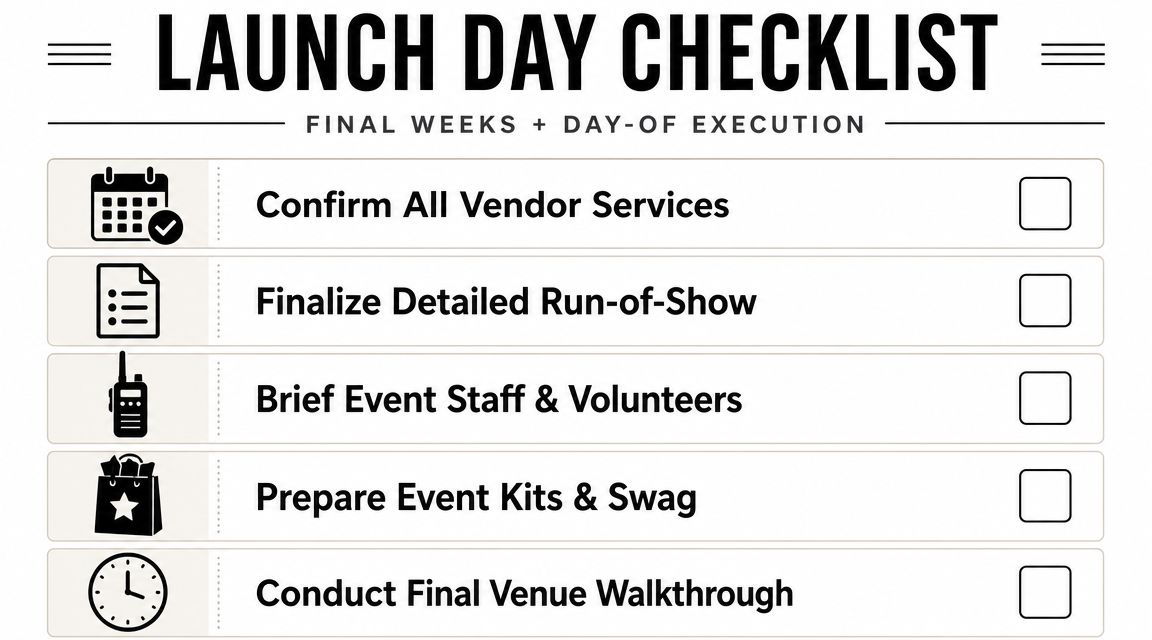
Lock the run-of-show
A usable run-of-show answers one question at every minute of the day: who is doing what right now?
If your document only shows presentation times, it is incomplete. Launch events break down at the edges. Guest arrival surges, talent timing, press access, demo turnover, freight delays, and reset windows cause more trouble than the keynote itself. The run-of-show needs to cover arrival waves, speaker call times, tech checks, door opening, holding music, cue points, check-in staffing, press handling, escort assignments, demo resets, and escalation contacts.
Build one master version, then issue role-specific versions for each lead. Registration does not need the same detail as AV. AV does not need the full media escort plan. What they do need is clean ownership and a current contact tree. For teams tightening this handoff, event logistics planning for live execution is a useful reference.
The strongest run-of-show documents include:
- Operational timestamps: room opens, scanner test, badge desk live, VIP arrival windows, reset periods
- Named owners: one person owns each decision and handoff
- Escalation order: first call, backup contact, approval path
- Fallback steps: alternate entrance, manual verification, revised seating, shortened show flow
Design check-in like a frontline operation
Check-in shapes the first five minutes of the event, and those five minutes set the tone for everything after. For a premium launch, that front door has to work under pressure, not just look organized on paper.
Use a QR code ticket check-in for Sheets setup across multiple devices so staff can scan in parallel, confirm status fast, and handle exceptions without sending every problem to one table. If the system writes back to the master sheet in real time, producers can see arrival patterns as they happen and adjust staffing before a line builds.
Set the entrance by function:
| Lane | Best for |
|---|---|
| Fast scan | confirmed guests with tickets ready |
| Assisted check-in | name search, badge reprint, replacements |
| VIP and media | escorted or priority arrivals |
| Staff and vendors | operational access |
A premium launch starts at the scanner, not the stage.
Print backup lists anyway. Phones die. Batteries run low. Guest names get misspelled. Wi-Fi can wobble at the worst time. A paper fallback and a manual approval process keep the line moving when the system gets messy.
Prepare for common, predictable problems
Day-of execution rewards discipline more than creativity. By this point, new ideas usually create more risk than value.
Plan responses for the issues that show up over and over:
- Unexpected guests: assign one person to approve exceptions, and make sure door staff know who that is.
- No-show speakers: keep a shortened session format or moderator-led backup ready.
- Badge and ticket issues: stock blank badges, chargers, extra lanyards, and a manual verification path.
- Zone confusion: give every frontline staffer a simple access matrix so they are not making judgment calls at the rope line.
- Late production changes: freeze nonessential updates before doors open, especially signage, seating, and access rules.
I have seen polished launches feel disorganized because the guest list logic broke down at the entrance. I have also seen modest productions feel high-end because arrivals were handled cleanly, questions were answered fast, and exceptions never turned into a public argument.
That is what strong day-of execution looks like. Problems still happen. Guests just do not feel them.
Measuring Success and Post-Event Follow-Up
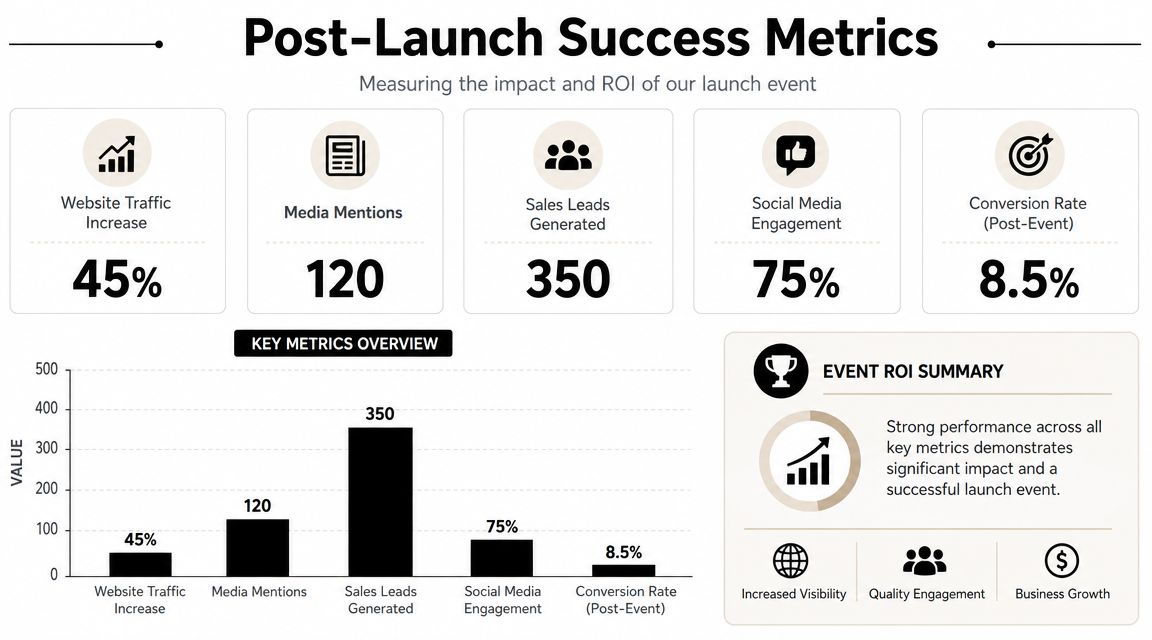
A launch doesn't prove its value at applause. It proves value in what happens after people leave.
Read the event like a funnel
Start with the data you can trust most. Registration status, actual check-ins, session participation, engagement signals, and follow-up actions are more useful than broad impressions. If your attendance data syncs back into the same working sheet, reporting gets much easier because you're not reconciling multiple exports by hand.
That's where a structured attendance tracking system helps. You can compare who registered, who attended, who stayed for key moments, and which segments deserve immediate follow-up.
The harder question is ROI. It isn't enough to say the room was full or social activity looked strong. The better analysis asks which audience groups moved, what they did next, and whether the event accelerated sales, partner action, or media outcomes.
Follow-up needs ownership and timing
Many launches falter in momentum post-event. According to Momencio's event industry report, 80% of trade show leads never receive any follow-up. For product launch event planning, that should be treated as a warning, not a distant trade show problem.
A usable follow-up structure looks like this:
- Same day: Thank-you messages, presentation or recording access where appropriate, internal arrival summary.
- Shortly after: Sales routing, media follow-up, partner outreach, unanswered question cleanup.
- Review cycle: Compare outcomes against the KPIs defined early, then note what operational changes are needed for the next launch.
The event creates concentrated attention. Follow-up determines whether that attention turns into business.
One more point matters here. Measurement isn't just a reporting exercise. It gives you evidence for future format choices. If a smaller audience with tighter qualification produced better downstream action than a broad invite list, that's not a disappointment. That's a useful planning answer.
Frequently Asked Questions
How is planning different for a virtual-only or hybrid launch
The main difference is operational complexity, not just content delivery. In a virtual-only launch, your pressure shifts to platform reliability, live moderation, speaker prep, and engagement pacing. In a hybrid launch, you carry both sets of risks at once.
For hybrid formats, assign separate owners for the in-room experience and the remote audience. If one producer tries to run both, one group will get neglected. Also build separate check-in and access rules for physical attendees, digital attendees, speakers, media, and staff.
What's the best way to handle press and influencers
Don't lump them into the general guest flow. They need different communication, earlier information, and a clearer onsite path. Give them one owner on your team, one arrival protocol, and one interview or content process.
For press, confirm practical details early. Arrival window, spokesperson access, media kit, photography rules, and embargo terms all need to be clear before the event. For influencers, be explicit about content timing, filming zones, and approval expectations so your staff aren't negotiating those details live at the venue.
What should I do if a speaker cancels late
Simplify fast. Don't try to rebuild the whole agenda under pressure. Decide whether to replace, shorten, or restructure.
The easiest save is usually one of these:
- Moderator-led discussion: Turn the session into a hosted conversation.
- Expanded demo: Give more time to the product itself.
- Customer or partner voice: Bring forward a credible supporting speaker already onsite.
Make the call early enough that production, signage, and front-of-house staff can all work from the same version.
How do I prevent check-in bottlenecks
Start by reducing variables. Pre-assign guest categories, issue scannable tickets, use multiple check-in devices, and split the entrance into lanes. Keep one exception desk for name search, replacements, or badge problems.
If you try to solve every arrival at the same table, the queue becomes your event's opening scene. That's avoidable.
How much should I measure after the launch
Measure only what your team will use. The essentials are attendance quality, engagement at key moments, follow-up completion, and downstream business movement by audience segment. Keep the reporting tied to the objectives you set early. Extra dashboards don't help if nobody acts on them.
If your team wants to run launch invitations, QR ticket distribution, and live check-in inside Google Workspace instead of learning another platform, QR code ticket check-in for Google Sheets and Forms is built for that workflow. It supports branded tickets, bulk sending, multi-device scanning, access control, and attendance sync back to your sheet so launch operations stay organized from RSVP to follow-up.