You're probably dealing with some version of this right now. One booking lives in a spreadsheet. Another sits in an email thread. A third is penciled into Google Calendar. Your caterer has one guest count, your front desk has another, and finance is waiting for final numbers after the event so they can send invoices and close the books.
That setup works. Until it doesn't.
The breaking point usually isn't dramatic. It's a room held twice. A vendor arriving for the wrong load-in window. A guest list that no longer matches ticket sales. A staff member asking which file is the “real” one. At that moment, the issue isn't effort. It's that the venue has no shared operating system.
That's where venue management software comes in. It gives your team one place to manage bookings, people, resources, and revenue instead of stitching those pieces together by hand. If you're also evaluating the financial side of new systems, Purple's guide to hotel technology ROI is useful because it shows how operators can think about software as an operations investment, not just a software expense.
Table of Contents
- What Is Venue Management Software Anyway
- Understanding the Core Concepts of Venue Operations
- Key Features Your Venue Needs to Succeed
- How Different Teams Benefit from This Software
- How to Choose the Right Software for Your Needs
- Understanding Deployment Models and Pricing
- Frequently Asked Questions About Venue Software
What Is Venue Management Software Anyway
A new venue manager often starts by inheriting a system that isn't really a system. It's a patchwork. The booking coordinator uses one spreadsheet. The sales team tracks leads in email. Ops keeps setup notes in a shared doc. Finance waits for someone to translate event details into invoice lines.
Then a corporate client asks for a room flip between sessions, extra badges, a revised attendee count, and split billing.
Without venue management software, every change ripples through the team manually. Someone updates the calendar. Someone else updates the room setup sheet. A third person tells catering. If any step gets missed, the problem shows up on event day.
Venue management software is the tool that turns that patchwork into a single source of truth. It centralizes the operational work of running a space. That usually includes bookings, room and resource scheduling, guest or customer records, ticketing, payments, and reporting. Instead of asking “which spreadsheet is current,” your team works from one shared record.
The broader shift toward centralized systems is real. The global venue management software market was valued at approximately USD 1.18 billion in 2024 and is projected to reach USD 3.85 billion by 2033, with a 14.1% CAGR from 2025 to 2033 according to Probity Market Insights' venue management software market report. The important part for operators isn't just the market size. It's what the growth represents: venues moving away from manual methods because demand for concerts, exhibitions, and corporate events makes fragmented workflows too risky.
Practical rule: If your team has to retype the same event details into multiple tools, you don't have a process problem first. You have a system design problem.
A simple way to think about it is this. A calendar tells you when a room is booked. Venue management software tells you what's booked, who booked it, what resources are attached, what the guest experience should look like, and how the money gets reconciled afterward.
That's why good software doesn't just “store bookings.” It runs operations.
Understanding the Core Concepts of Venue Operations
The easiest way to understand venue management software is to stop thinking of it as a booking app. Think of it as air traffic control for your venue.
Planes don't just need a runway. They need sequencing, timing, gate assignments, crew coordination, fuel, and constant communication. A venue works the same way. An event isn't just a date on a calendar. It has room dependencies, staffing needs, guest movement, vendor timing, and financial consequences.
A strong platform acts as a centralized operations layer that unifies bookings, CRM, payments, ticketing, floor plans, and reporting, while letting guest and order data move through the system in near real time, as described in Skedda's guide to venue management software.
Think of it like air traffic control
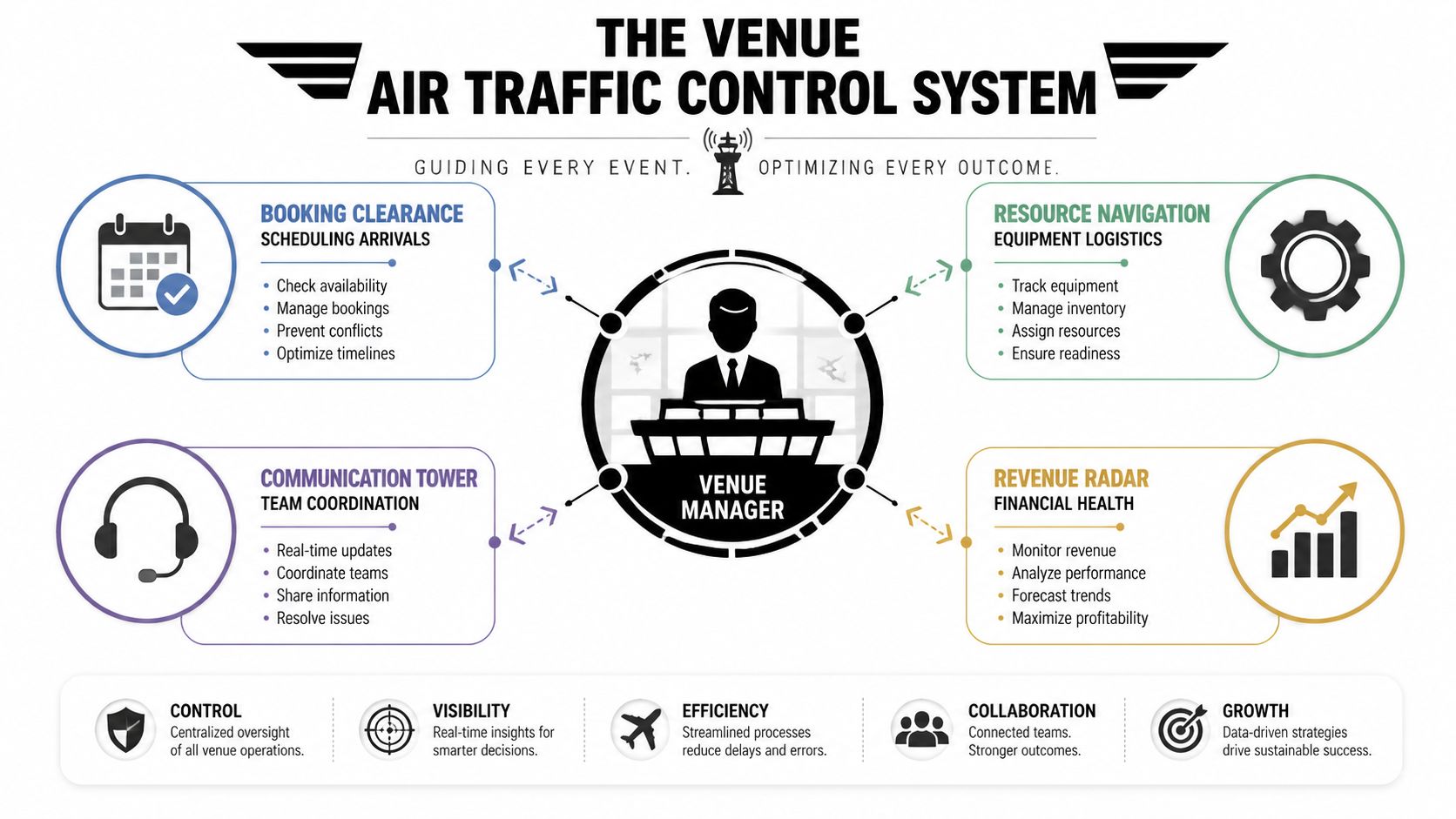
When a venue manager opens the day's dashboard, they're doing the same kind of coordination an air traffic team does. They're checking which event is arriving, what room is ready, which staff are assigned, whether access rights are correct, and whether the financial record matches what's happening on site.
That mental model helps because it shifts your focus away from features and toward flow.
A booking isn't complete when the date is saved. It's complete when the room, people, permissions, and money all line up.
The four pillars of daily venue work
Most venue operations fall into four connected pillars.
Space
This includes rooms, seating layouts, floor plans, equipment, and resource hierarchies. A ballroom can become a banquet room, a classroom setup, or three smaller breakout spaces. The software needs to understand those relationships so your team doesn't accidentally sell conflicting configurations.Time
This is more than start and end times. It includes holds, confirmed bookings, setup windows, teardown, cleaning buffers, rehearsal slots, and vendor access windows. Time is where hidden conflicts usually live.People
Guests, organizers, speakers, staff, vendors, security, and finance all touch the same event from different angles. Good software keeps those roles connected without forcing everyone into the same workflow.Money
Deposits, invoices, ticket revenue, refunds, add-ons, and final reconciliation belong to the same event record. If the financial view sits somewhere else, your team ends up matching numbers by hand later.
A lot of confusion comes from treating these pillars as separate. In practice, they move together. If a client changes from 80 guests to 180, that affects room selection, seating, staffing, ticketing or check-in, and invoicing. The software should carry that change through the workflow.
Here's the test I use when advising operators: if one event update requires three phone calls and two spreadsheet edits, your tools aren't connected enough.
Key Features Your Venue Needs to Succeed
The phrase “feature-rich” isn't helpful when you're buying software. What matters is whether each feature removes friction from daily work. A venue manager doesn't need more buttons. They need fewer mistakes, faster handoffs, and cleaner reconciliation.
The practical shortlist starts here.
Booking and calendaring
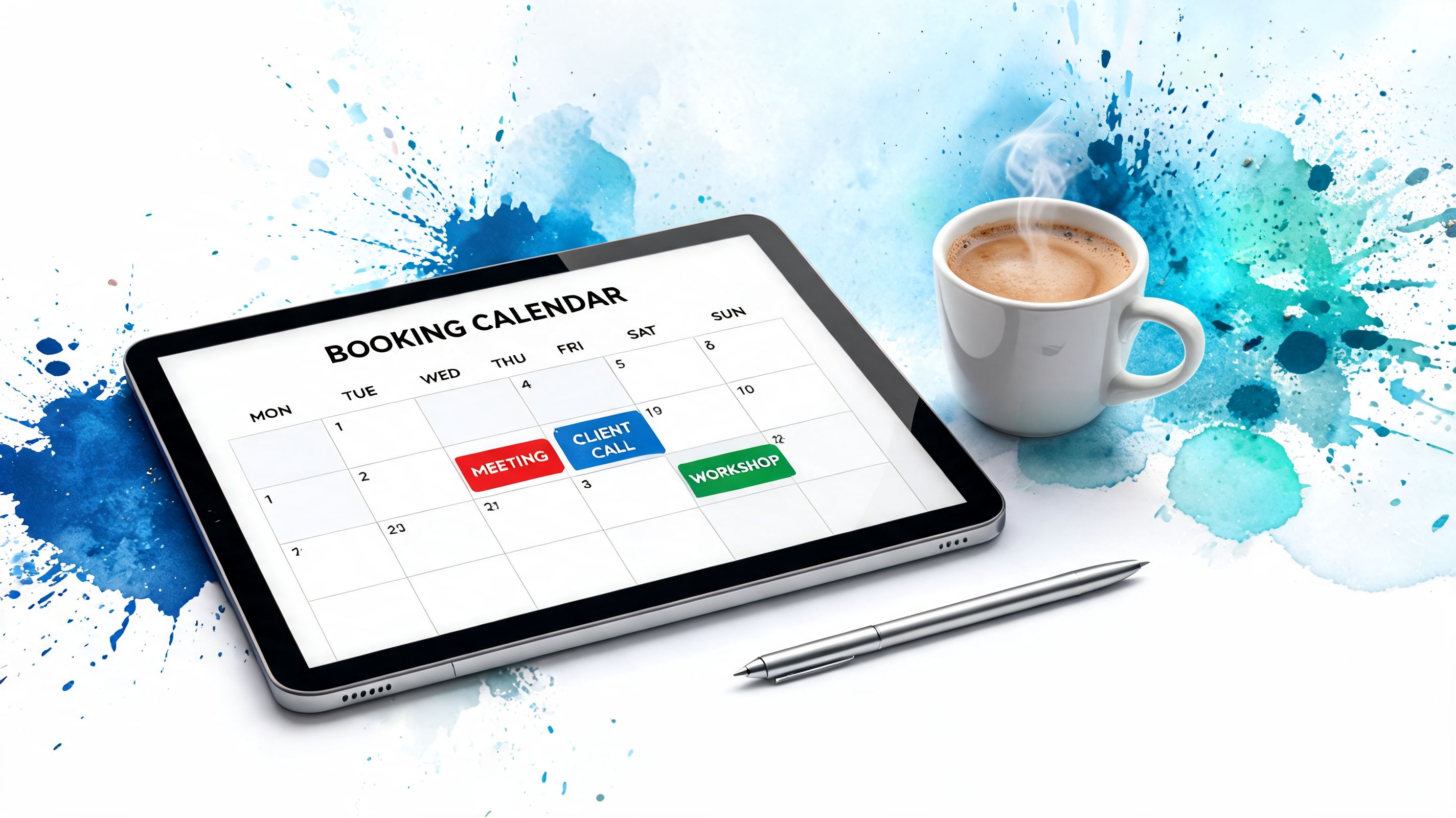
Booking tools are the front door of venue management software. They should let your team place holds, confirm events, block setup time, and see room availability clearly across one or multiple spaces.
Conflict prevention is the primary benefit. Good software automatically detects scheduling conflicts and prevents double-bookings. That matters even more when you're managing multiple rooms or overlapping calendars, as noted in Prism.fm's explanation of venue software automation.
A proper booking view should answer these questions quickly:
What is available Not just “is the room empty,” but “is the room free after accounting for setup, teardown, and linked resources?”
What is tentative versus confirmed
Holds and definite bookings need to be visually different, or sales and operations will make different assumptions.What changes downstream
If a client moves an event, the update should flow to staffing, guest communications, and financial records.
Ticketing and check in
A booking may be the sale, but check-in is where the guest experience becomes real.
Your software should support attendee records, ticket delivery, scanning, and live attendance status. If your venue runs events where connectivity can be unreliable, offline support matters. A practical reference is Darkaa's documentation on offline event check-in workflows, which shows how teams can validate attendees even when internet access is inconsistent.
This matters for more than speed at the door. It affects trust. If the scanner says one thing, the spreadsheet says another, and the event lead says a third, your staff lose confidence fast.
Seating and access control
Some venues need simple admission. Others need layered permissions. VIP sections, staff-only areas, timed entry, premium rooms, backstage zones, and session-specific access all complicate the day.
That's why seating and access control shouldn't be treated as separate afterthoughts. They should connect directly to the ticket or booking record. If a guest is entitled to a certain zone, the access system should reflect that without manual intervention from the front desk.
For venues that host mixed-format events, this is often where software gaps become visible first. The booking looked fine. The entry logic was not.
Before you invest, ask whether the platform can handle:
- Assigned or managed seating for reserved experiences
- Zone-based permissions for premium or restricted areas
- Multi-session access for conferences, festivals, and campus events
- Real-time status updates so staff aren't checking separate systems
A short walkthrough helps clarify what robust check-in looks like in practice:
Reporting and analytics
Many event organizers underestimate this feature until after the event.
Reporting is what turns the venue from reactive to controlled. You want dashboards that update as tickets sell and records change, not a pile of exports someone has to clean up after the doors close. Prism.fm notes that real-time financial reporting can update as tickets sell, which shortens post-event reconciliation and reduces calculation errors.
Operational advice: If finance still waits for a manual “final numbers” spreadsheet after each event, reporting hasn't been built into the workflow. It's being added after the fact.
Useful reporting usually falls into three buckets:
- Operational visibility for room use, attendance, staffing, and check-in status
- Commercial visibility for sales, invoices, refunds, and outstanding balances
- Planning visibility for spotting recurring bottlenecks, underused spaces, or event types that create extra work
If the software does these well, your team spends less time chasing information and more time running the venue.
How Different Teams Benefit from This Software
The same platform can feel completely different depending on who's using it. That's normal. Venue owners care about utilization and control. Event planners care about execution. Front-of-house teams care about smooth entry. Finance cares about clean records.
If you're building support for a software decision internally, speak in those terms.
For venue owners and general managers
Owners and general managers usually want fewer operational surprises. They need to know which spaces are earning, which are underused, and where friction is slowing the team down.
Venue management software helps by creating consistency. The booking process becomes more visible. Changes are easier to track. Revenue-related activity sits closer to the event record instead of being pieced together later.
That consistency also makes it easier to review outside suppliers. For venues investing in expo booths, brochures, signage, or sponsor materials, a practical reference for comparing print support options is this guide to best providers for event marketing materials.
For event planners and operations leads
Planners and operations leads get relief from context switching. Instead of checking email, a shared drive, a spreadsheet, and a group chat to confirm the latest plan, they can work from one operational record.
The day-to-day impact is simple:
- Fewer handoff errors because room details, timing, and guest information live together
- Clearer event-day coordination for front desk, scanners, vendors, and support staff
- Less post-event cleanup because attendance and payment details are already captured
For teams that want to improve the process around setup, staffing, and movement on event day, this guide to event logistics planning is a useful companion.
For schools universities and civic spaces
These organizations often run a wide mix of events. One week it's a graduation. Next week it's a theater performance, board meeting, community fair, or departmental conference.
Their challenge isn't only ticketing. It's permissions, shared spaces, approvals, and repeatable workflows across different departments. Venue management software helps them standardize those processes without forcing every event into the same mold.
A campus events office, for example, may need one room booking process for academic departments, another for public events, and another for invited guests with check-in requirements. A stronger system keeps those variations manageable.
For promoters and entertainment teams
Promoters care about sales flow, guest entry, and control at the venue edge. They need accurate attendance status, clear access rules, and fewer disputes at the gate.
This is especially valuable when multiple ticket types or access zones are involved. A promoter doesn't want door staff interpreting screenshots, side lists, and verbal approvals in real time. They want one dependable admission workflow.
The faster the venue can answer “Is this person allowed in here right now?”, the calmer the front gate becomes.
That's why entertainment teams often see venue software less as administration and more as crowd movement infrastructure.
How to Choose the Right Software for Your Needs
Most venues buy software after a frustrating season. A missed booking. A rough reconciliation cycle. A painful event-day entry experience. That urgency is understandable, but it also leads teams to buy based on demos instead of workflow fit.
A polished demo can hide a lot. The better question is whether the platform fits the way your team works.
Start with the real workflow not the demo
Before you compare vendors, write down your actual event journey from inquiry to closeout. Include every handoff. Include every spreadsheet. Include every place where a staff member copies data from one system into another.
Then use a simple checklist.
| Criteria | What to Look For | My Priority (High/Med/Low) |
|---|---|---|
| Ease of use | Staff can learn core tasks quickly without building side spreadsheets | |
| Booking logic | Holds, confirmed bookings, buffers, and resource conflicts are clear | |
| Check-in workflow | Ticketing or guest validation matches your door process | |
| Reporting | Operations and finance can view live event status without manual exports | |
| Integration fit | Works with tools your team already uses, such as Google Workspace | |
| Access control | Supports your venue's rules for zones, sessions, or permissions | |
| Support and onboarding | Vendor can help with setup, migration, and staff adoption | |
| Scalability | Can handle your current complexity and likely future needs |
If you've ever selected software for another operational environment, the decision logic is similar. Clouddle's article on selecting software for your real estate portfolio is a good cross-industry example of how to compare systems by practical fit rather than feature volume.
Integration versus replacement
This is the part many buying guides skip.
A major challenge in venue software is friction with existing tools like Google Workspace. Coverage often assumes you should either adopt a brand-new dashboard or continue living in spreadsheet chaos. Guideflow points out that this “minimal friction” middle ground is often ignored, even though extending current workflows can be more practical for many teams, especially those already working heavily in Google Sheets and related tools, as discussed in its article on venue management software tools.
That creates two valid paths:
Replacement model
You move to a full all-in-one platform and try to centralize everything inside it.Extension model
You keep core tools your team already uses, then add purpose-built layers for ticketing, check-in, permissions, and reporting where needed.
Neither is automatically right. The right choice depends on your complexity, budget, training capacity, and tolerance for process change.
For example, a venue with highly customized room resources and deep finance workflows may prefer a broader platform. A mid-scale team that already runs operations inside Google Workspace may get better adoption from a lighter approach. One example is Darkaa's event registration tool approach, which extends Google Sheets and Forms into QR ticketing and check-in instead of requiring teams to leave their existing workspace.
Ask one blunt question during selection: Are we buying software to improve operations, or are we accidentally buying a retraining project?
Understanding Deployment Models and Pricing
Once you've narrowed the shortlist, the next confusion point is usually technical and financial. Buyers hear terms like SaaS, cloud, on-premise, subscription, per-event, and transaction-based fees, then try to compare offers that aren't priced the same way.
The simplest starting point is deployment.
Cloud software versus on premise systems

Cloud-based software means the vendor hosts the system and your team accesses it through the internet. This is the dominant direction of the market. In the broader event software market, cloud deployments accounted for over 71% of revenue in 2025, and that market is projected to reach USD 24.17 billion by 2031, according to MarketsandMarkets coverage summarized in the event management software market data. For operators, the practical reasons are straightforward: lower upfront cost, easier scaling, and simpler integrations.
On-premise software means the organization hosts and manages the system itself. Some venues still choose this route when they need tighter control over infrastructure or work in environments with strict internal requirements.
A plain-language comparison helps:
Cloud-based
- Easier remote access
- Lower upfront infrastructure burden
- Vendor usually handles updates and maintenance
- Often better for teams that need integrations and flexibility
On-premise
- More direct control over hosting environment
- Can suit high-control or high-security settings
- Usually requires more internal IT involvement
- Updates and maintenance are more hands-on
Buying note: Don't choose on-premise because it “sounds safer.” Choose it only if your operating environment genuinely requires that level of control.
How vendors usually charge
Pricing models vary, but most venue software offers some mix of these structures:
Subscription pricing
Monthly or annual access to the platform. This is common for venues with ongoing operations and recurring event volume.Per-event pricing
You pay based on each event you run. This can work well for seasonal venues or teams with irregular usage.Transaction-linked pricing
Costs may be tied to ticketing or payment activity. This matters if admissions volume changes significantly across event types.
The key isn't finding the cheapest line item. It's understanding which model matches how your venue earns and operates. A venue that hosts frequent smaller events may prefer predictable subscription costs. A team running occasional events may prefer usage-based flexibility.
Also ask what is included. Training, onboarding, hardware compatibility, support responsiveness, and reporting depth can affect the actual cost more than the headline price.
Frequently Asked Questions About Venue Software
A lot of practical questions show up only after you understand the basics. These are the ones I hear most often from new venue managers.
Can I use venue software for free events
Yes. Venue management software isn't only for paid ticketing.
Free events still need registration, capacity control, guest lists, check-in, room assignments, staffing coordination, and post-event reporting. In some cases, free events need more operational discipline because there's no financial transaction forcing the data to stay organized.
If your venue runs open houses, community events, school functions, or invited gatherings, software can still provide structure and cleaner attendance records.
How much training does staff need
Usually less than buyers fear, and more than vendors imply.
The amount depends on two things: how complex your workflow is, and whether the tool matches how your staff already work. A system that forces everyone into a brand-new process usually needs more hands-on training. A system that fits existing habits tends to get adopted faster.
For most venues, focus training on roles, not menus. Front desk staff need check-in confidence. Coordinators need booking control. Finance needs accurate reporting paths. Keep each group focused on the tasks they perform repeatedly.
Train for the event day, not for the software tour.
Why not just use a calendar app
Because a calendar shows time, not operations.
A calendar can tell you that Ballroom A is booked on Thursday. It usually can't tell you whether the room flip is feasible, whether catering has the right count, whether access permissions are set, whether invoices are updated, or whether the attendee record matches the entry list.
Calendar apps are good at visibility. Venue management software is meant for coordination.
Can it handle multi day or multi session events
It should. If it can't, many venues will outgrow it quickly.
Conferences, festivals, graduations, campus programs, and entertainment schedules often involve multiple sessions, zones, entry rules, or repeating time blocks. The software needs to track not just the headline event, but the structure underneath it.
When you evaluate options, ask vendors to show this in a real workflow. Don't accept a verbal “yes.” Ask them to demonstrate how they would manage:
- A multi-day event with different attendance lists each day
- Parallel sessions in separate rooms
- Different access rights for speakers, VIP guests, staff, and general attendees
- Check-in history that updates accurately across the event timeline
Is venue management software only for large venues
No. Smaller venues often feel the pain sooner because they have less slack in staffing.
A large venue may survive a messy process for longer because it has specialized teams. A smaller team often has the same person handling bookings, guest lists, and vendor coordination. That makes disconnected tools more dangerous, not less.
The right software for a smaller venue may be lighter and more workflow-friendly, but the need for coordination is still real.
What should I ask in a final vendor demo
Ask them to show your messy reality.
That means a date change, a room conflict, a revised attendee list, a ticket scan at the door, a no-internet fallback, and a final reporting view. If the software only looks good when the event is simple and nothing changes, the demo isn't telling you much.
If your team already works in Google Sheets or Google Forms and you want QR ticketing, check-in, and attendance tracking without moving into a new dashboard, Darkaa is one practical option to evaluate. It extends existing Google Workspace workflows into ticket distribution and door validation, which can be useful for venues and organizers that want lower training friction while keeping operations organized.