在正式活动前清除测试门票

无论测试来宾来自工作表还是您自己的表单,试用插件后即可使用此功能。
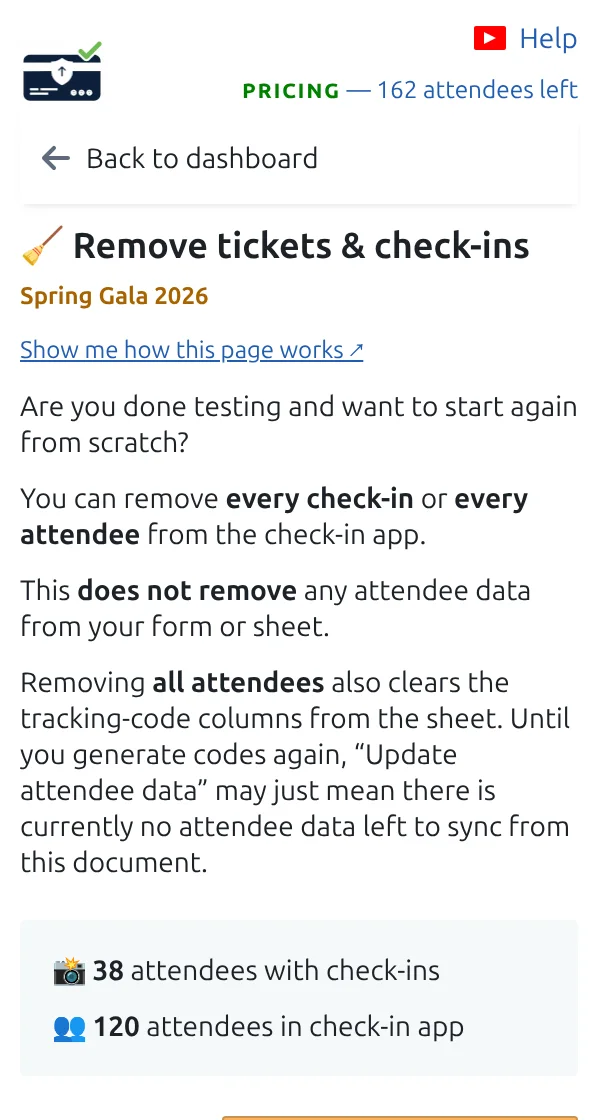
“删除门票和签到记录”页面,有清除签到记录或所有参与者的按钮。
在正式活动前,在这里清除您的测试数据。 点按可放大查看。
第 1 步

打开“删除门票和签到记录”

选择只清除签到记录,还是清除整个测试来宾名单。

第 2 步

清除签到记录以复用同一批来宾

所有人都带着门票留在名单中,但会被计为尚未到场。

第 3 步

全部清除,从全新名单开始

然后用真实来宾重新开始:把他们放进工作表,或向公众开放表单。

工作原理

Clearing test check-ins Clearing check-ins puts the arrival count back to zero while every guest keeps their ticket. Clearing everything empties the guest list. After your rehearsal Guests in your list 5 Guests marked as arrived 5 clear the check-ins only After clearing the check-ins Guests in your list 5 (unchanged) Guests marked as arrived 0 Clearing everything instead empties the guest list, so you can put your real guests in. Neither can be undone.
Clear the scans and keep your guests, or clear everything and start again.

示例

用五位测试来宾彩排后,清除签到记录会把计数器归零,为正式活动做好准备。

观看工作原理

避免这些错误

下一步

准备好开始使用二维码门票了吗?

为 Google Sheets、Google Forms、Jotform、Tally 或 WordPress 创建二维码门票。选择您已在使用的流程,然后把参与者名单保存在一个地方。