在正式活動前清除測試票券

無論測試來賓來自工作表還是您自己的表單,試用外掛程式後即可使用此功能。
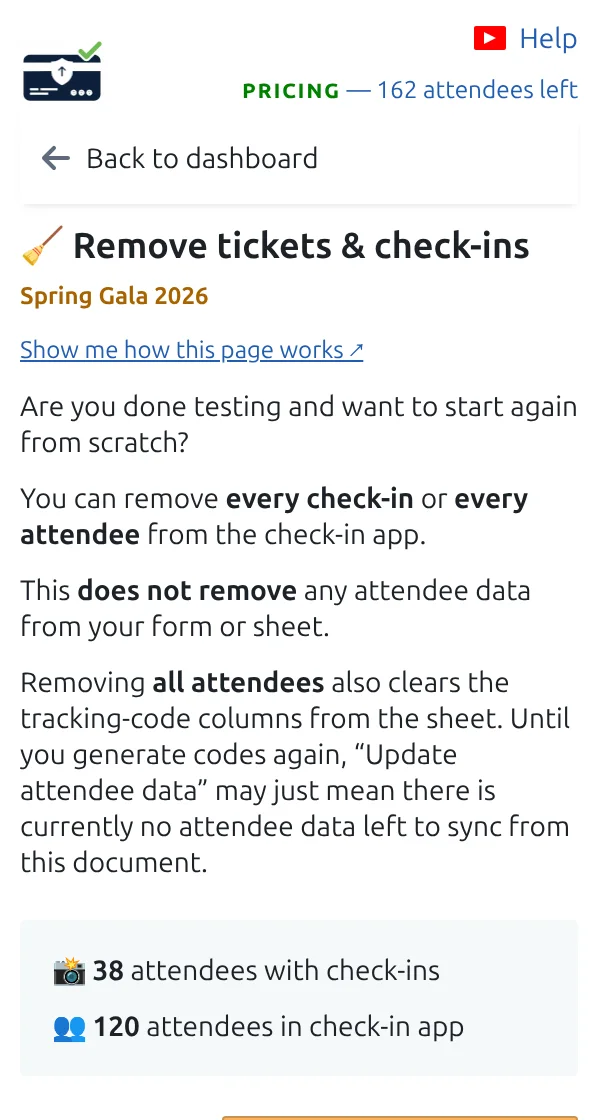
「刪除票券和報到紀錄」頁面,有清除報到紀錄或所有參加者的按鈕。
在正式活動前,在這裡清除您的測試資料。 點按可放大查看。
第 1 步

開啟「刪除票券和報到紀錄」

選擇只清除報到紀錄,還是清除整個測試來賓名單。

第 2 步

清除報到紀錄以重用同一批來賓

所有人都帶著票券留在名單中,但會被計為尚未到場。

第 3 步

全部清除,從全新名單開始

然後用真實來賓重新開始:把他們放進工作表,或向公眾開放表單。

運作方式

Clearing test check-ins Clearing check-ins puts the arrival count back to zero while every guest keeps their ticket. Clearing everything empties the guest list. After your rehearsal Guests in your list 5 Guests marked as arrived 5 clear the check-ins only After clearing the check-ins Guests in your list 5 (unchanged) Guests marked as arrived 0 Clearing everything instead empties the guest list, so you can put your real guests in. Neither can be undone.
Clear the scans and keep your guests, or clear everything and start again.

範例

用五位測試來賓彩排後,清除報到紀錄會把計數器歸零,為正式活動做好準備。

觀看運作方式

避免這些錯誤

下一步

準備好開始使用 QR Code 票券了嗎?

為 Google Sheets、Google Forms、Jotform、Tally 或 WordPress 建立 QR Code 票券。選擇您已在使用的流程,然後把參加者名單儲存在一個地方。