
USD 8.6 billion in 2024, with a projected climb to USD 25.3 billion by 2033 at a 13.1% CAGR. That's the clearest sign that the hybrid event platform category isn't a stopgap anymore. It's becoming core infrastructure for modern events, according to hybrid event platform market projections.
Many organizations still approach hybrid events incorrectly. They treat the live event as the main event, then bolt on a stream for everyone else. That creates two weak experiences instead of one strong one. The in-room audience gets energy but limited data. The remote audience gets access but little presence.
A good hybrid setup does the opposite. It turns one agenda, one attendee journey, one sponsor strategy, and one reporting model into a single operating system for both groups. If you're planning your first serious hybrid program, that shift matters more than the logo on the software.
Table of Contents
- The Rise of the Hybrid Event
- What Exactly Is a Hybrid Event Platform
- Core Features Every Hybrid Platform Needs
- The Benefits and Trade-Offs of Going Hybrid
- How to Choose Your Hybrid Event Platform
- A Practical Hybrid Workflow with Google Workspace
- Your Roadmap to Hybrid Event Success
The Rise of the Hybrid Event
Hybrid events kept growing because organizers and sponsors saw a practical upside. They could keep the energy and relationship-building of an in-person event while extending access to attendees who would not travel, could not get budget approval, or only wanted selected sessions. As noted earlier, the market growth behind hybrid is substantial. More important for planning teams, buyer expectations have already shifted.
That shift shows up in briefings long before anyone starts talking about platforms. Leadership wants the room to feel full. Marketing wants broader reach. Sales wants better lead visibility. Sponsors want measurable exposure beyond foot traffic. Operations still has to deliver an event that runs on time and does not create extra failure points.
Those goals are reasonable. They also create pressure.
The mistake I see most often with first-time hybrid organizers is underestimating synchronization. Registration rules, access permissions, agenda timing, speaker cues, sponsor placements, moderation, and reporting all need to work as one operating system. If those pieces are handled in separate tools without a clear workflow, the on-site event and the virtual event drift apart within hours.
Remote attendees feel that drift first. They miss a session link, audio starts late, Q&A is only happening in the room, or a sponsor segment makes no sense online. On-site attendees feel it next when staff are busy troubleshooting the broadcast instead of managing the floor. The result is not a bigger event. It is two partial experiences competing for the same team.
Production discipline matters as much as software choice. Teams that want a grounded reference on show flow, staging, and audience design should review this guide to effective hybrid event production. Good hybrid execution comes from joining production, communications, and access control into one plan.
This is also where many teams overspend. They assume hybrid requires a large all-in-one platform before they have mapped the event model. In practice, many organizations can build a strong hybrid setup with familiar tools, including Google Workspace, as long as ownership, handoffs, and attendee flows are clearly defined. The platform matters, but the operating model matters first.
Hybrid rose because it solves a real business problem. It gives organizers more reach without giving up the value of being in the room. The teams that get the most from it are not chasing feature lists. They are building a system that keeps both audiences in sync.
What Exactly Is a Hybrid Event Platform
A hybrid event platform is the system that connects your venue, stream, audience access, and event operations into one working model. It gives remote and in-person attendees ways to join the same event with the right sessions, the right interactions, and the right follow-up data.
For organizers, the practical value is coordination. Registration status, session access, live viewing, chat, Q&A, polls, sponsor activity, and attendance records should feed into one operational picture instead of being scattered across separate tools. That matters even more when teams are building a scalable setup with familiar systems such as Google Workspace, rather than buying a large all-in-one product before the workflow is clear.
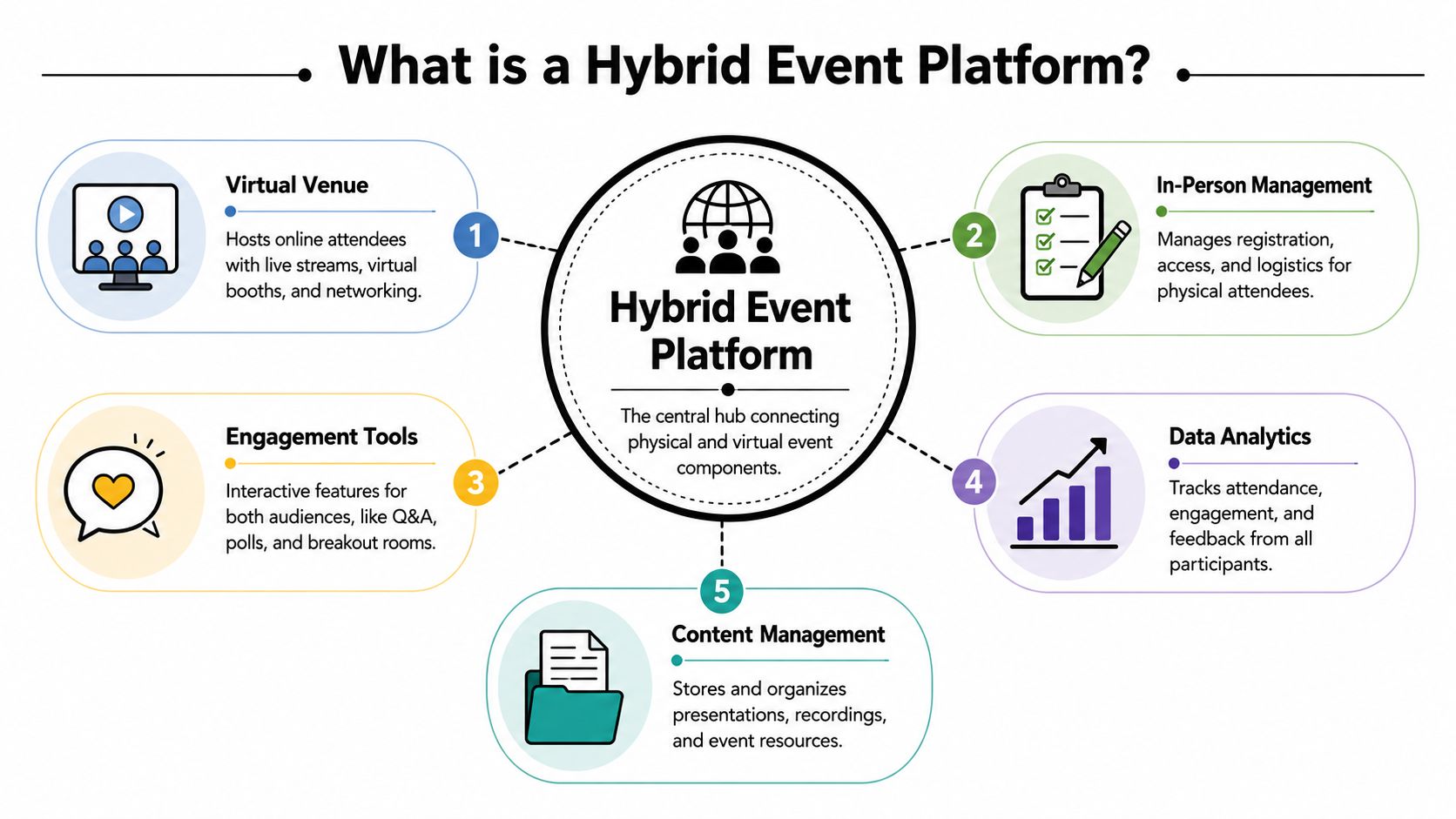
A platform functions as the digital layer of the venue
Teams new to hybrid often reduce the platform to a streaming page. That misses the job.
A platform has to coordinate five connected layers:
- Audience access: registration, ticket types, permissions, and session entry
- Content delivery: live sessions, replays, handouts, and agendas
- Interaction: polls, chat, Q&A, messaging, and breakout formats
- Operations: check-in, staff roles, speaker cues, and attendee updates
- Measurement: attendance, engagement patterns, and sponsor reporting
If those layers are disconnected, staff end up patching the event together by hand. That usually means shared inboxes, spreadsheet fixes, and last-minute access issues that could have been prevented with a clearer system design.
This is also why infrastructure decisions matter early. Teams that are planning unified communications infrastructure usually have an easier time supporting speakers, moderators, production, and attendee communications without creating parallel workflows.
What separates a platform from a livestream
A livestream delivers video. A hybrid platform manages participation.
That difference shows up quickly on event day. Remote attendees need authenticated access, clear session paths, working interaction tools, and a way to move between agenda items without asking support for every link. On-site attendees need check-in, room access, schedule updates, and a reliable connection between what is happening in the room and what is happening online.
Freeman notes in its overview of driving growth with hybrid events that hybrid formats give organizers a wider set of engagement signals than an in-person event alone. Used properly, that gives planners a better read on which sessions held attention, which sponsors generated interest, and which content deserves an on-demand life after the event.
Practical rule: If remote attendees can watch but cannot participate, your setup is a broadcast channel, not a hybrid event platform.
In practice, many first-time hybrid teams do not need a single monolithic product to get this right. They need a clear system. A registration tool, a streaming layer, structured check-in, shared docs, moderated chat, and reporting can work well together if ownership is defined and handoffs are tight. For teams mapping the access side, this guide to QR code event check-in workflows is a useful reference.
The platform earns its keep when your team can answer post-event questions from one connected record instead of five exports and a cleanup spreadsheet.
Core Features Every Hybrid Platform Needs
The fastest way to buy the wrong platform is to shop by feature count. What matters is whether the core features work together under pressure.
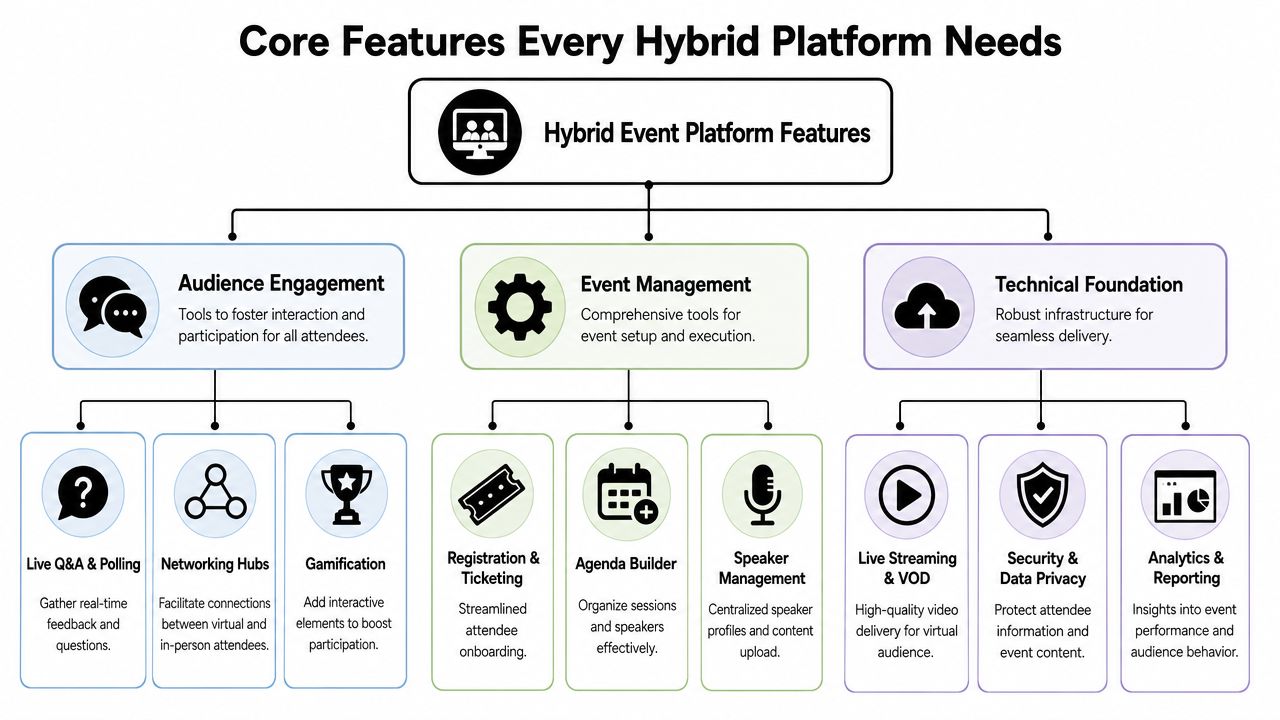
Registration and check-in have to work as one system
Start with entry. Every hybrid event needs one registration model that handles both on-site and virtual attendance without creating duplicate records.
That usually means:
- Distinct ticket types: in-person, virtual, VIP, staff, speaker, sponsor
- Session-level permissions: access by day, track, room, or content tier
- Fast check-in paths: desk check-in, self-scan, badge lookup, remote login
- Clean status tracking: registered, checked in, attended session, no-show
If those pieces live in separate tools, your staff spends event day reconciling people instead of serving them. For planners using spreadsheet-first operations, a practical reference on QR code for event check-in workflows can help map the access side before you commit to a larger stack.
Streaming and engagement must be designed together
Many teams buy streaming quality and forget participation design. That's a mistake. Video quality matters, but engagement is what makes hybrid worth the effort.
A useful platform supports:
| Function | What it solves |
|---|---|
| Live stream delivery | Gives remote attendees reliable access to session content |
| Q&A moderation | Lets speakers handle both room and remote questions |
| Polling | Creates shared moments across both audiences |
| Chat and messaging | Adds informal interaction that the room gets naturally |
| Breakout support | Keeps remote attendees from being sidelined after the keynote |
To keep the infrastructure stable, the platform architecture matters. Red Hat's guidance on event-driven architecture for modern applications explains why independent scalability with a broker buffer helps systems handle spikes in live streams, logins, polls, and keynote traffic without monolithic bottlenecks.
A related planning issue is communications flow. Session audio, stage confidence monitors, moderator handoffs, stream return feeds, and support channels all need to work as one environment. Teams that are sorting out the operational side often benefit from reading about planning unified communications infrastructure, because hybrid events break down quickly when communication paths are improvised.
Here's a useful demo to think through the moving parts before procurement gets involved.
Security and analytics are operational features
Security isn't a back-office concern in hybrid. It affects who gets into sessions, who can view on-demand content, and who can touch attendee data.
According to CrowdComms' platform selection guidance, hybrid platforms require role-based access controls, SSO integration, and GDPR compliance so attendee management and session analytics are protected while maintaining audit trails for ROI measurement. That's not abstract compliance language. It directly affects how safely you can run sponsors, staff access, speaker uploads, post-event replay, and internal reporting.
If your platform can't separate permissions by role, access level, and content type, the event team ends up doing manual risk management.
The analytics side matters just as much. You need attendance records, session engagement, and interaction history that people can trust. If exports are messy or fragmented, sponsor recap becomes subjective and internal reporting turns into an argument about which spreadsheet is right.
The Benefits and Trade-Offs of Going Hybrid
Hybrid expands what an event can do, but it also increases the number of things that can break. A useful plan starts with both truths.
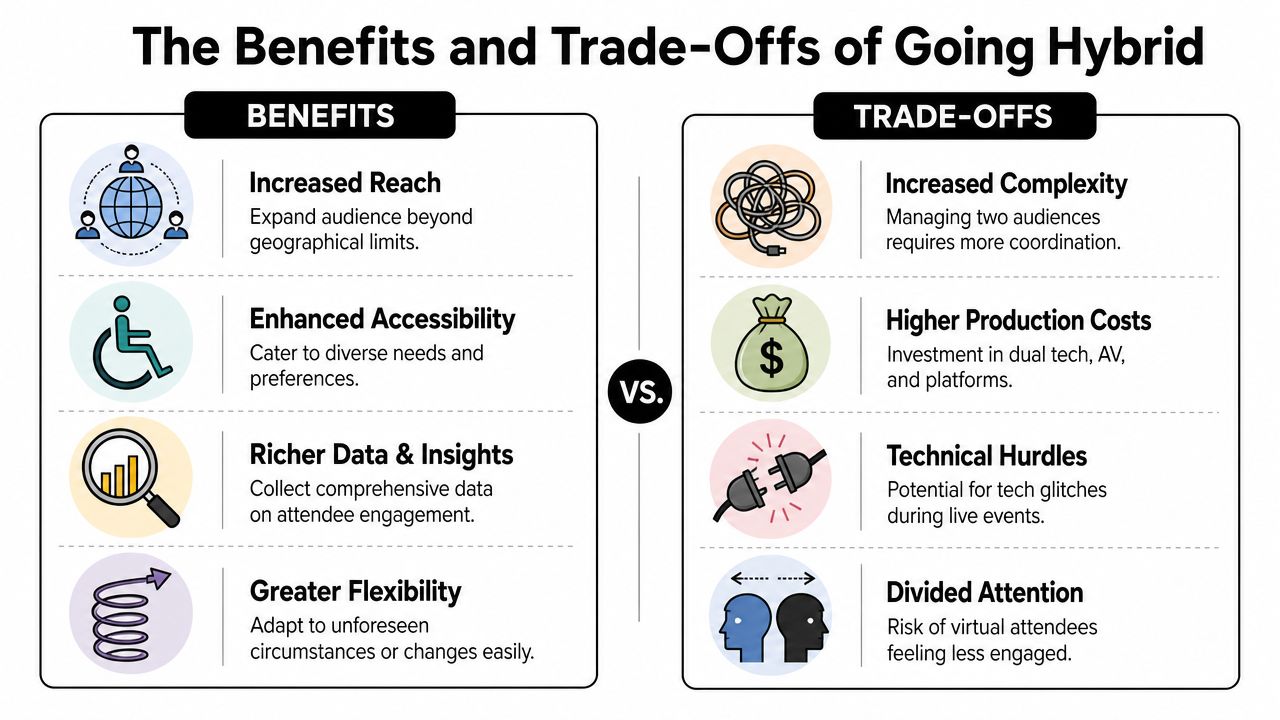
What hybrid does well
The biggest upside is reach. People who can't travel can still attend live, join key sessions, ask questions, and consume content later. That changes the business case for leadership, sponsors, and internal stakeholders.
It also improves visibility into attendee behavior. Digital participation leaves usable signals behind, while the on-site side still benefits from check-in and session tracking. Done well, that combination gives planners a far stronger view of what landed.
Infrastructure design matters here. Hybrid events need scalable technology and smooth integration of onsite operations with mobile apps inside a single ecosystem so sponsor visibility doesn't get lost in fragmented systems and remote attendees aren't shut out of discussion, as noted in this overview of scalable hybrid event infrastructure.
Where teams get burned
The downside is complexity. You're producing a room and a broadcast at the same time. That means more dependencies, more coordination, and less tolerance for weak process.
A few trade-offs show up repeatedly:
- More production pressure: stage management, stream timing, and moderation all need tighter control.
- Higher upfront tooling decisions: you have to think through registration, permissions, content delivery, and reporting before launch.
- Split attention risk: speakers and moderators can favor the room unless the format is designed to include remote voices.
- Support load: staff has to help people at the desk and online at the same time.
Hybrid rewards integration and punishes fragmentation.
There's also a quieter issue that many buyers miss. Sponsor reporting often breaks apart by format. On-site scans live in one report. Virtual clicks and booth interactions live somewhere else. If your system can't bring those into a coherent recap, sponsors won't care that you collected more data. They'll care that you can't explain it clearly.
How to Choose Your Hybrid Event Platform
Most selection mistakes happen before the demo starts. Teams go shopping for software before they've defined the operating model of the event.
Start with the event model, not the vendor demo
Ask these questions first:
- What is the event trying to achieve? Lead generation, education, internal alignment, community building, sponsor exposure, or content capture all push platform needs in different directions.
- Who is attending in person and who is remote? Executives, customers, students, staff, media, and sponsors don't need the same experience.
- What must happen live? Keynotes, networking, certification, Q&A, sponsor meetings, workshops, and replay access all create different technical requirements.
- What can't fail? Check-in speed, stream reliability, access control, badge printing, or session attendance reporting. Rank these early.
If you need a baseline framework for comparing broader software categories, this guide to an event management platform selection process is a useful starting point before you narrow down hybrid-specific options.
Questions that expose real platform fit
Vendor websites all promise a smooth experience. Ask operational questions instead.
Can it scale in the right places
Scalability doesn't just mean attendee count. It means whether registration, streaming, session access, and support can expand without forcing your team into manual workarounds.
Check whether the platform can handle separate producer and consumer demands cleanly. A keynote spike creates different pressure than routine registration traffic.
Does it connect to the tools you already use
A platform that ignores your actual workflow becomes expensive fast. Look at:
- CRM sync
- Marketing automation
- Google Workspace or Microsoft 365 compatibility
- Badge and check-in workflows
- Export quality for finance, sales, and sponsor recap
If you have to re-enter attendee data by hand, the integration story isn't real.
What does the attendee journey feel like
Walk through both paths.
For an in-person attendee, test registration confirmation, ticket retrieval, arrival, session access, and agenda updates. For a virtual attendee, test login, navigation, stream access, Q&A, networking, and on-demand viewing.
Make someone outside the project team try both. Internal teams already know where everything is. Attendees don't.
How good is the reporting, really
Ask to see actual output, not dashboard screenshots. Can you report by session, ticket type, sponsor interaction, and attendance status? Can your team export it without hiring a specialist?
A platform that looks polished but hides raw reporting usually creates pain after the event, not before.
Does the pricing match your event pattern
Per-event pricing can work well for occasional programs. Subscription models make sense when teams run events continuously. Neither is better by default. The right choice depends on frequency, internal skills, and whether you want a heavyweight suite or a lighter operational stack.
Buy the system your team can run confidently at 7:00 a.m. on event day, not the one that sounds impressive in procurement.
A Practical Hybrid Workflow with Google Workspace
Not every hybrid event needs an all-in-one enterprise platform. For many planners, the better answer is a smaller, clearer system built on tools the team already uses every day.
A simple operating model for a real event
Take a multi-session conference with two audiences. Some attendees are on site with all-access passes. Others are virtual and only need the main stage plus selected breakouts.
Google Workspace can handle more of this than most planners expect. Google Sheets add-ons can automatically generate QR codes for each row in a spreadsheet by using the IMAGE function with a column formula, so entering the formula causes a QR code to appear for ticketing or attendance tracking, as shown in this Google Sheets QR code walkthrough.
That setup gives you a clean operating flow:
- Build the attendee list in Sheets
- Assign ticket classes and access notes by column
- Generate unique QR codes per attendee
- Distribute confirmations and tickets
- Use scan-based validation on event day
- Sync attendance back to the same sheet
For planners building lean workflows, Google Workspace add-ons can also connect Sheets with third-party systems and other Workspace apps such as Google Slides, which makes process design far more flexible without forcing end users into a new software environment, according to Google Workspace add-ons documentation for Sheets.
A practical next step is to map the repetitive parts. This article on Google Workspace automation for event operations is useful if you want to reduce manual updates across registration, ticketing, and attendance.
Why this approach works for lean teams
The main advantage is familiarity. Most event coordinators, admins, faculty teams, and agency staff already know how to work in Google Sheets. That shortens training and reduces launch friction.
It also gives you flexibility without overbuilding. You can create columns for day access, VIP permissions, meal notes, breakout eligibility, or remote-only status. Staff can sort, filter, and troubleshoot in a system they understand.
This approach is also useful when your hybrid event includes broadcast-style segments, interviews, or distributed speakers. Teams planning those content blocks can borrow good habits from guides on how to host remote podcast guests, because the same discipline applies. Remote contributors need clean audio, clear cueing, stable connections, and a format built for interaction rather than passive observation.
Keep the workflow boring. Boring systems survive live events.
A Google Workspace-based model won't replace every enterprise feature. It may not be the right fit for large sponsor marketplaces or highly customized virtual expo environments. But for many conferences, graduations, seminars, internal meetings, and education events, it covers the part that creates stress. Registration accuracy, ticket delivery, access control, and check-in.
Your Roadmap to Hybrid Event Success
Hybrid events now sit in the normal operating mix for conferences, education programs, internal meetings, and community events. The teams that run them well usually share one habit. They stop shopping for a miracle platform and start building a dependable system.
That shift matters because hybrid success is operational before it is technical. A polished event app will not save a weak run-of-show, unclear speaker cueing, or a registration process that breaks the moment someone changes sessions. What works is tighter alignment between registration, access, production, moderation, and post-event follow-up.
For a first major hybrid event, keep the architecture simple. Put one owner in charge of attendee data. Define one source of truth for access rules. Test the remote experience as aggressively as the in-room experience. If a process requires staff to update three tools by hand during show week, redesign it before launch.
The strongest long-term strategy is not buying the biggest platform you can justify. It is choosing a setup your team can repeat, document, and improve event after event. That is why familiar tools often outperform heavier all-in-one systems for small and mid-sized teams. Google Workspace, paired with the right ticketing and check-in layer, can cover registration control and on-site verification without sending staff into a new dashboard they barely know.
Treat your first hybrid event like version one of an operating model. Capture where handoffs failed, where attendees got confused, and where staff had to improvise. Those notes are more valuable than a feature comparison chart because they tell you what to automate next, what to simplify, and what to leave alone.
If you want to run hybrid events without moving your team into another complicated dashboard, Darkaa is worth a look. It turns Google Workspace into a practical ticketing and check-in system with tools like QR code tickets for Google Sheets, QR code attendance for Google Forms, and QR code ticket check-in for Sheets, so you can manage attendee lists, generate tickets, control access, and verify arrivals in a workflow your team already knows.